The Admin Helper Form: Architecting a Centralized Command Center

Tyler
IdentityEXE Founder
The Hook & Business Context
Administrators and engineers of SailPoint Identity Security Cloud (ISC) frequently encounter architectural limitations when executing specialized administrative actions, such as bypassing the source owner bug during account resets or surgically disabling health checks. Traditionally, managing these operations requires manual intervention via API tools like Postman or running disparate PowerShell scripts outside of the platform.
Leaving these administrative processes disconnected creates significant operational drag. A fragmented approach leads to massive deployment lag, severe manager approval fatigue, and increased security vulnerabilities as critical lifecycle actions rely on undocumented manual scripts. When governance teams are forced to context-switch across external tools, organizational momentum stalls and compliance audit risks compound.
To solve this, our engineering team developed the Admin Helper Form framework: a repeatable architectural methodology designed by IdentityEXE. By unifying interactive ISC forms with backend workflows and parallelized scripts, this modular framework ensures that your ISC deployment operates as a seamless, centralized command center for all advanced identity operations.
Solution Overview
When we architect this solution for our enterprise clients, we utilize a robust technical stack comprising 1 Form + 2 Workflows + 2 PowerShell Scripts.
High-Level Flow: Our core engineering methodology structures the data layer to create a dynamic launcher. An administrator selects an action to perform on a specific source or identity. The form provides an outlook of every item through a detailed description variable. The chosen actions trigger backend workflows that either execute direct API calls or provide outputs for secure PowerShell execution.
User Interface
Input Fields:
- Action Selector (Dropdown)
- Target Selector (Source or Identity)
User Experience: The form utilizes a detailed description variable to clearly explain what each option does before execution. This modular framework ensures that your ISC deployment avoids executing irreversible changes without proper context.
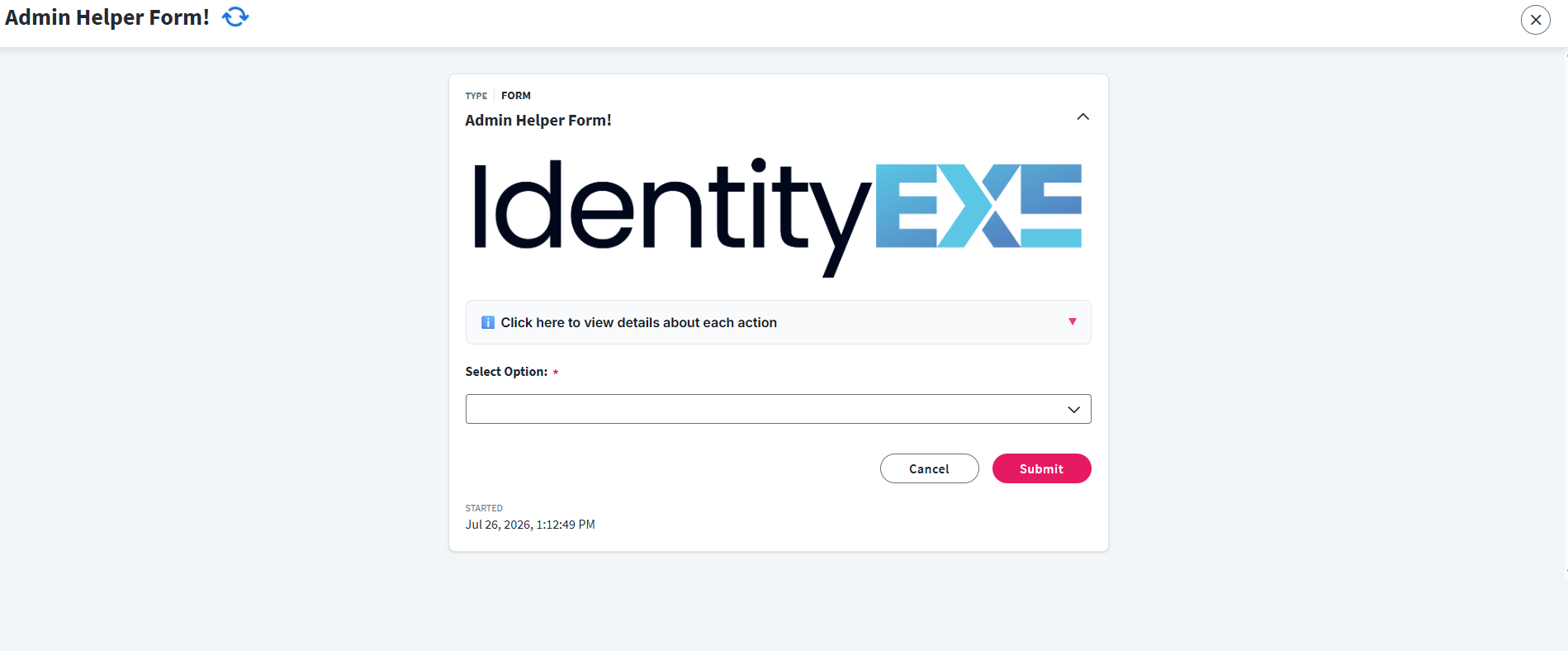
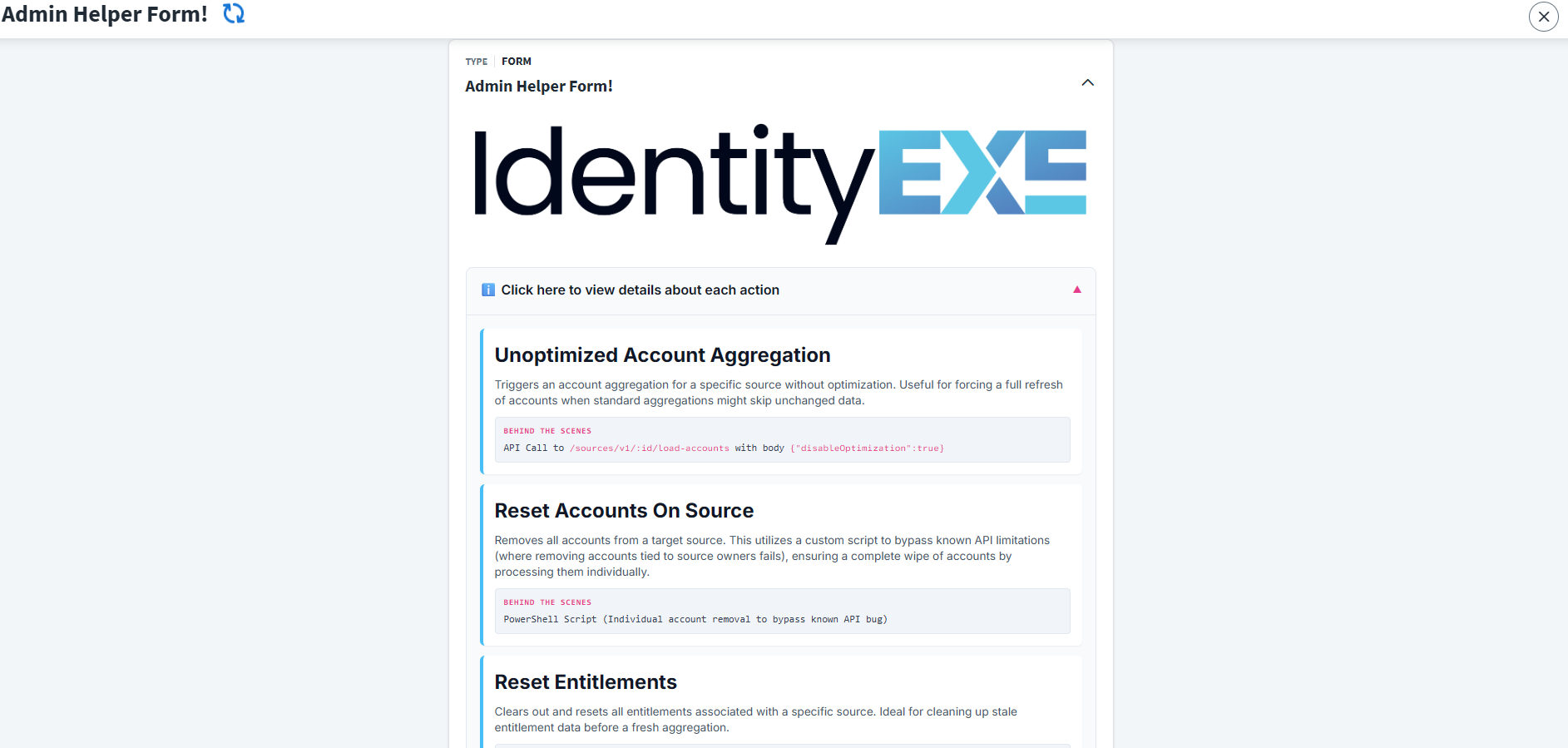
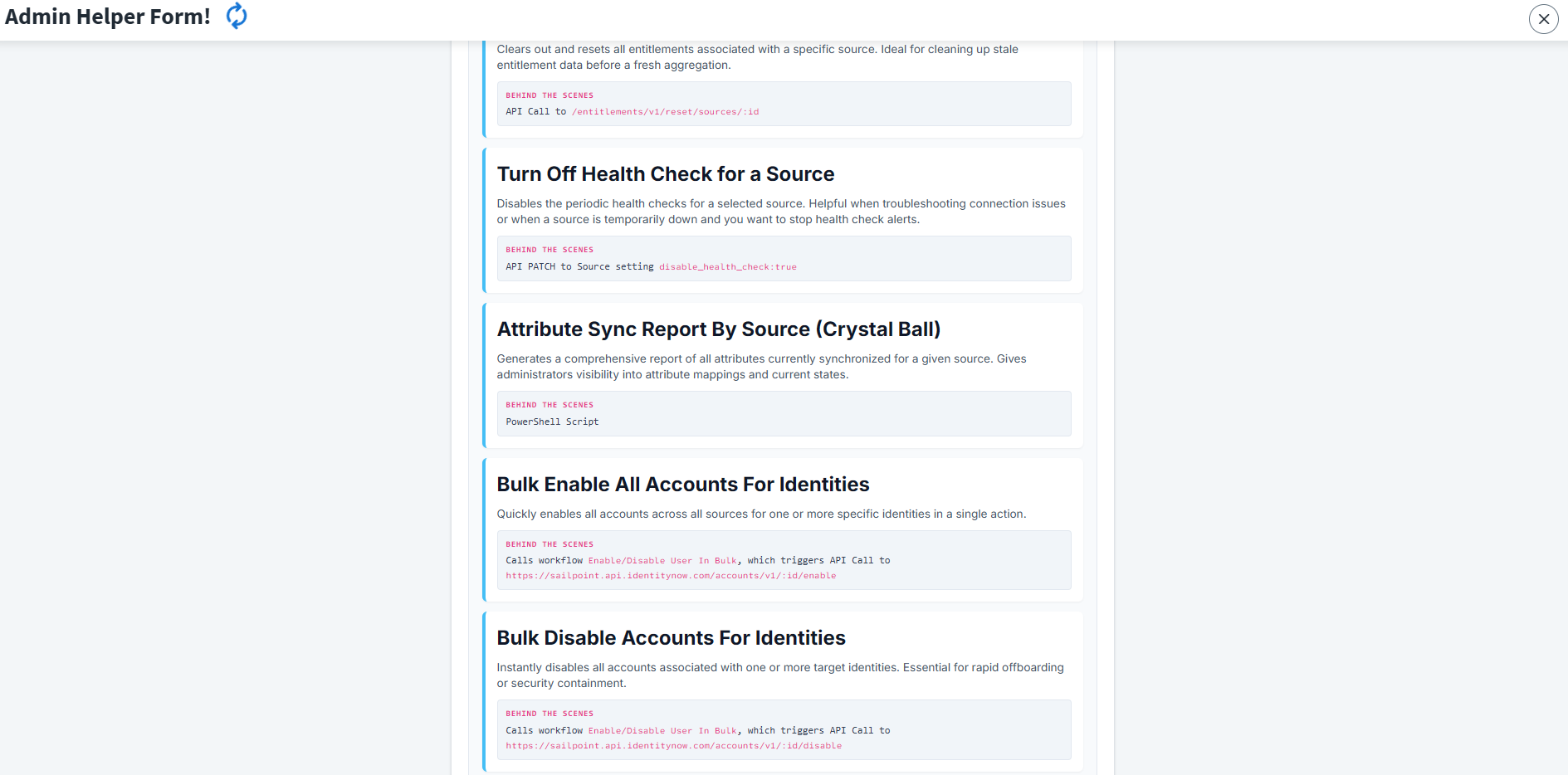
The Main Workflow Engine
At the core of this IdentityEXE Blueprint is the main workflow that ties everything together. It uses an Interactive Form Trigger to display the user interface shown above. Once submitted, the workflow processes selected inputs using a series of Compare Strings operators to branch the logic and determine precisely which API call or PowerShell script to execute next.
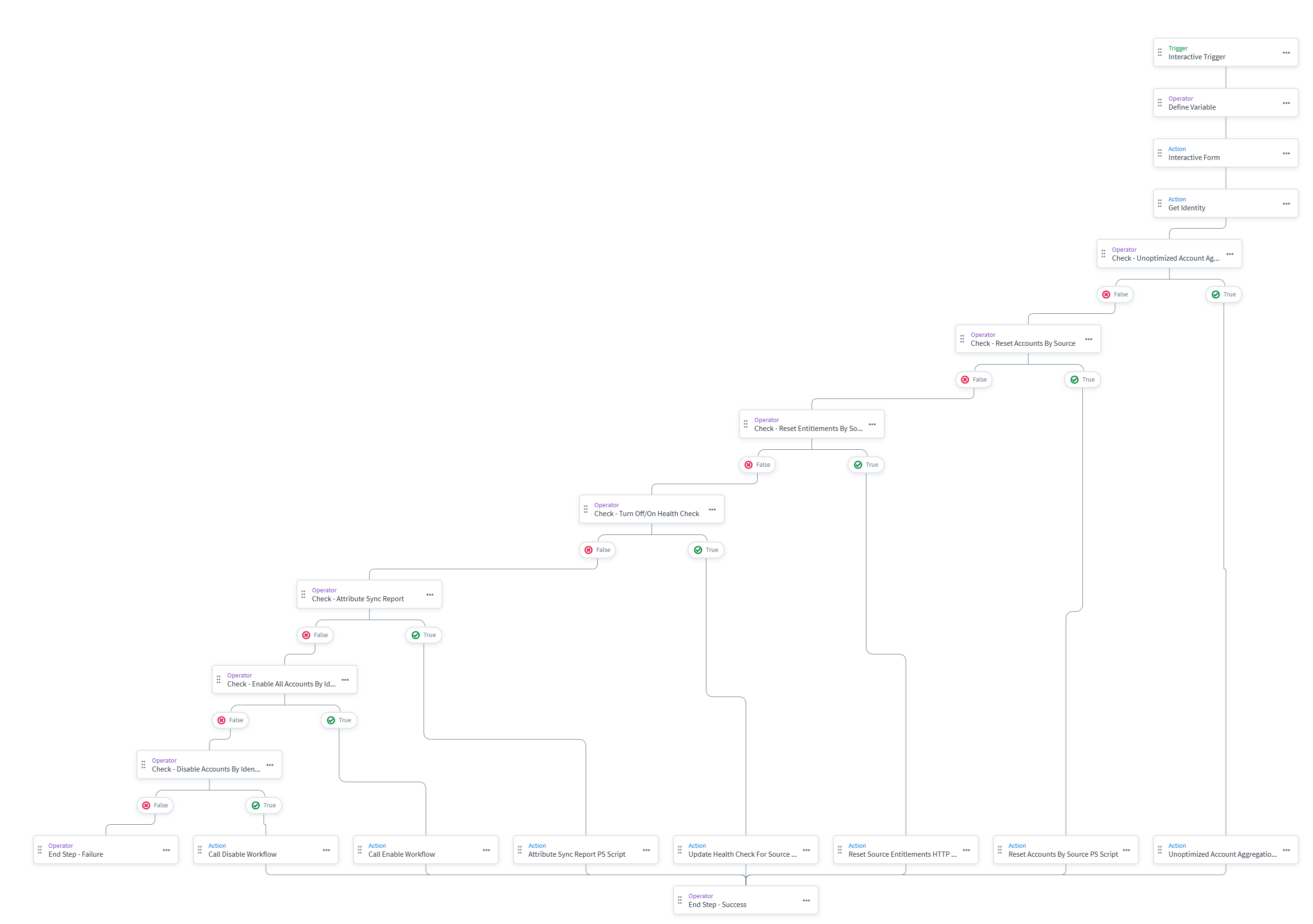
Actions & Back End
Here are the actions supported by the IdentityEXE Implementation Framework and what happens under the hood when selected:
1. Unoptimized Account Aggregation
Executes a direct API Call to /sources/v1/:id/load-accounts with the body {"disableOptimization": true}.
2. Reset Accounts On Source
You might wonder, why not just use the standard API call /sources/v1/:id/remove-accounts? This endpoint has a known quirk where it fails to remove accounts associated with an identity that are source owners (even if they aren't owners of the specific source you are resetting).
When we architect this solution, we deploy a PowerShell script to bypass that bug. It attempts the bulk removal, and if it encounters a 400 Bad Request, it parses the error message payload to find the specific blockers.
Technical Quirks & Error Handling: When the removal fails due to the source owner bug, the API returns a JSON error structure. The script catches this 400 status code, extracts $errorJson.messages[0].text, and uses a foolproof Regex \b[a-fA-F0-9]{32}\b to parse out any 32-character SailPoint Hex IDs trapped inside the error text. Once the $badAccountIds are extracted, the script executes a sequential, surgical removal loop specifically targeting those blocking accounts. It handles 429 rate limits gracefully by sleeping and retrying up to 5 times. Once the blockers are completely cleared, it invokes the bulk removal endpoint a second time to finish the job for the rest of the source.
3. Reset Entitlements
Simple API Call to /entitlements/v1/reset/sources/:id.
4. Turn Off Health Check for a Source
Simple API Call to PATCH a source, setting disable_health_check to true or false.
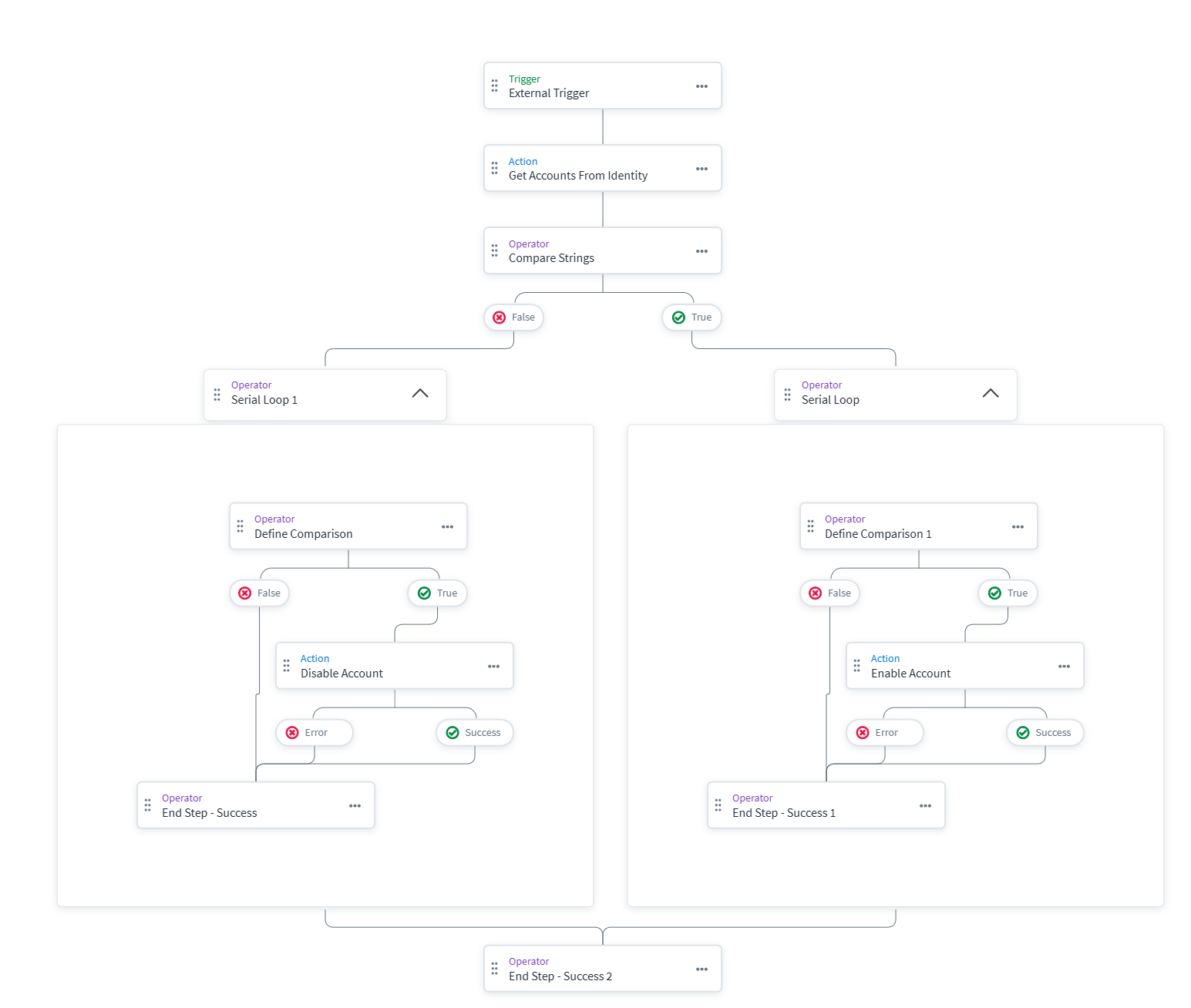
5. Bulk Enable & Bulk Disable Accounts for Identities
These actions call an external workflow named "Enable/Disable User In Bulk" passing the identity ID and the action. This workflow loops through all of the user's accounts and enables or disables them in bulk using the corresponding account enable/disable API endpoints.
6. Attribute Sync Report By Source (Crystal Ball)
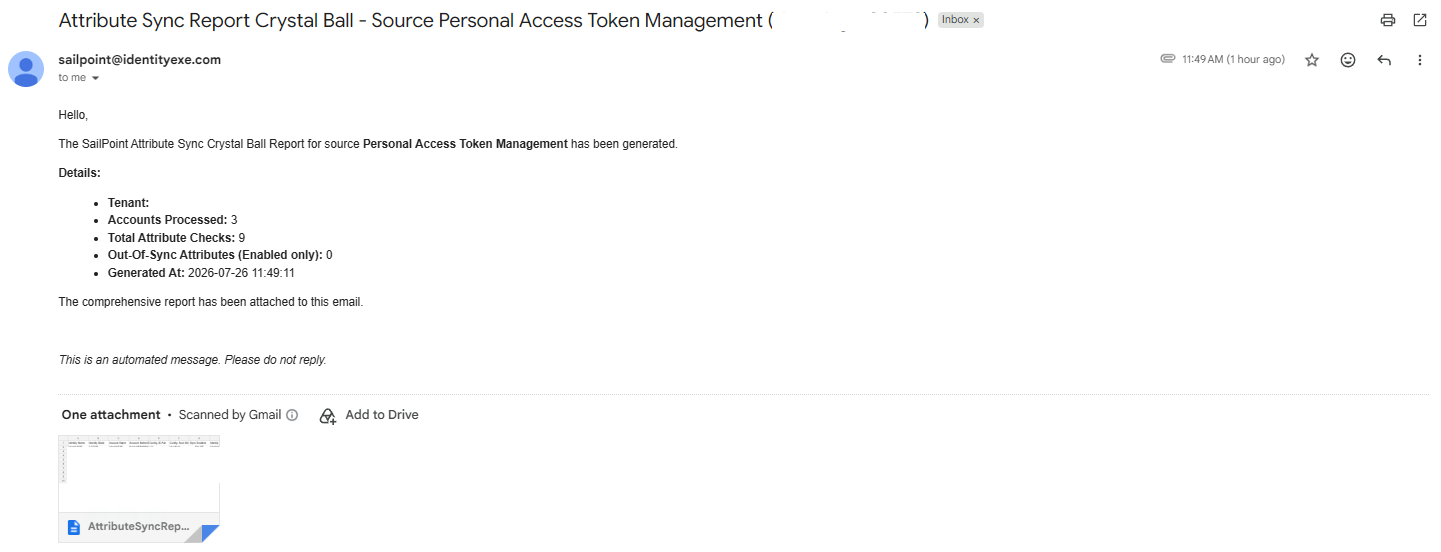
An insightful PowerShell script that looks at the attribute sync config for a selected source. It pulls all accounts and identities for that source, calculates the differences and current lifecycle states, and determines if a sync will occur. It then emails a comprehensive report to the requester.
Technical Quirks & Performance: Because retrieving tens of thousands of identities and accounts sequentially takes an extensive amount of time, this script leverages parallel runspaces. It sets up a [runspacefactory]::CreateRunspacePool with 20 concurrent threads to query the /accounts and /search APIs simultaneously using limit/offset pagination blocks.
Inside each background runspace thread, there is native 429 Too Many Requests error handling utilizing an exponential backoff formula with jitter: $WaitMs = [math]::Pow(2, $RetryCount) * 1000 + (Get-Random -Minimum 100 -Maximum 500)
This prevents a "thundering herd" scenario. After all concurrent requests complete, the script correlates the Accounts with their Linked Identities locally in a Hash Map, cross-references against the source's Attribute Sync Configuration mapping, evaluates if they are in sync, and dynamically generates an output CSV payload before triggering the email alert.
Considerations & Best Practices
- Permissioning: The launcher for this form should be strictly granted to administrators in ISC. The actions performed, such as deleting all accounts on a source or bulk enabling and disabling, are highly privileged.
- Error Handling: When running the PowerShell scripts, ensure you review the console outputs if any surgical removals fail due to rate limits or other issues.
- PAT Needed to Run: When setting the PAT client ID and secret for the HTTP Requests within the workflows and the scripts, ensure your service account holds the necessary permissions (e.g., ORG_ADMIN) and proper scopes.
- Credential Security: The PowerShell scripts provided include placeholders for Client IDs, Client Secrets, and SMTP Passwords. Best practice dictates that these secrets should never be stored in plain text within the script. You should utilize secure storage methods such as Windows Credential Manager, Azure Key Vault, or encrypted XML files to retrieve these credentials safely at runtime.
Configuration Snippets & Downloads
1. Admin Helper (Form)
Interactive selection form providing detailed descriptions and variable inputs.
2. Main Orchestrator (Workflow)
The main workflow engine handling branching logic and execution routes.
3. Enable/Disable Bulk (Workflow)
Looping worker process that enables or disables all accounts on an identity.
4. Surgical Removal (PowerShell)
Account reset script that bypasses the known source owner bug during bulk removals.
5. Attribute Sync Report (PowerShell)
Concurrent threaded analysis script simulating sync status for thousands of accounts.
Conclusion
The Admin Helper Form provides a scalable and interactive way to perform complex, multi-step actions natively inside ISC, eliminating the need to context-switch to external terminals for critical operations.
Ready to Elevate Your Identity Architecture?
A stalled identity governance rollout burns capital and stalls organizational momentum. If your team is hitting configuration walls or struggling with complex admin-helper-form integrations, stop guessing. Book a targeted SailPoint Architecture Review directly with our engineering team to map out a clear path forward.
Book Your SailPoint Architecture Review