Architecting Dynamic Certification Email Frequencies

Tyler
IdentityEXE Founder
The Problem: Rigid Reminders & Approval Fatigue
By default, SailPoint Identity Security Cloud (ISC) sends certification campaign reminders once a week, with no out-of-the-box (OOTB) capability to adjust the frequency or stop them automatically when a campaign is overdue. This rigid architectural limitation creates friction for organizations operating under aggressive compliance deadlines or specialized regulatory requirements.
Leaving this limitation unsolved has severe commercial and operational impacts. Without dynamic reminder cadences, reviewers often ignore weekly digests, leading to a massive deployment lag in campaign completions. This creates manager approval fatigue when they are eventually flooded with manual follow-ups, introduces security vulnerabilities from unreviewed access, and puts the organization at risk of failed compliance audits.
To overcome this, we rely on a repeatable architectural methodology designed by IdentityEXE. By unifying interactive forms, specialized workflows, and Privileged Task Management (PTA), this framework ensures your ISC deployment avoids rigid boundaries, giving you complete control over escalation timing and notification routing.
The IdentityEXE Blueprint: Customizable Cadence
When we architect this solution for our enterprise clients, we utilize a unified tech stack: 1 Form + 1 Workflow + 2 PowerShell Scripts + 1 HTML Email Template.
Our core engineering methodology structures the data layer to allow administrators to select active campaigns dynamically, dictate immediate reminder actions, configure exact time intervals (in days), and safely halt execution based on campaign end dates. The workflow acts as the orchestration engine, calculating the required iterations and pausing through a serial loop while securely invoking PowerShell scripts via the Privileged Access Gateway.
Interactive Launcher: The User Interface
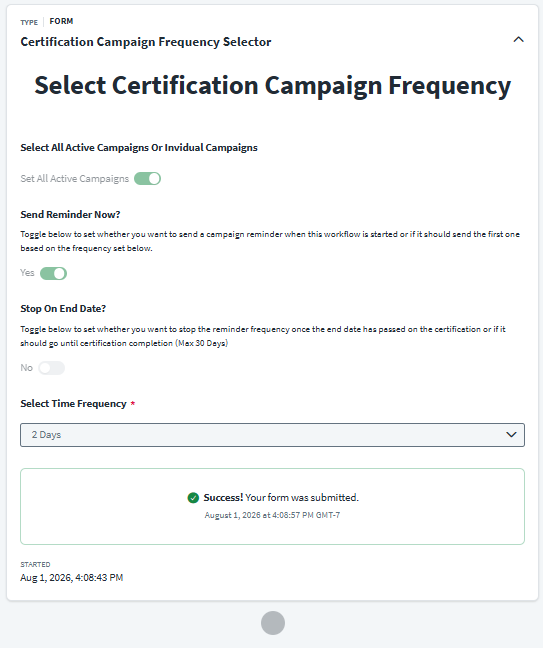
We use an interactive form to act as the launcher for the workflow. This allows administrators to quickly select target campaigns and define frequency parameters without hardcoding anything. The form utilizes dynamic showing/hiding so the campaign selector only appears if you opt not to select all active campaigns.
- Select All Active Campaigns Or Individual Campaigns: Toggle Field
- Campaign Selector: Dropdown Field (Only appears if the toggle above is set to false)
- Send Reminder Now?: Toggle Field (Controls whether to send an immediate reminder or wait until the first frequency interval hits)
- Stop on End Date?: Toggle Field (Controls whether notifications should stop if the campaign due date has passed)
- Select Time Frequency: Dropdown Field (1-15 Days)
Back End Workflow Architecture
This modular framework ensures that your ISC deployment avoids infinite loop boundaries and formats all duration logic safely. Here is a visual representation of the orchestration:
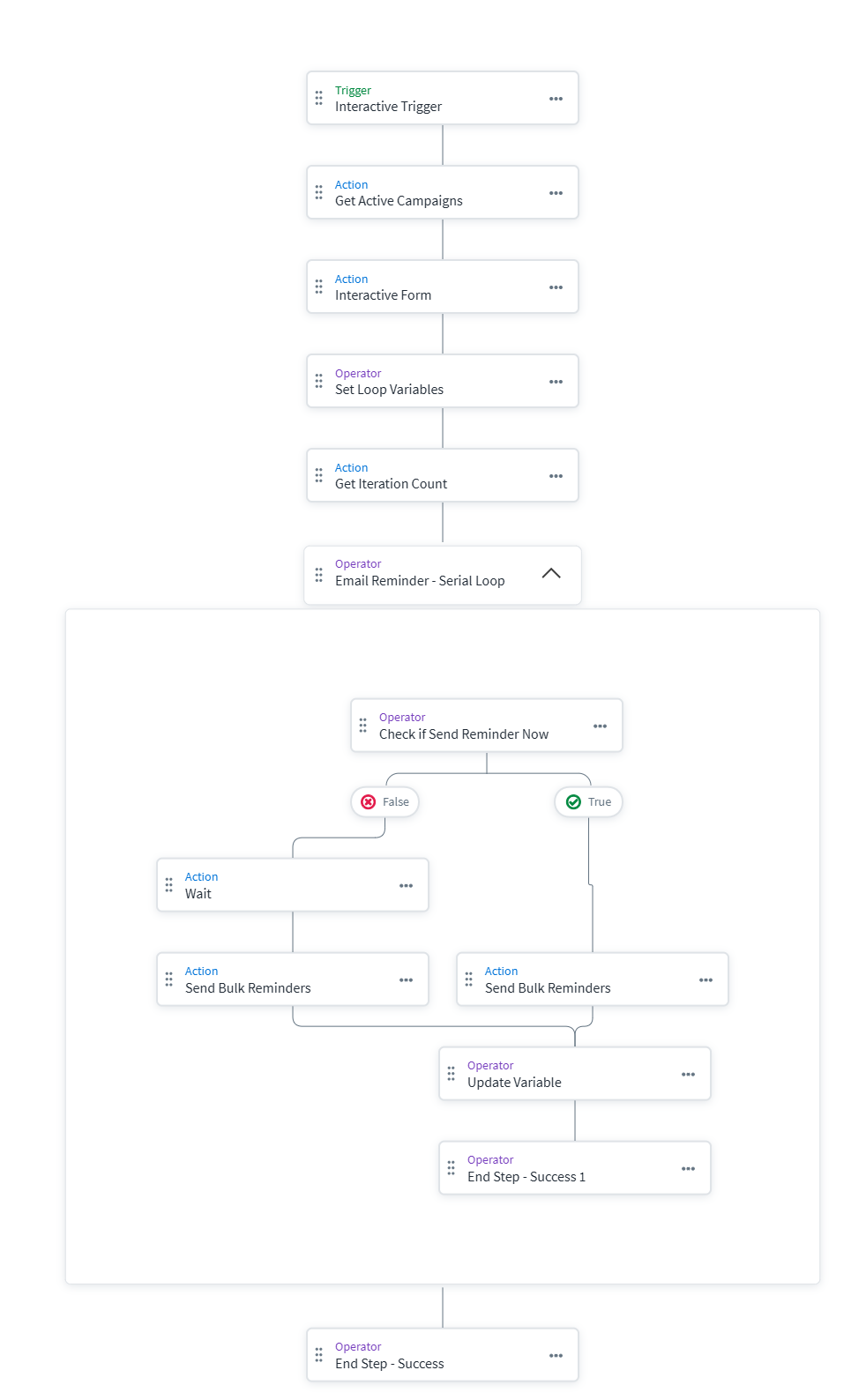
- Trigger & Setup: The workflow utilizes the
Interactive Triggerso the form can be presented to the user. It first queries for active campaigns to populate the form dynamically. - Time Conversion: The workflow handles duration formatting via a "Define Variable" step with string replacement transforms to convert the dropdown text ("3 Days") into a usable workflow duration format ("3d").
- Calculate Iterations: We execute a PowerShell script via Windows Server PTA integration to calculate how many loop iterations are required. It returns a JSON object with the
iterationscount. - Serial Loop: A counter variable is initialized at 0. A "While" Serial Loop runs as long as the counter is less than the iterations. A Choice step evaluates the "Send Reminder Now?" flag, executing the reminder script immediately if true, or pausing via a Wait step if false.
Privileged Task Management (PTA) Scripts
Because there isn't an OOTB action to manually trigger campaign reminders in a workflow, we take complete ownership of the email delivery using PowerShell executed securely via PTA/PAG.
- Calculate-Iterations.ps1: Connects to the ISC API to determine the furthest deadline among selected campaigns. Since SailPoint workflows have a hard maximum execution time of 30 days, the script natively caps the iteration timeline at 30 days to prevent failures.
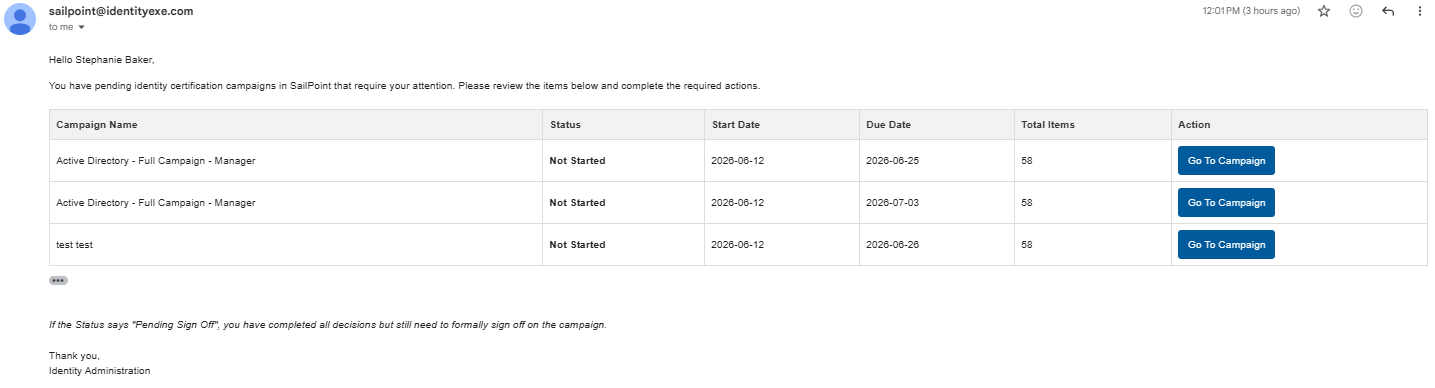
- Send-ReminderEmails.ps1: Handles the heavy lifting of user aggregation and notification:
- Queries
/certifications/v1for the target campaigns. - Filters out completed or signed-off certifications.
- Groups pending certifications by
reviewer.id. - Dynamically builds an HTML table string for each reviewer and replaces the placeholders in the HTML template.
- Sends a single, consolidated SMTP email to each reviewer. A reviewer with three pending campaigns will only receive one email containing links to all of them.
- Queries
Crucial Security & Configuration Considerations:
- Update the SMTP settings inside the
Send-ReminderEmails.ps1script with your organization's mail server details. Securely handle SMTP credentials. - Workflow executions only last 30 days in ISC. If your campaign exceeds this, you will need to retrigger the workflow.
- Ensure the Client ID and Secret used in the scripts have the necessary permissions (e.g., ORG_ADMIN or specific Campaign read scopes).
Framework Downloads
Download the configuration files below to import directly into your Identity Security Cloud environment.
1. Form Definition
Interactive Launcher UI for administrators.
2. Workflow Definition
Core orchestration loop and script invocations.
3. Calculate Iterations Script
Determines optimal wait time and loop limit.
4. Send Reminders Script
Aggregates campaigns and sends consolidated emails.
5. HTML Email Template
The visual layout for the consolidated email reminders sent to users.
Conclusion
A stalled identity governance rollout burns capital and stalls organizational momentum.
If your team is hitting configuration walls or struggling with complex certification-email-frequency integrations, stop guessing. Book a targeted SailPoint Architecture Review directly with our engineering team to map out a clear path forward.