Self-Service Certification Escalation

Tyler
IdentityEXE Founder
The Problem: The End-of-Quarter Certification Crunch
- The Late-Reviewer Dilemma: At the end of a quarterly or semi-annual access certification cycle, compliance administrators often face a common problem: a handful of non-responsive certifiers who have let their reviews sit past the deadline.
- The Manual Overhead: Standard SailPoint Identity Security Cloud (ISC) campaigns allow notifications and automated reminders, but escalating past-due items to a reviewer's manager typically requires manual intervention. An admin has to track down the certifications, identify the managers, and manually reassign each certification inside the UI.
- The Goal: A Launchpad-driven self-service portal where administrators can view all active campaigns, selectively choose which ones to escalate, review a high-density summary of their choices, and programmatically reassign outstanding certifications to the respective reviewers' managers.
The Architecture: A Two-Phase Escalation Combo
To build an efficient, rate-limit-conscious solution that does not cause workflow execution timeouts, the architecture is split into two distinct workflows and two interactive forms. This keeps execution runs short, structured, and modular.
Selection & Confirmation (UI)
Launched directly from the administrator launcher interface.
Retrieve active campaigns and request choices from admin.
Loop selected campaigns to build dynamic HTML summary cards.
Display compiled HTML, prompt for approve/deny choice.
Background Escalation (Worker)
Workflow 1 triggers background executions asynchronously.
Fetch incomplete active certification items for target campaign.
Retrieve reviewer details, fetch manager ID dynamically.
Reassign target certifications to the resolved managers.
- Workflow 1: Certification Selection For Escalation
- Trigger: Interactive process launched via the Launchpad.
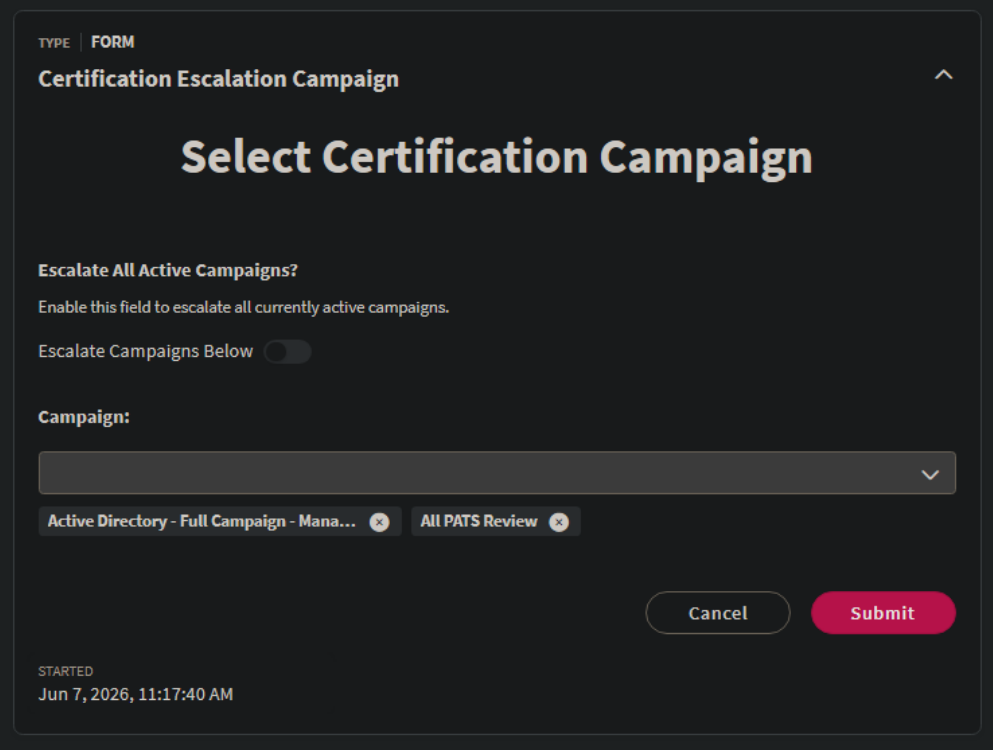
- Interactive Form 1 (Selector): Fetches active campaigns and lets the admin select either "All Active Campaigns" or select individual campaigns from a dropdown list.
- Serial Loop: Loops through active campaigns to check if they were selected, dynamically building a stylized HTML/CSS high-density summary card block.
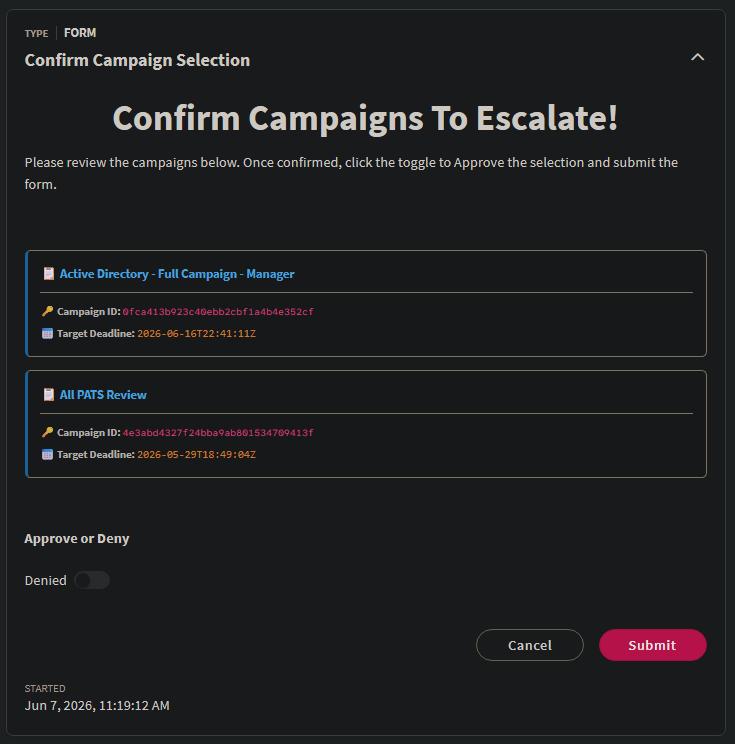
- Interactive Form 2 (Confirmation): Renders the generated HTML summary inside a description block and prompts the user with an Approve/Deny toggle.
- Loop & Trigger: If approved, it loops through the selected campaigns and sends an asynchronous HTTP POST call to run Workflow 2 for each campaign.
- Workflow 2: Certification Escalator
- Trigger: External HTTP trigger receiving the
campaignid. - Get Certifications: Fetches all active, incomplete certifications under the target campaign.
- Serial Loop: For each certification, it retrieves the reviewer's identity details, resolves their manager's ID, and calls the reassignment API.
- Trigger: External HTTP trigger receiving the
Design Decision: Why Split Into Two Workflows?
- Licensing Compliance: Splitting the logic ensures both workflows stay under 20 steps, which is the maximum step count allowed under the entry-level SailPoint ISC business subscription. Users with higher-tier plans can combine these into a single workflow if preferred.
- Easier Debugging & Simpler Logic: Decoupling the interactive frontend selector from the background worker escalator keeps the logic simple, structured, and easy to trace in execution logs.
- Runtime Optimization: Reassigning hundreds of certifications takes time. Splitting prevents a single interactive workflow execution from running into maximum execution timeouts.
- Fault Tolerance: If a reassignment loop fails, we only have to restart that specific campaign's escalator execution. We avoid repeating the campaign selection UI or risking a partial run failure where only some campaigns get processed, forcing us to restart the entire sequence.
User Interface: Interactive Forms
By leveraging ISC Interactive Forms, we can build a clean, guided wizard experience.
1. Campaign Selector Form
The first form asks the user if they want to target all active campaigns or specify a list. A form condition shows the campaign selection dropdown only when the toggle is turned off.
- Escalate All Active Campaigns? (Toggle): Defaults to
true(Escalate All Campaigns) orfalse(Escalate Campaigns Below). - Campaign Selector (Dropdown): Multi-select dropdown populated dynamically by Workflow 1 with the names and IDs of active campaigns.
2. Confirmation Form
The second form uses a description block to render a dynamic HTML preview generated during the workflow's execution. This ensures the admin knows exactly which campaigns they are about to escalate before executing.
- Dynamic Campaign Selections (Description Block): Displays the formatted HTML summary.
- Approve or Deny (Toggle): Requires the administrator to actively flip to "Approved" and click submit.
Back End: Workflow Details
Workflow 1: Certification Selection For Escalation
This workflow is responsible for querying campaigns, orchestrating the interactive forms, and dynamically compiling the campaign selection summaries depending on whether the administrator selected the "Escalate All Campaigns" toggle in Form 1.
- Individual Campaign Selections (Card Style): When specific campaigns are manually selected, a detailed card format featuring a left accent border, structured titles, and deadlines is compiled:
<div style='background-color: #1e1e1e; padding: 14px; border-radius: 6px; border: 1px solid #333; border-left: 4px solid #3498db; margin-bottom: 15px;'> <span style='font-size: 14px; font-weight: bold; color: #3498db;'>📋 {{$.loop.loopInput.name}}</span> <hr style='border: 0; border-top: 1px solid #2d2d2d; margin: 8px 0;'> <span style='font-size: 12px; opacity: 0.85;'><strong>🔑 Campaign ID:</strong> <code>{{$.loop.loopInput.id}}</code></span><br> <span style='font-size: 12px; opacity: 0.85;'><strong>📅 Target Deadline:</strong> <span style='color: #e67e22; font-family: monospace;'>{{$.loop.loopInput.deadline}}</span></span> </div> - All Campaigns Selected (Consolidated View): When "Escalate All Campaigns" is toggled, looping through every active campaign could result in massive page heights. The workflow builds a high-density list using inline vertical piping and dashed separators:
<div style='font-size: 13px; line-height: 1.6; margin-bottom: 5px; border-bottom: 1px dashed #2d2d2d; padding-bottom: 5px;'> 🔹 <strong style='color: #3498db;'>{{$.loop.loopInput.name}}</strong> <span style='color:#444;'>|</span> <span style='font-size: 11px; opacity: 0.6;'>ID:</span> <code style='font-size: 11px; padding: 0; vertical-align: middle; font-family: monospace;'>{{$.loop.loopInput.id}}</code> <span style='color:#444;'>|</span> <span style='font-size: 11px; color: #e67e22;'>📅 <span style='font-family: monospace;'>{{$.loop.loopInput.deadline}}</span></span> </div>
Workflow 2: Certification Escalator
This workflow performs the actual heavy lifting. It executes asynchronously in the background for each escalated campaign, gathering incomplete active certifications, looping through them, looking up each reviewer's manager, and executing the reassignment.
API Operations
The workflow relies on three core API calls from SailPoint's v2026 endpoint:
GET /v2026/campaigns?filters=status eq "ACTIVE"
Retrieves the list of currently active campaigns to populate Form 1.
GET /v2026/certifications?filters=campaign.id eq "{{$.trigger.campaignid}}" and phase eq "ACTIVE" and completed eq false
Takes the campaign ID received from the external HTTP trigger, then queries all active and outstanding certifications under that campaign. The filters for phase and completed ensure we do not reassign users who have already performed and completed their certifications.
POST /v2026/campaigns/{{$.loop.loopInput.campaign.id}}/reassign
{
  "certificationIds": [
    "{{$.loop.loopInput.id}}"
  ],
  "reason": "Escalating Certification To Users Manager",
  "reassignTo": {
    "id": "{{$.defineVariable.managerid}}",
    "type": "IDENTITY"
  }
}
Platform Limitations & Best Practices
When deploying this solution, keep the following platform behaviors and limits in mind:
- The 250 Pagination Limits and Early Cancellation Checks:To maintain platform stability and protect workflows from unexpected behavior, the solution enforces hard limits at two stages, backed by early-exit cancellation checks:
- Campaign Limit (Form 1 and All-Campaign Toggle): The initial API call retrieves a maximum of 250 active campaigns (which is the default API pagination page limit). If the user toggles "Escalate All Active Campaigns", the workflow is designed to safely handle up to 250. If the active campaign response count is exactly 250, we immediately cancel/exit the workflow early (using a decision branch) to prevent unintended or incomplete behavior.
- Certification Limit (Escalator Workflow): The second workflow retrieves up to 250 active certifications per campaign. If there are exactly 250 certifications returned, this indicates that the campaign size exceeds our single-page query limit. To avoid partial escalations and out-of-order reassignments, we have a check (
Compare Multi Type 2step comparing the body length to250) that terminates the escalator workflow early if the threshold is met.
- Why these limits are practical: In a production setting, having more than 250 concurrent active campaigns is highly improbable. Similarly, because escalations are typically run near the end of a review cycle, only a small fraction of certifications (typically well under 250) remain past due and need escalation in a single campaign.
- Launchpad Role Restrictions: Ensure that access to the "Certification Selection For Escalation" interactive trigger is restricted. Only authorized compliance managers or IAM administrators should be allowed to run the tool.
- Manager Integrity: The escalator workflow checks if a manager ID exists for the reviewer (using a
Compare Multi Typestep). If a reviewer does not have an assigned manager, the workflow skips that certification, ensuring it doesn't fail or throw API errors.
Conclusion
Splitting this escalation solution into a selection UI workflow and an asynchronous worker workflow ensures speed, compliance reviews, and high reliability. Interactive forms bring IIQ-like workflow flexibility to the modern Identity Security Cloud platform.
If you are looking to deploy this solution or want to implement custom certification escalations in your environment, book a time with me by using the Talk to an Expert button below.
Configuration Snippets & Downloads
1. Campaign Selector (Form)
Interactive selection form capturing target campaign list or escalation toggle parameters.
2. Confirm Selection (Form)
Description rendering confirmation panel displaying stylized HTML preview variables.
3. Selection Workflow (Workflow)
Orchestrator retrieving active campaigns, displaying selector UI, and triggering backend worker loops.
4. Background Escalator (Workflow)
Worker endpoint looping active certifications, resolving reviewer's manager, and reassigning via API.
Need a custom reporting or governance dashboard?
Whether you are developing complex multi-source aggregations, automating task gateways, or deploying customized alert dashboards, custom expert support helps you deploy safely.