Comprehensive SailPoint Source Health Reporting

Tyler
IdentityEXE Founder
Executive Summary
In SailPoint Identity Security Cloud (ISC), seeing a green "Healthy" badge on a connected source in the administrative console creates a dangerous operational illusion. That status indicator reflects nothing more than a successful connectivity ping between the Cloud Connector Gateway (CCG) or SaaS connector and the target managed endpoint. It merely verifies network reachability. The out-of-the-box health check is entirely blind to silent operational failures: scheduled account aggregations failing on unhandled filestream locks or schema parse errors, entitlement aggregations failing to sync newly created security groups, automated account provisioning actions (Create, Modify, Disable, Enable, Delete) aborting due to LDAP schema constraints or expired service account credentials, and attribute synchronization failing to push authoritative changes down to managed applications.
Leaving this architectural blind spot unaddressed inflicts severe commercial and operational damage. When provisioning actions fail silently, day-one onboarding grinds to a halt—leaving high-value employees sitting idle without essential tools and sparking high-priority escalations to already strained service desk teams. Even more dangerous are silent termination failures: when an employee separates and automated disable or delete actions fail under the radar, privileged access remains orphaned and active in downstream systems. During SOX, SOC 2, and ISO 27001 audit cycles, auditors uncover these discrepancies, resulting in catastrophic audit findings and compliance penalties. Meanwhile, IAM engineering teams waste hundreds of unplanned hours hunting through fragmented tenant logs, and IT leadership faces severe manager approval fatigue over phantom and desynchronized accounts.
IdentityEXE engineered the Tenant Source Health & Operational Resilience Framework, a repeatable architectural methodology designed to deliver holistic, real-time operational governance across every connected source in SailPoint ISC. Rather than relying on manual audits or isolated scripts, this implementation framework unites scheduled SailPoint Workflows, secure execution through the Privileged Action Gateway (PAG), and a high-performance PowerShell auditing engine. It dynamically interrogates connector capabilities across eight core operations, enforces high-volume pagination safeguards across the Task-Status and Search APIs, calculates real-time operational error percentages, flags any source breaching a 3% failure threshold, and delivers an executive HTML operations matrix alongside automated, targeted ITSM incident dispatch directly into your enterprise service desk.
Solution Overview
- Tech Stack: 1 Scheduled SailPoint Workflow + 1 PowerShell Automation Engine + 2 Modular HTML Templates + CSV Audit Export.
- Execution Plane: Runs on a scheduled cadence within SailPoint Workflows and executes via the Privileged Action Gateway (PAG) on a secured Windows Server host over WinRM.
- High-Level Flow: The automation authenticates to ISC via OAuth 2.0 client credentials, discovers and caches all tenant sources, dynamically discovers source capabilities, audits recent task statuses and search audit logs across a configurable lookback window (default 24 hours), computes granular error percentages per operation and source, and delivers rich HTML notifications alongside an audit-ready CSV.
- ITSM Incident Integration: In addition to an executive summary email sent to the identity administration distribution list, the engine can be configured to automatically dispatch individual, contextual incident emails directly to service desk queues (e.g., ServiceNow, Jira Service Management, Freshservice) for any source breaching the error threshold.
Enterprise Architecture Note: The "Silent Failure" Trap
When we architect this solution for our enterprise clients, we frequently encounter organizations that have experienced multi-month aggregation blind spots. A connector reported "Healthy" in the UI while its cron aggregation schedule had been failing on a filestream lock every single midnight. By auditing the actual execution records from the Task-Status and Search APIs, this framework guarantees that operational reality matches administrative expectations.
Architecture & High-Level Flow
Our core engineering methodology structures the data layer to isolate capability discovery from health auditing, preventing false positive alarms while guaranteeing 100% event capture across high-volume enterprise tenants.
/sources/v1 using offset pagination (batch: 250)./task-status/v1 (reverse chronological) and /search/v1 (cursor-based searchAfter).Monitored Operations & Capability Detection
A primary engineering challenge when auditing source health across an entire enterprise tenant is preventing false positives. In complex environments managing hundreds of sources, you cannot simply evaluate every operation against every source. For example, auditing account creation against an authoritative flat-file HR source that does not support provisioning would produce false error alerts.
This modular framework ensures that your ISC deployment avoids false alarms by evaluating the active capabilities of each source prior to evaluating task or search telemetry:
| Operation | Capability Verification Method | Health Evaluation API Surface |
|---|---|---|
| Account Aggregation | Validates if cron schedule exists (type == ACCOUNT_AGGREGATION via /sources/:id/schedules) | /task-status/v1 filtered by Cloud Account Aggregation |
| Entitlement Aggregation | Validates if cron schedule exists (type == GROUP_AGGREGATION via /sources/:id/schedules) | /task-status/v1 filtered by Cloud Group Aggregation |
| Create Account | Checks if connector features contain PROVISIONING or CREATE (via /sources/v1) | /search/v1 (accountactivities index: accountRequests.op == "Create") |
| Modify Account | Checks if connector features contain PROVISIONING or UPDATE (via /sources/v1) | /search/v1 (accountactivities index: accountRequests.op == "Modify", excluding Attribute Sync) |
| Disable Account | Checks if connector features contain ENABLE, DISABLE, or PROVISIONING | /search/v1 (accountactivities index: accountRequests.op == "Disable") |
| Enable Account | Checks if connector features contain ENABLE or PROVISIONING | /search/v1 (accountactivities index: accountRequests.op == "Enable") |
| Delete Account | Checks if connector features contain DELETE or PROVISIONING | /search/v1 (accountactivities index: accountRequests.op == "Delete") |
| Attribute Sync | Queries /sources/:id/attribute-sync-config for enabled synchronized attributes | /search/v1 (accountactivities index: activity action == "Attribute Sync") |
In the generated executive reports and operations health matrix, each operation is categorized into one of four deterministic states:
- DISABLED: The source does not support this operation or does not have it configured (e.g., no aggregation schedule exists, or provisioning feature flags are absent).
- IDLE: The capability is active and configured, but zero execution runs occurred during the lookback window.
- OK (X): The capability is active, with
Xruns completed and zero failures detected. - X/Y (Z%): Failures were detected during the window, displaying failed runs (
X), total runs (Y), and the calculated error percentage (Z%).
Data Completeness & Pagination Architecture
In enterprise tenants managing hundreds of sources and tens of thousands of daily provisioning actions, simple API queries fall victim to payload limits, timeouts, or silent data truncation. To guarantee complete visibility, the engine implements three distinct pagination techniques:
Offset Pagination (/sources/v1)
Sources are gathered in batches of 250 records using standard limit and offset parameters, indexed into in-memory lookup dictionaries for instant access during task processing.
Reverse Chronological (/task-status/v1)
Task statuses are gathered using sorters=-created. The engine terminates pagination immediately as soon as a task falls outside the lookback window (e.g., 24h), eliminating redundant API calls.
Cursor-Based (/search/v1)
Standard offset pagination on Search fails due to Elasticsearch's hard 10,000 document maximum window. The script uses cursor-based pagination with searchAfter sorted by [-created, id].
Executive Reporting & ITSM Incident Ticketing
The solution produces three distinct outputs tailored for administrators, compliance auditors, and automated service desk queues:
1. Executive Summary HTML Email
The primary deliverable is an executive-ready HTML email summary delivered to the identity engineering distribution list. It provides an immediate pulse on tenant health with zero administrative friction:
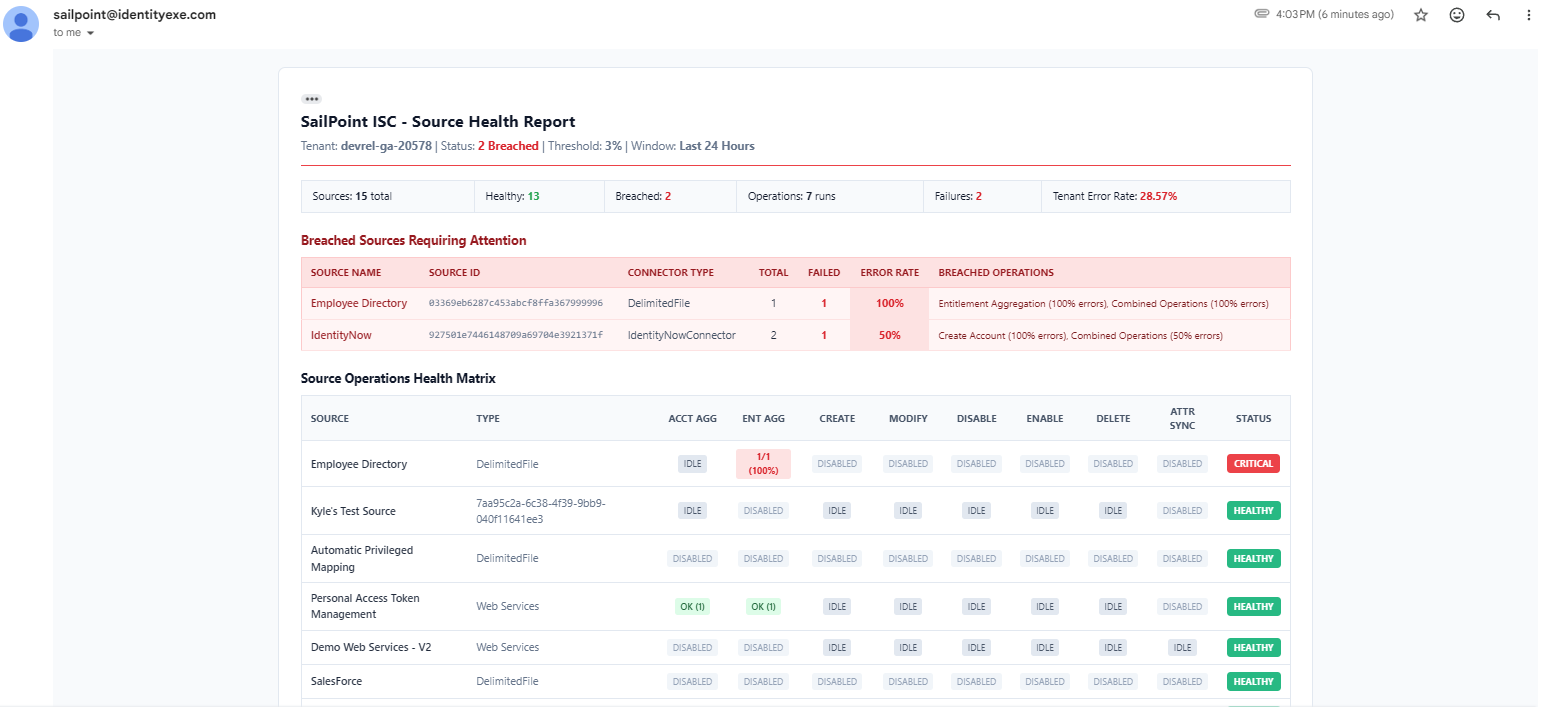 Executive HTML Health Report displaying KPI metrics, breached sources requiring immediate attention, and the full operational health matrix.
- Dynamic Header & Status Badge: Instantly alerts the team whether all tenant operations are compliant or if sources have breached the threshold.
- KPI Metrics Bar: Summarizes total evaluated sources, healthy sources, breached sources, total operational runs, total failures, and the aggregate tenant error rate.
- Breached Sources Requiring Attention Table: Surfaces only the sources exceeding the threshold, listing their specific failing operations, failure counts, and exact error percentages.
- Source Operations Health Matrix: Displays a clean, color-coded grid mapping all tenant sources across every monitored capability.
2. Automated Incident Ticketing (Service Desk / ITSM Integration)
Discovering failures in an email report is helpful, but automatically routing them to your incident management system is critical for enterprise governance. When the -CreateTickets parameter is enabled and a -TicketEmailToSendTo address is provided (e.g., ServiceNow, Jira Service Management, or Freshservice inbound mailbox), the engine dispatches individual incident tickets:
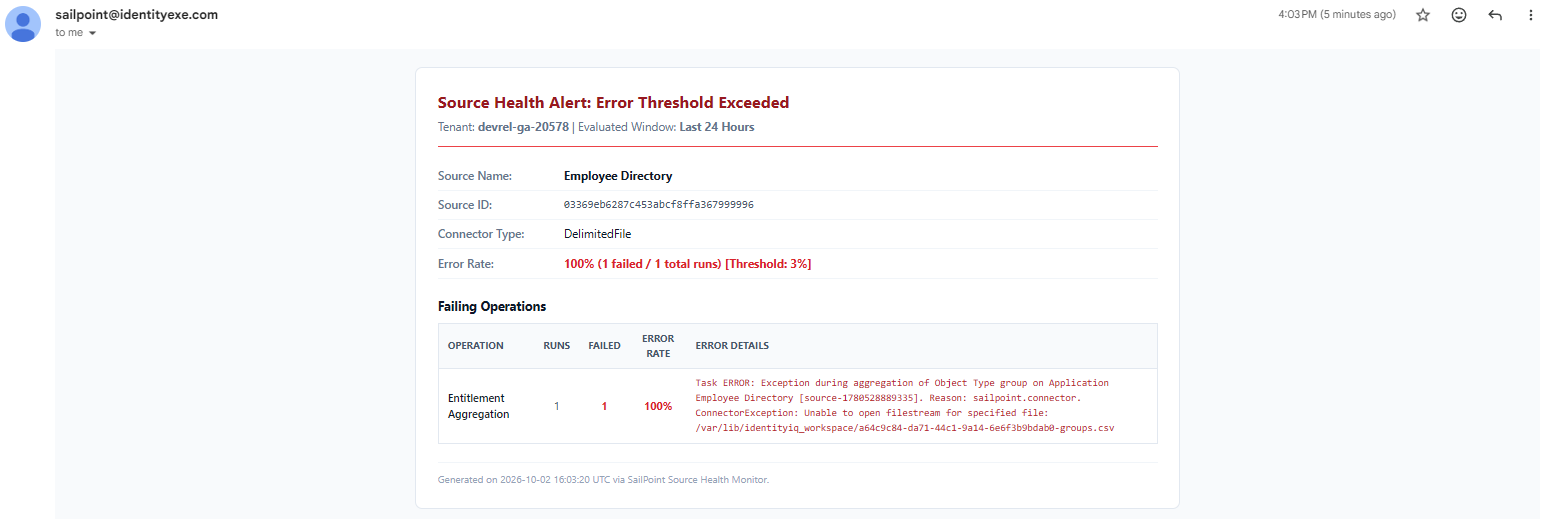 Automated incident ticket email containing source context, connector type, calculated error percentage, and raw task exception traces.
Tickets are created exclusively for sources breaching the configured error rate (default 3%). Healthy sources never create noise in service desk queues.
Isolates failures so distinct application administration teams can take ownership of specific connector incidents independently.
Provides Source Name, Source ID, Connector Type, and calculated error rate in a clean, structured table for immediate routing.
Includes raw task error messages and connector exception logs (e.g., file not found, bad credentials, LDAP timeouts) directly in the ticket.
3. Audit-Grade CSV Report
Attached directly to the executive email and saved locally on the script host is a timestamped CSV report (Source_Health_Report_YYYYMMDD_HHmmss.csv). This file provides compliance teams with an immutable audit log containing every source, operation status, total runs, failure counts, calculated error rates, and last activity timestamps.
SailPoint Workflow & PAG Canvas
The automation is orchestrated natively within SailPoint ISC through a scheduled workflow that invokes the script execution via the Privileged Action Gateway (PAG):
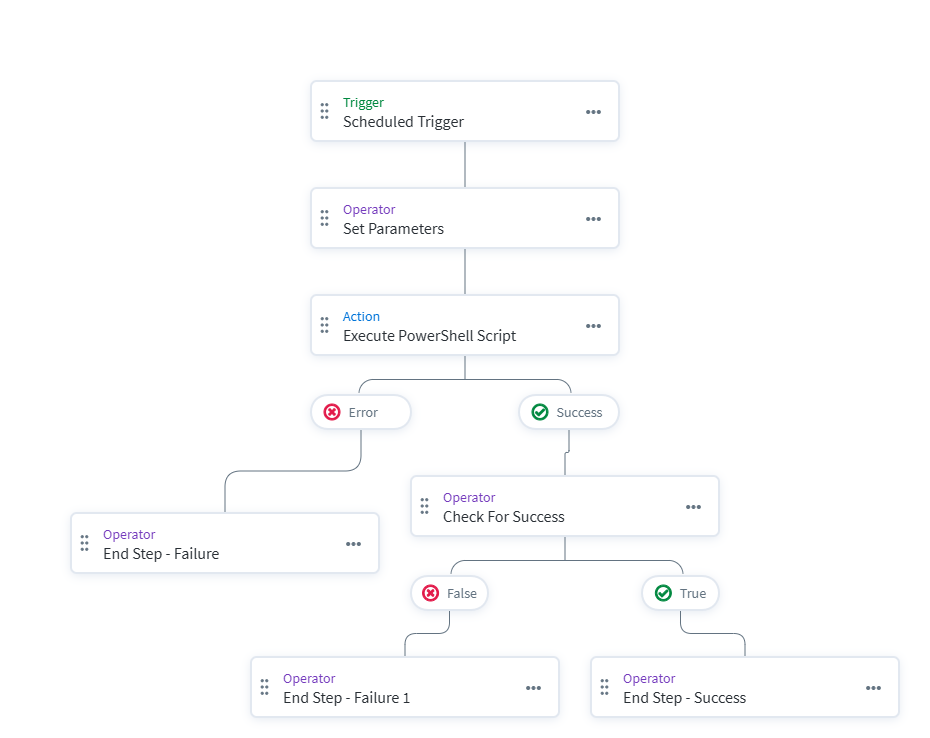 Complete visual canvas mapping of the scheduled source health workflow and PAG execution routing.
Workflow Step Walkthrough:
- Scheduled Trigger: Configured on a recurring cron schedule (e.g., daily at 6:00 AM UTC or hourly during major deployment windows).
- Set Parameters (Define Variable Operator): Establishes dynamic runtime parameters directly inside the workflow UI so operators avoid editing underlying script files:
- EmailToSendTo: "identity-team@yourcompany.com"
- ErrorThresholdPercent: "3.0"
- LookbackHours: "24"
- ExcludedSources: "Decommissioned App, Sandbox Active Directory"
- CreateTickets: "true"
- TicketEmailToSendTo: "servicedesk-incidents@yourcompany.com"
- Execute PowerShell Script (PAG Windows Server Action): Transmits an execution command over secure WinRM to the Windows Server hosting PAG, passing dynamic workflow variables as script parameters.
- Error Handling (Catch Path): If the host server is unreachable or the command times out, the workflow routes gracefully to an
End Step - Failurenode. - Check For Success (Compare Multi-Type Choice Operator): Inspects the JSON payload emitted by the script to confirm that
$.windowsServer.result.data.status == "success". - Terminal Nodes: Routes cleanly to
End Step - SuccessorEnd Step - Failure 1based on execution telemetry.
Workflow Output JSON Payload
Upon completion, the PowerShell engine emits a compressed JSON payload to standard output, providing downstream workflow nodes with complete operational visibility:
{
  "status": "success",
  "tenant": "your-tenant",
  "alertTriggered": true,
  "errorThresholdPercent": 3,
  "lookbackHours": 24,
  "sourcesEvaluated": 15,
  "sourcesExcluded": 1,
  "sourcesBreached": 1,
  "sourcesWithWarnings": 0,
  "healthySources": 13,
  "totalOperationsRuns": 7,
  "totalFailedOperations": 2,
  "tenantErrorRatePercent": 28.57,
  "ticketsDispatched": 1,
  "ticketRecipient": "servicedesk-incidents@yourcompany.com",
  "reportCsvPath": "C:\\Scripts\\reports\\Source_Health_Report_20261002_160320.csv",
  "duration": "00:00:12",
  "generatedAt": "2026-10-02 16:03:22"
}
Downstream workflow logic can evaluate $.windowsServer.result.data.alertTriggered to trigger secondary incident workflows, dispatch high-urgency Microsoft Teams or Slack alerts, or temporarily pause downstream certification campaigns.
Key Code Highlights & Implementation Choices
Here is a closer look at core architectural patterns embedded within the IdentityEXE PowerShell engine:
1. Cursor-Based Search Pagination with searchAfter
To audit account provisioning and attribute synchronization events without risking pagination errors or hitting Elasticsearch offset caps, our core engineering methodology structures the search query with cursor-based searchAfter pagination:
# Search API cursor pagination loop
$SearchQuery = "created:[now-${LookbackHours}h TO now]"
$SearchLimit = 250
$LastActivityCreated = $null
$LastActivityId = $null

while ($true) {
    $SearchPayload = [ordered]@{
        indices = @("accountactivities")
        query   = @{ query = $SearchQuery }
        sort    = @("-created", "id")
    }

    if ($LastActivityCreated -and $LastActivityId) {
        $SearchPayload["searchAfter"] = @((Format-IsoUtc $LastActivityCreated), $LastActivityId)
    }

    $SearchUri = "$BaseUrl/search/v1?limit=$SearchLimit"
    $SearchBatch = Invoke-RestMethod -Method Post -Uri $SearchUri -Headers $Headers -Body ($SearchPayload | ConvertTo-Json -Depth 6)

    $activityArray = @($SearchBatch)
    if (-not $activityArray -or $activityArray.Count -eq 0) {
        break
    }

    foreach ($act in $activityArray) {
        # Process account activity and provisioning operations
        Process-AccountActivity -Activity $act
    }

    if ($activityArray.Count -lt $SearchLimit) {
        break
    }

    # Extract tiebreaker sort values from the last item
    $lastItem = $activityArray[-1]
    $LastActivityCreated = $lastItem.created
    $LastActivityId = $lastItem.id
}
2. Dual-Threshold Evaluation & Breach Detection
A source is flagged as breached if either an individual active capability exceeds the error threshold (e.g., account creations failing at 5%) or the source's combined error rate across all operations hits the threshold:
$isBreached = $false
$breachedOperations = [System.Collections.Generic.List[string]]::new()

foreach ($opKey in $SourceOps.Keys) {
    $opData = $SourceOps[$opKey]
    if (-not $opData.Enabled -or $opData.TotalRuns -eq 0) { continue }

    $rate = [math]::Round(($opData.FailedRuns / $opData.TotalRuns) * 100, 2)
    $opData.ErrorRatePercent = $rate

    if ($rate -ge $ErrorThresholdPercent) {
        $isBreached = $true
        $breachedOperations.Add("$($opData.DisplayName) ($rate% errors)")
    }
}

# Evaluate combined source error rate
$combinedRate = if ($totalSourceRuns -gt 0) {
    [math]::Round(($totalSourceFailures / $totalSourceRuns) * 100, 2)
} else { 0.0 }

if ($combinedRate -ge $ErrorThresholdPercent -and $totalSourceRuns -gt 0) {
    $isBreached = $true
}
Considerations & Production Best Practices
- API Client Scopes & Least Privilege: Ensure the Personal Access Token (PAT) or OAuth 2.0 Client Credentials Grant assigned to the automation is constrained to read-only scopes:
- idn:sources:read (to inspect sources, connector features, schedules, and attribute sync configs)
- idn:tasks:read (to audit task execution statuses and error traces)
- idn:search:read (to query provisioning and attribute sync account activities)
- Managing Excluded Sources: Sandbox sources, test directories, or applications undergoing maintenance often generate expected failures. Use the
-ExcludedSourcesparameter to pass a comma-separated list of source names or IDs. The engine will bypass health checks for these systems while clearly logging them as excluded in the executive summary KPI bar. - Tuning Error Rate Thresholds: The default baseline of 3.0% provides an optimal threshold for enterprise environments. It tolerates transient network timeouts while immediately flagging systemic aggregation or provisioning failures. Organizations with zero-tolerance SLAs can tune this down to 1.0% or 0.5%.
- PAG Host Security & Network Egress: When placing the script on your Windows execution host, locate it in a protected administrative directory (e.g.,
C:\Scripts\comprehensive-source-reporting\), enforce TLS 1.2 on all outgoing connections, and verify that the host has network egress to your internal or cloud SMTP relay.
Downloads & Implementation Code
Download the complete IdentityEXE Comprehensive Source Reporting implementation package below:
Conclusion
Relying solely on green "Healthy" connectivity pings leaves critical blind spots in your identity governance posture. By combining SailPoint Workflows, the Privileged Action Gateway, and automated ISC API auditing across eight core operations, enterprise identity teams can proactively track aggregation health, catch failing provisioning events before users or auditors notice, and eliminate the audit findings that plague enterprise rollouts.
A stalled identity governance rollout burns capital and stalls organizational momentum.
If your team is hitting configuration walls or struggling with complex comprehensive-source-reporting integrations, stop guessing. Book a targeted SailPoint Architecture Review directly with our engineering team to map out a clear path forward.