Self-Service Governance Group Management

Tyler
IdentityEXE Founder
The Problem: The Governance Group Bottleneck
If you manage a SailPoint Identity Security Cloud (ISC) environment, you’re likely familiar with the gap with managing governance groups natively. Idea Portal post GOV-I-1808 goes into this lack of functionality with requests for a way so governance group owners can manage their own groups.
Currently, Governance Group owners lack the self-service capabilities to manage their own group memberships. When team churn occurs, a member is terminated or a new hire joins, the group owner has no native way to update the group. Instead, they are forced to submit a service request to the IT or Identity team. This creates unnecessary administrative overhead, delays access modifications, and turns identity engineers into bottlenecked ticket-takers.
Until a native feature is released, we need a solution. This post outlines a workaround leveraging ISC Forms, Workflows (with Interactive Triggers), and the ISC APIs to securely delegate group administration directly to the owners.
Here is a look at the final self-service experience we are going to build:
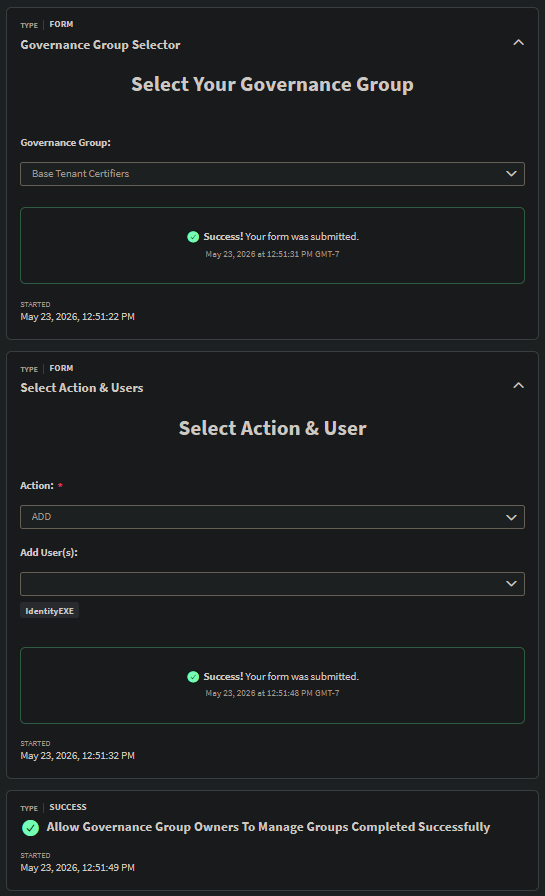
Architectural Overview: The Two-Form Pipeline Pattern
You might wonder: Why not just use one form? The technical challenge lies in dynamic filtering. A single ISC form cannot dynamically fetch and refresh a dropdown box based on a previous selection within the same active session. If an owner selects "Group A", we need to query the API to find the exact current members of "Group A" so the owner doesn't have to guess who to remove.
To solve this, we use a Multi-Form Pipeline:
- Form 1 (Selection): Displays only the Governance Groups owned by the user interacting with the form.
- Workflow Intermission: Executes an API lookup (
GET /v2026/workgroups/{id}/members) for the exact membership of the selected group. - Form 2 (Action): Pipes that API response into a dynamic dropdown, allowing owners to selectively remove existing members or add new ones.
Implementation Step-by-Step
Phase A: Automated Launcher Access (Workflow 2)
Before owners can use our self-service forms, they need access to the Workflow Launcher. We don't want admins manually provisioning this entitlement every time a new group is created or an owner changes.
We resolve this with a daily scheduled cron workflow that keeps roles synchronized:
- It executes a
GET /v2026/workgroupsto pull all active governance groups. - It evaluates the targeted Launcher Role's identity membership.
- It uses a JSON Patch (
POST /v2026/roles/{roleid}) inside a loop to automatically attach group owners to the specific role containing the launcher permission.
A Quick Caveat on Workflow 2:
There is a known quirk with SailPoint's native JSON Patch operation for roles. The API allows the same identity to be appended to a role multiple times. While this won't break access, it creates a UI bug where the role's assigned headcount shows artificially high numbers. Because staying 100% native inside Workflows is usually the goal, this is the default solution. However, if that UI discrepancy bothers you, I've included an optional PowerShell script at the bottom of this post that handles deduplication before patching. Please see the bug report if you want further details - Bug Report.
Phase B: Designing the User Interface (The Forms)
Our UI relies on two distinct forms passed back and forth by the workflow.
Form 1: Governance Group Selector
- Input: A
governanceGroupsarray dynamically populated by the main workflow. - Configuration: A single-select interface pulling data directly from
FORM_INPUT.
Form 2: Select Action and User
- Inputs: An
actiondropdown (ADDorREMOVE). - Dynamic Selectors:
- If
ADDis selected, an Identity Picker (capped at 30 items) appears. - If
REMOVEis selected, a dynamic selector populated by theremoveUsersarray (passed from the API fetch in the workflow) appears.
- If
- Form Conditions: We use
SHOWeffects tied to theactiondropdown so the user only sees the relevant selection box.
Phase C: Orchestrating the Engine (Workflow 1)
This is the core engine, triggered by an Interactive Process Launcher (idn:interactive-process-launched).
- Strict Authorization API Call: We execute
GET /v2026/workgroups. The absolute most critical part of this step is the JSONPath filter applied when passing this data to Form 1:$.hTTPRequest.body[?(@.owner.id == '{{$.trigger.launchedBy.id}}')]This ensures the owner can ONLY see and manage groups they own, establishing a hard security boundary. - Display Form 1: The user selects their Governance Group.
- Fetch Members: We take the ID from Form 1 and run
GET /v2026/workgroups/{{$.interactiveForm.formData.governanceGroup}}/members. - Display Form 2: We pass the members into Form 2, allowing the user to select their action and target identities.
- Branching Execution: A
Compare Stringsstep checks the action:- If ADD: Loop through the selected users and invoke
POST /v2026/workgroups/{id}/members/bulk-add. - If REMOVE: Loop through the selected users and invoke
POST /v2026/workgroups/{id}/members/bulk-delete.
- If ADD: Loop through the selected users and invoke
Key Considerations & Security Boundaries
- API Calls: We deliberately use
/v2026/workgroupsand/v2026/rolesto leverage the bulk modifications and complex role management. - Scalability: Ensure your form's maximum item limits (e.g., 30 identities for bulk add/remove) align with your workgroup sizes. If you go outside this boundary, the form will not be able to handle it in one submission, and multiple submissions will be required.
- Tenant-Specific Variables: When importing the JSON files below, remember to update the Base URLs & Role IDs (replace
TENANT&ROLEIDwith your tenant URL and Role ID).
Configuration JSON Snippets
You can import these directly into your tenant. Note: Please update the tenant URLs and Role IDs to match your environment.
1. Governance Group Selector (Form 1)
Select form definition to dynamically list owned groups based on launcher.
2. Select Action and User (Form 2)
Action selector (ADD/REMOVE) and dynamic identities picker logic.
3. Workflow For Managing Workgroups (Workflow 1)
The core engine managing dynamic pipeline state and API patches.
4. Workflow For Syncing Role (Workflow 2)
Scheduled sync matching workgroup owners to workflow launcher access role.
5. (OPTIONAL) PowerShell Script For Adding Workgroup Owners To Role
As mentioned in Phase A, the native Workflow 2 will successfully manage access, but the SailPoint API's lack of deduplication on JSON patches means a user added 5 times will artificially inflate the role's member count by 5 in the UI.
If keeping your role metrics perfectly clean is a priority, you can bypass Workflow 2 entirely and run this PowerShell script on a schedule instead. It fetches the existing role members first, compares them against the workgroup owners, and only patches in the true net-new identities.
$clientId     = "ENTERYOURCLIENTIDHERE"
$clientSecret = "ENTERYOURCLIENTSECRETHERE"
$tenantName   = "ENTERYOURTENANTNAMEHERE"
$baseUrl      = "https://$tenantName.api.identitynow.com"
$targetRoleId = "ENTERYOURROLEIDHERE"

$tokenBody = @{
    grant_type    = "client_credentials"
    client_id     = $clientId
    client_secret = $clientSecret
}

try {
    $tokenResponse = Invoke-RestMethod -Method Post -Uri "$baseUrl/oauth/token" -Body $tokenBody
    $accessToken = $tokenResponse.access_token
} catch {
    Write-Error "Failed to authenticate with SailPoint ISC: $($_.Exception.Message)"
    exit
}

$getHeaders = @{
    "Authorization" = "Bearer $accessToken"
    "Content-Type"  = "application/json"
}

$patchHeaders = @{
    "Authorization" = "Bearer $accessToken"
    "Content-Type"  = "application/json-patch+json"
}

Write-Host "Fetching Workgroups..."
$allWorkgroups = @()
$limit = 250
$offset = 0
$totalCount = 0

do {
    $uri = "$baseUrl/v2026/workgroups?limit=$limit&offset=$offset&count=true"
    $response = Invoke-WebRequest -Method Get -Uri $uri -Headers $getHeaders

    if ($offset -eq 0) {
        # Safely handle header arrays (fixes the [int] cast issue)
        $headerValue = $response.Headers["X-Total-Count"]
        $totalCount = [int]($headerValue -join "")
        Write-Host "Total Workgroups found: $totalCount"
    }

    $workgroups = $response.Content | ConvertFrom-Json
    $allWorkgroups += $workgroups
    $offset += $limit

} while ($offset -lt $totalCount)

# Extract unique owner IDs, filtering out any workgroups that might have a null owner
$workgroupOwnerIds = $allWorkgroups |
    Where-Object { $null -ne $_.owner -and $null -ne $_.owner.id } |
    Select-Object -ExpandProperty owner |
    Select-Object -ExpandProperty id |
    Select-Object -Unique

Write-Host "Found $($workgroupOwnerIds.Count) unique workgroup owners."

Write-Host "Fetching Target Role ($targetRoleId)..."
try {
    $roleUri = "$baseUrl/v2026/roles/$targetRoleId"
    $roleResponse = Invoke-RestMethod -Method Get -Uri $roleUri -Headers $getHeaders
} catch {
    Write-Error "Failed to fetch Role $targetRoleId $($_.Exception.Message)"
    exit
}

# Extract existing identities to prevent duplicate additions (UI Bug fix)
$existingIdentityIds = @()
if ($null -ne $roleResponse.membership -and $null -ne $roleResponse.membership.identities) {
    $existingIdentityIds = $roleResponse.membership.identities | Select-Object -ExpandProperty id
}

Write-Host "Role currently has $($existingIdentityIds.Count) identities."

# Filter down to only the owners who are NOT already in the role
$ownersToAdd = $workgroupOwnerIds | Where-Object { $_ -notin $existingIdentityIds }

if ($ownersToAdd.Count -gt 0) {
    Write-Host "Adding $($ownersToAdd.Count) new owners to the role..."

    $patchBody = @()

    # If the role has completely empty membership, initialize it.
    # Otherwise, append to the existing array.
    if ($null -eq $roleResponse.membership -or $null -eq $roleResponse.membership.identities) {
        $identitiesArray = @()
        foreach ($ownerId in $ownersToAdd) {
            $identitiesArray += @{ id = $ownerId; type = "IDENTITY" }
        }
        $patchBody += @{
            op = "add"
            path = "/membership"
            value = @{
                type = "IDENTITY_LIST"
                identities = $identitiesArray
            }
        }
    } else {
        foreach ($ownerId in $ownersToAdd) {
            $patchBody += @{
                op = "add"
                path = "/membership/identities/-"
                value = @{
                    id = $ownerId
                    type = "IDENTITY"
                }
            }
        }
    }

    # -InputObject prevents array unrolling for single items
    # We still wrap in a string check just to guarantee [ ] brackets are present for the patch requirement
    $jsonPatchBody = ConvertTo-Json -InputObject @($patchBody) -Depth 5
    if (-not $jsonPatchBody.TrimStart().StartsWith("[")) {
        $jsonPatchBody = "[$jsonPatchBody]"
    }

    try {
        $patchResponse = Invoke-RestMethod -Method Patch -Uri $roleUri -Headers $patchHeaders -Body $jsonPatchBody
        Write-Host "Success! Added $($ownersToAdd.Count) identities to Role $targetRoleId."
    } catch {
        Write-Error "Failed to patch Role: $($_.Exception.Message)"
        if ($_.ErrorDetails) {
            Write-Error $_.ErrorDetails.Message
        }
    }
} else {
    Write-Host "No new workgroup owners to add. All owners are already members of the role."
}
Conclusion
This multi-form pipeline effectively solves an immediate operational gap using standard, native tools—no external middleware required. It empowers governance owners, tightens up access modification timelines, and frees up your identity engineering team from routine ticket management.
If this is a pain point for your organization, I highly encourage you to cast your vote on GOV-I-1808 to help push a native solution to the roadmap. In the meantime, deploy this workflow and take back your time!
Need a custom delegated administration solution?
Whether you are building complex multi-form logic, dynamic workgroup aggregations, or customized access request engines, direct advisory can help you deploy quickly and securely.