Delegated Role Management in Identity Security Cloud

Tyler
IdentityEXE Founder
Executive Summary
Out-of-the-box, SailPoint Identity Security Cloud (ISC) requires an administrator to modify role configurations, such as adding or removing entitlements, updating descriptions, or changing owners. This monolithic approach restricts business units from autonomously managing their own access models and forces the core IAM team to act as a bottleneck for routine administrative changes.
Leaving this architectural limitation unsolved has severe commercial and operational impacts. When role owners lack self-service capabilities, organizations experience massive deployment lag and a dramatic increase in operational overhead. Furthermore, relying on a centralized IAM team for every configuration change introduces manager approval fatigue and potential security vulnerabilities, as inappropriate access often lingers while support tickets sit in queue.
To eliminate this bottleneck, IdentityEXE has developed a repeatable architectural methodology for delegated role management. This is not just a script—it is a modular implementation framework designed to empower business owners to manage their assigned roles directly and securely through an interactive launcher, fundamentally shifting the administrative burden away from the core identity team.
The IdentityEXE Blueprint
When we architect this solution for our enterprise clients, we utilize two interactive forms and three workflows. This modular framework ensures that your ISC deployment avoids administrative bottlenecks.
Our core engineering methodology structures the data layer to handle the following API calls (all utilizing PATCH /roles/v1/{roleid}):
[
  {
    "op": "replace",
    "path": "/name",
    "value": "{{newName}}"
  }
][
{
"op": "replace",
"path": "/description",
"value": "{{newDescription}}"
}
][
{
"op": "replace",
"path": "/requestable",
"value": {{true/false}}
}
][
{
"op": "replace",
"path": "/owner",
"value": {
"type": "IDENTITY",
"id": "{{newOwnerId}}"
}
}
][
{
"op": "add",
"path": "/entitlements/-",
"value": {
"id": "{{entitlementId}}",
"type": "ENTITLEMENT"
}
}
][
{
"op": "remove",
"path": "/entitlements/{{index}}"
}
]Important Security Warning
This form currently includes no approval schema. Users who are granted access to this launcher should be chosen very carefully. While the form restricts users to modifying only the roles they own, they can still potentially add highly privileged entitlements or remove access for many users if the form is used improperly. Please ensure appropriate governance and auditing are in place before deploying.
User Interface (Forms)
The user experience is split into two distinct forms to ensure clarity and provide dynamic context.
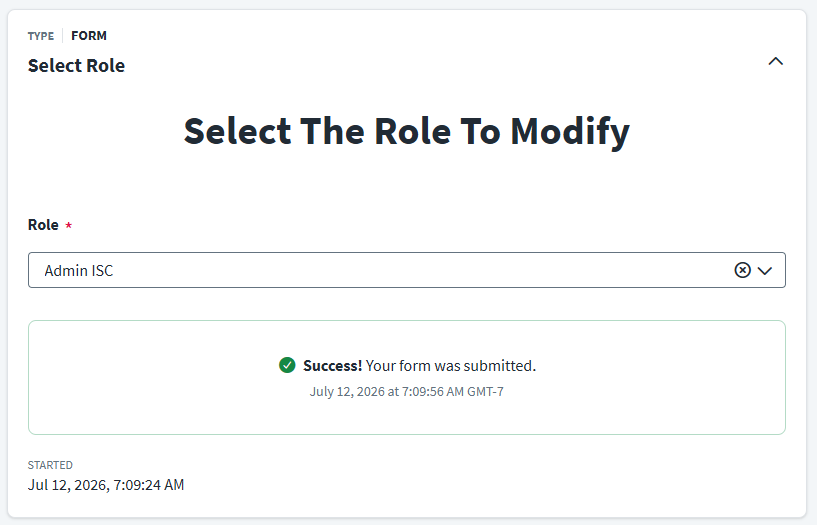
1. Role Selector Form
The first step is selecting the role to manage.
- Implementation Detail: This form utilizes an advanced search and form input filter on the owner UID to display only the roles available to the current user. In the main role management workflow, we use
trigger.launchedby.idto retrieve this ID and pass it to the form.
2. Role Management Form
Once a role is selected, the second form displays the role's current state and available actions.
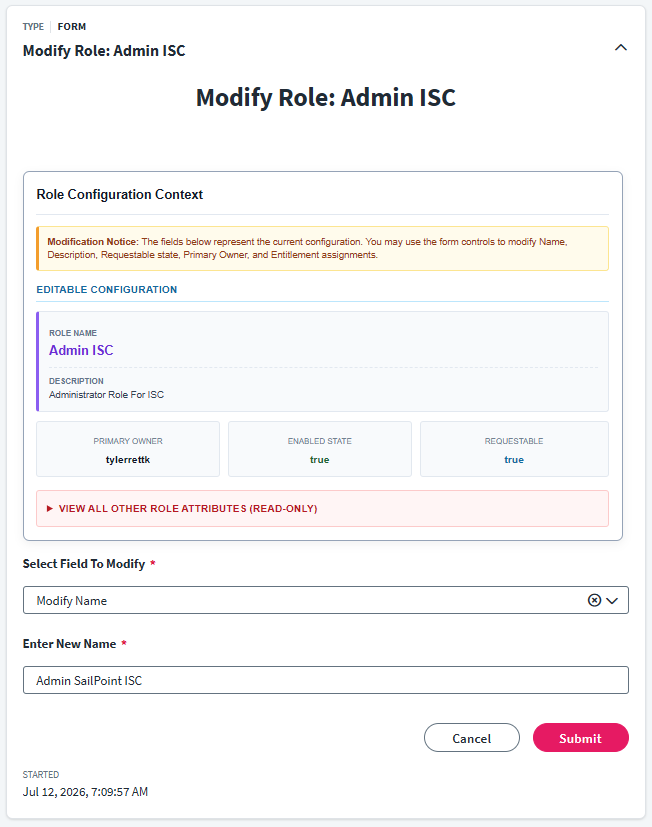
- Dynamic Summary: We use a form input to pull a summary from a
roles/v1/HTTP call, displaying all relevant details to the user. A "Define Variable" step maps this data and sets the relevant CSS/HTML tags for a clean display. - Conditional Fields: The form employs heavy conditional logic. When the user selects an action from the "Select Field to Modify" dropdown, the form dynamically adjusts which input fields are visible.
- Smart Entitlement Selection: For the "Remove Entitlement" action, the form uses the entitlements field from the
roles/v1/API call as an input. This ensures the user can only select entitlements that are actually assigned to the role, preventing errors.
Implementation Frameworks (Back End)
The backend consists of three workflows to handle the logic. The primary workflow manages standard modifications, while two external trigger workflows handle the complexities of adding and removing entitlements.
1. Main Role Management Workflow
This workflow handles the initial form interactions and standard role updates.
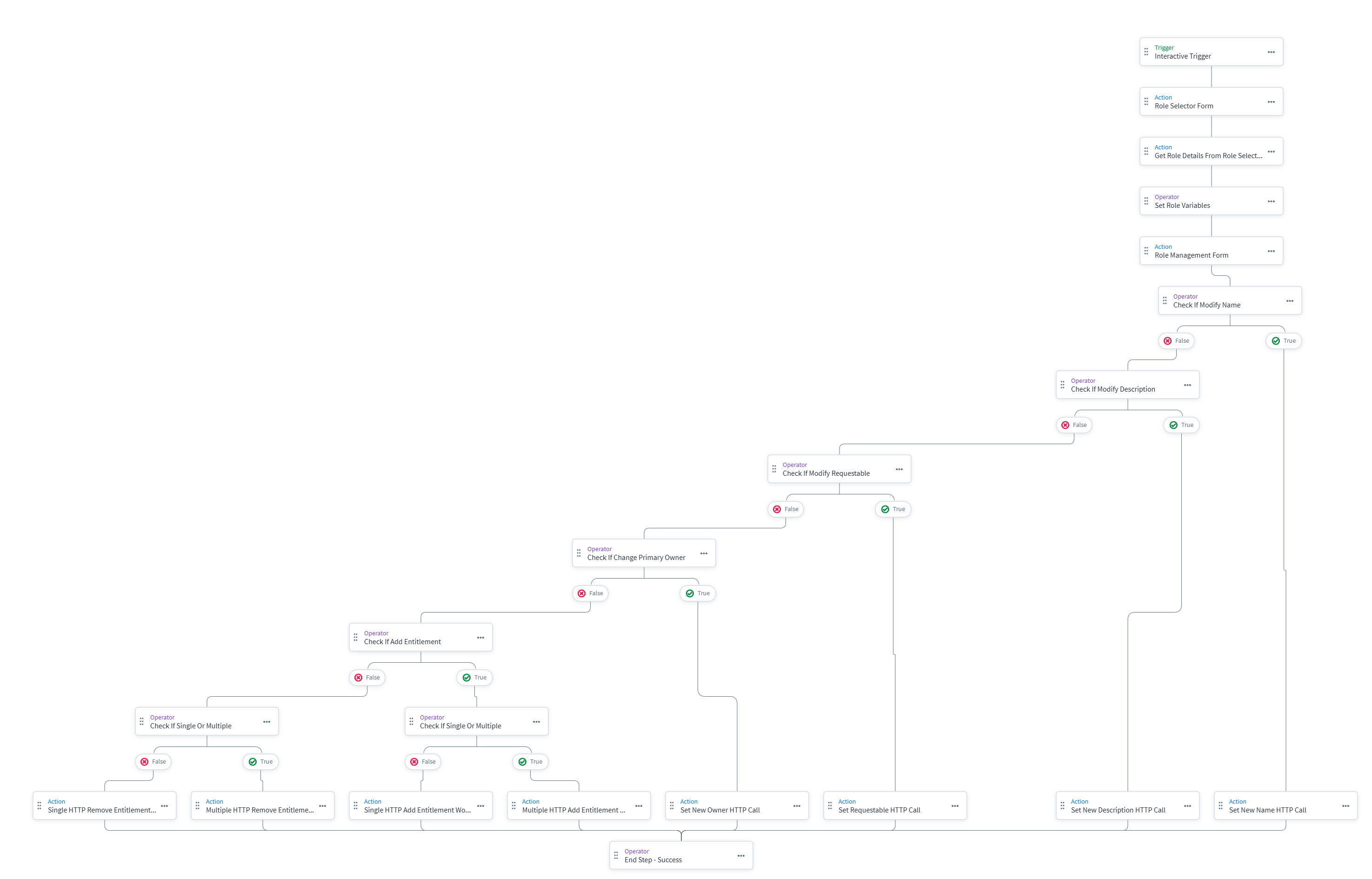
- Conditional Logic Web: The workflow uses a web of "Define Comparison" calls to route the execution based on the chosen action.
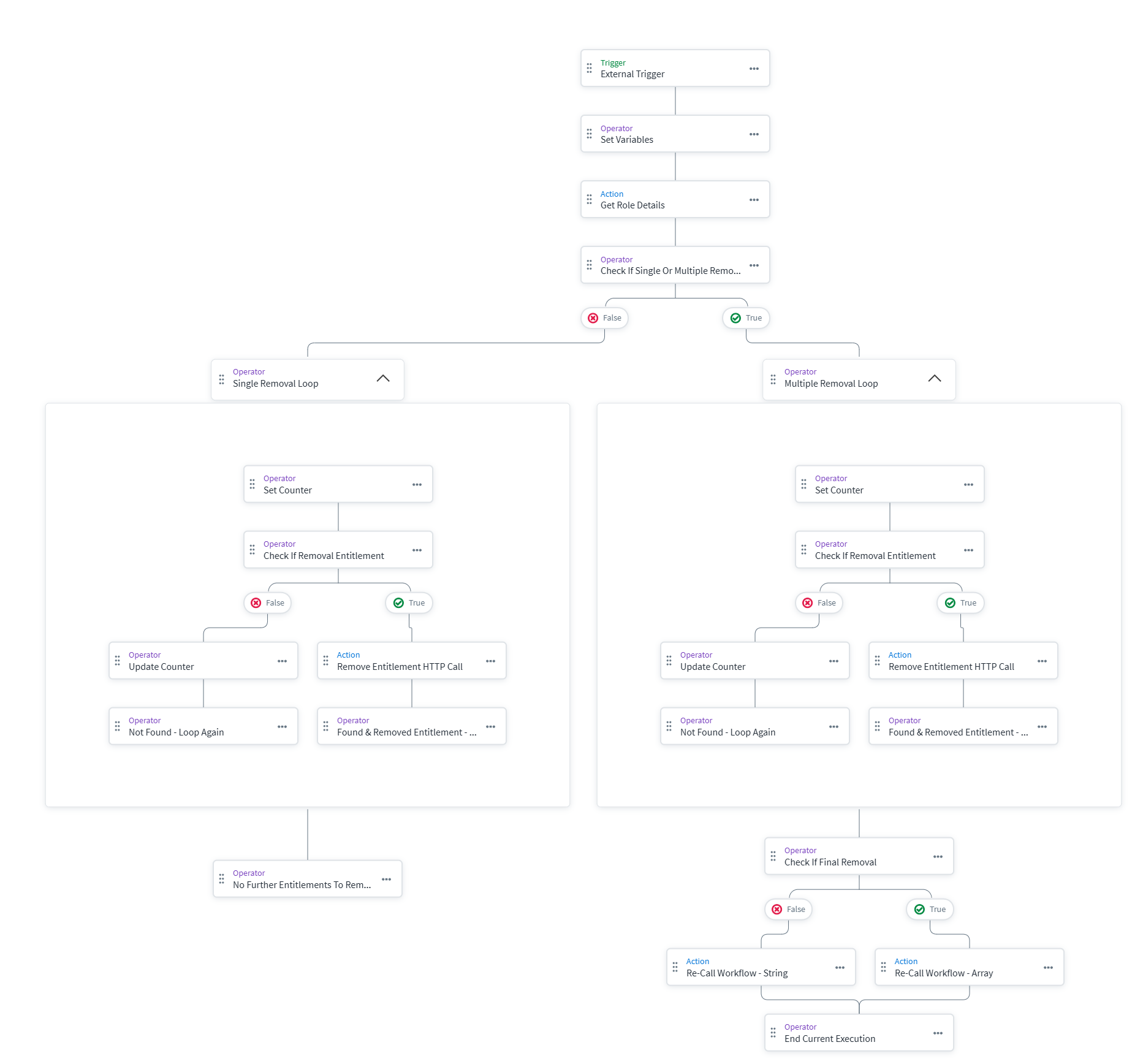
- Handling Arrays vs. Strings: A key challenge is that adding or removing entitlements can involve a single item (output as a string) or multiple items (output as an array). Passing this directly into a JSON body can break the API call if it expects one format over the other. To resolve this, the workflow branches to handle single and multiple selections distinctly.
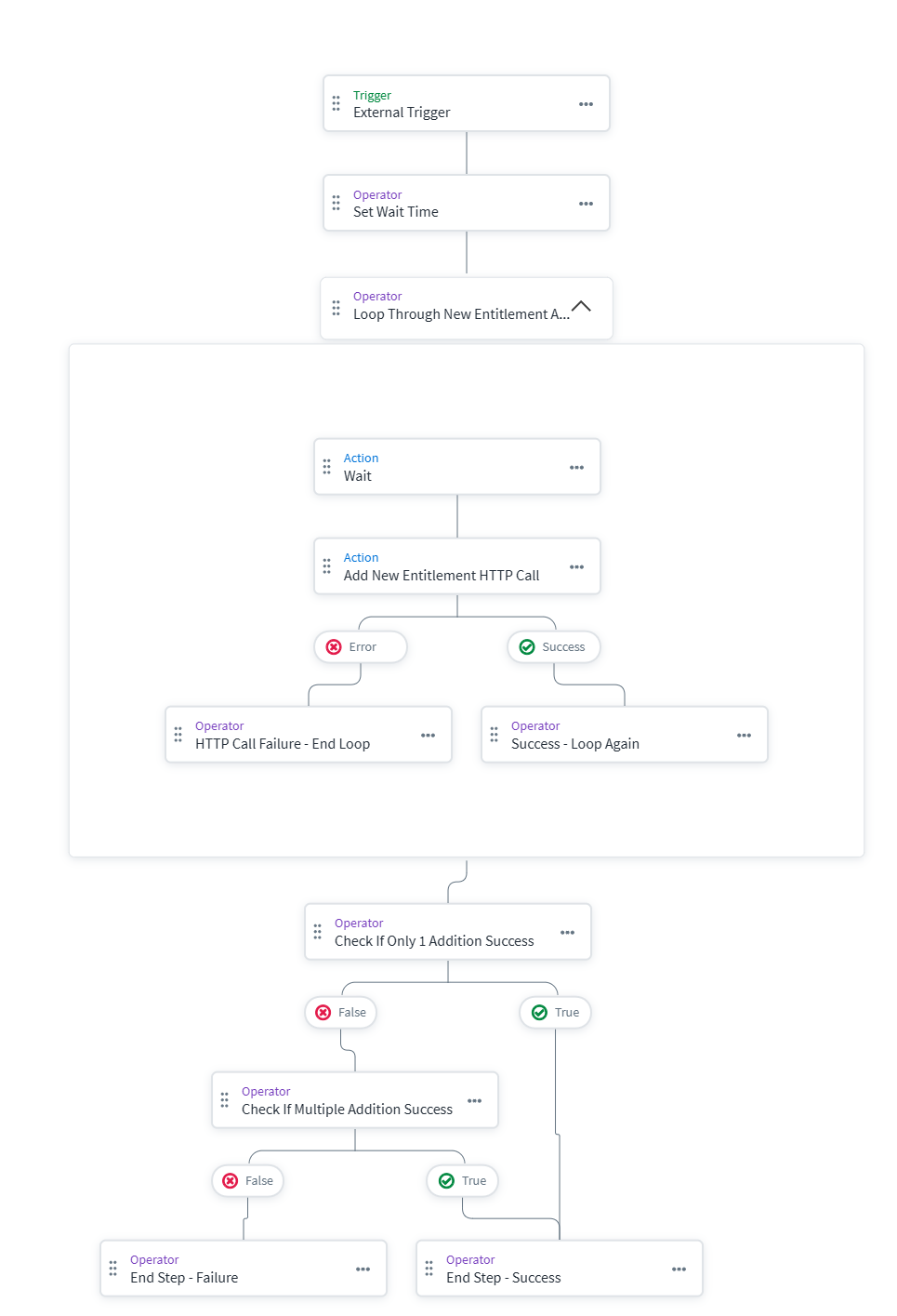
2. Add Entitlement Workflow
Adding an entitlement is relatively straightforward using a PATCH call, but there is a specific nuance when adding multiple entitlements at once.
- Wait Time Workaround: When sending multiple ADD patch requests simultaneously, they can potentially overwrite each other, causing some entitlements to be missed. Standard parallel loops do not work reliably for this scenario. To fix this, a
waittimevariable (e.g., 5 seconds) is added between iterations in the serial loop to ensure each patch is processed successfully.
3. Remove Entitlement Workflow
Removing entitlements is the most complex part of this solution due to the mechanics of JSON Patch.
- Index Shifting Challenge: JSON Patch only allows removals by index. If you remove one entitlement, the index shifts for all subsequent entitlements. To handle this safely, we perform only one removal per execution. We pull the role details fresh every run to ensure we are targeting the correct index.
- Dynamic Re-looping: The workflow has two paths depending on if it receives a string (single item) or an array (multiple items) in the
entitlementstoremovetrigger. The single path signifies the last entitlement, allowing the workflow to exit. The array path processes the first item, and then makes an HTTP call to re-trigger the workflow with the remaining array items.
- Counter Initialization Bug: Inside the loops, there is a specific quirk with the set counter variable. If you do not initialize the counter inside the "Define Variable" step when referencing it, it will not output properly in the REMOVE patch call.
Conclusion
This modular architecture provides a streamlined, secure approach to delegated role management, eliminating reliance on native, centralized configuration limitations. By implementing this IdentityEXE framework, enterprises empower their role owners and accelerate identity lifecycle operations.
A stalled identity governance rollout burns capital and stalls organizational momentum.
If your team is hitting configuration walls or struggling with complex delegated-role-management integrations, stop guessing.