Dynamic Retry Workflows in Identity Security Cloud

Tyler
IdentityEXE Founder
Executive Summary
In Identity Security Cloud (ISC), engineering teams often interact with APIs or external scripts that require variable execution time or occasionally fail on the first attempt. Launching a certification campaign and waiting for generation before activating it is a frequent bottleneck. Instead of relying on arbitrary "Wait" commands that congest operations, architectures require a dynamic mechanism to retry, evaluate status, and proceed only when downstream dependencies are ready.
When this architectural limitation remains unsolved, the operational impact scales rapidly. Hardcoded waits result in massive deployment lag, while unverified external workflow calls mask underlying errors, resulting in silent failures. For enterprise environments, this translates directly to failed compliance audits from missed campaigns, severe manager approval fatigue, and unaddressed security vulnerabilities.
To resolve this, IdentityEXE designed a repeatable architectural methodology. This is not a mere script, but a modular framework where an external "Retry Workflow" assumes control over HTTP POSTs or Windows Server PowerShell script executions. It natively handles retries, aggregates error telemetry, and exposes a polling capability for the primary workflow to safely verify status.
Solution Overview
- Tech Stack: 4 Workflows (2 Core Retry Workflows + 2 Starting Workflows)
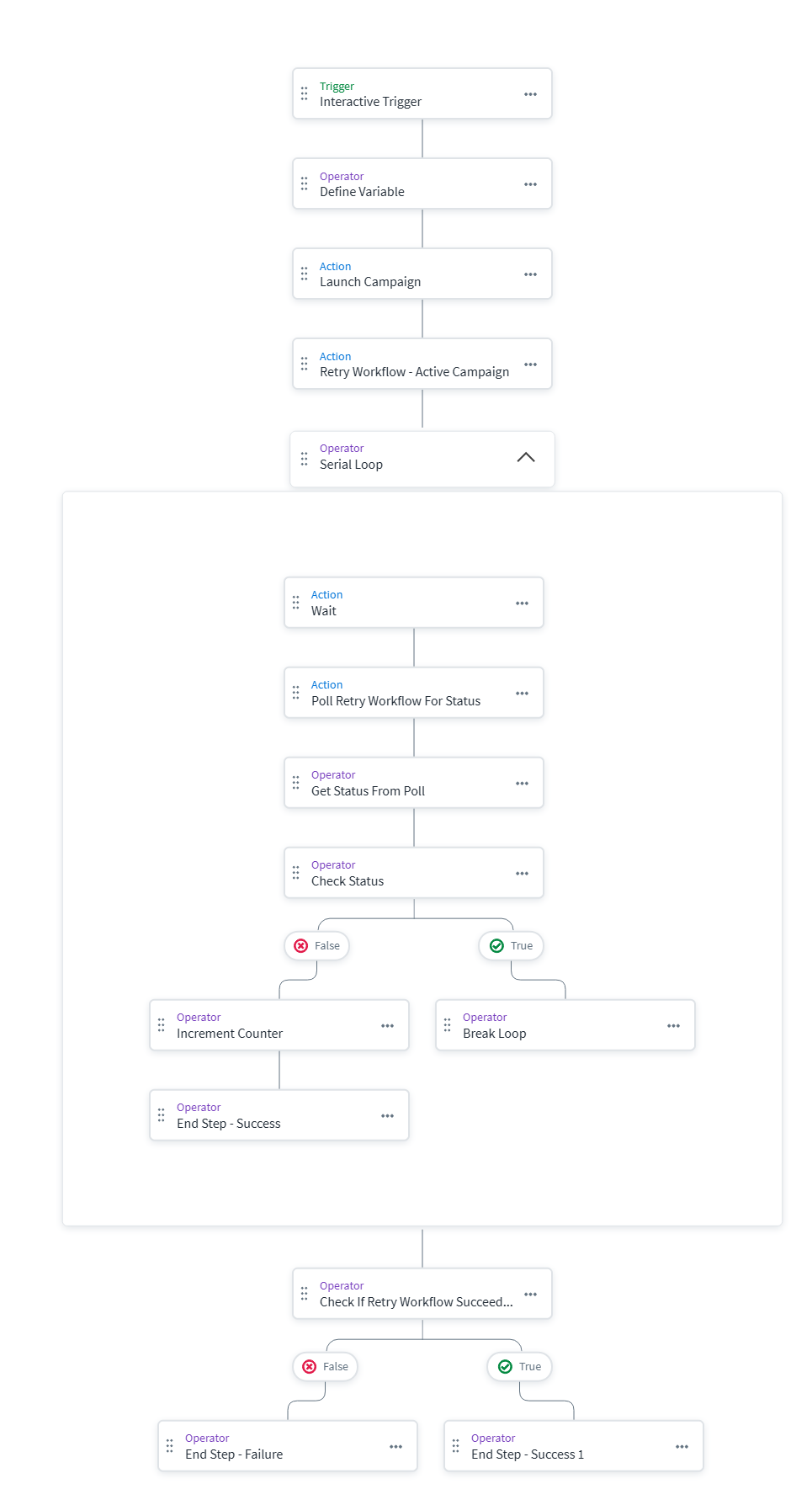
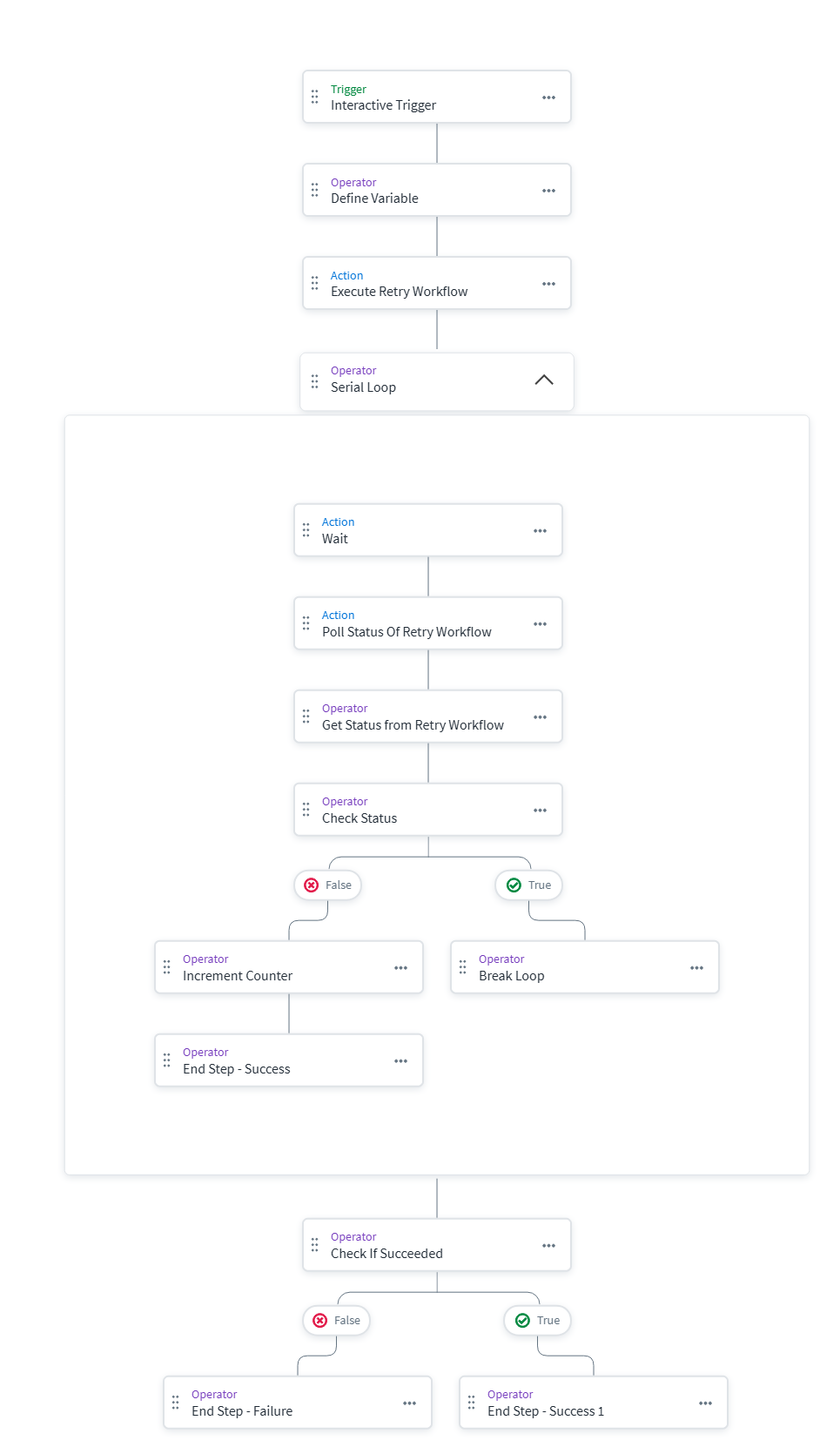
- High-Level Flow: Instead of executing a complex POST or PowerShell task right in your main workflow, you hand off the execution to a dedicated Retry Workflow via an HTTP Request using an External trigger. The initial workflow then polls the Retry Workflow to check its status. If the external task succeeds, the polling loop breaks and the original workflow marks as successful. If the retry workflow exhausts its retries and fails, the original workflow is marked as failed. This prevents confusion when debugging.
IdentityEXE Blueprint: Core Concepts
When we architect this solution for our enterprise clients, we utilize several key methodologies inside the data layer to ensure fault tolerance:
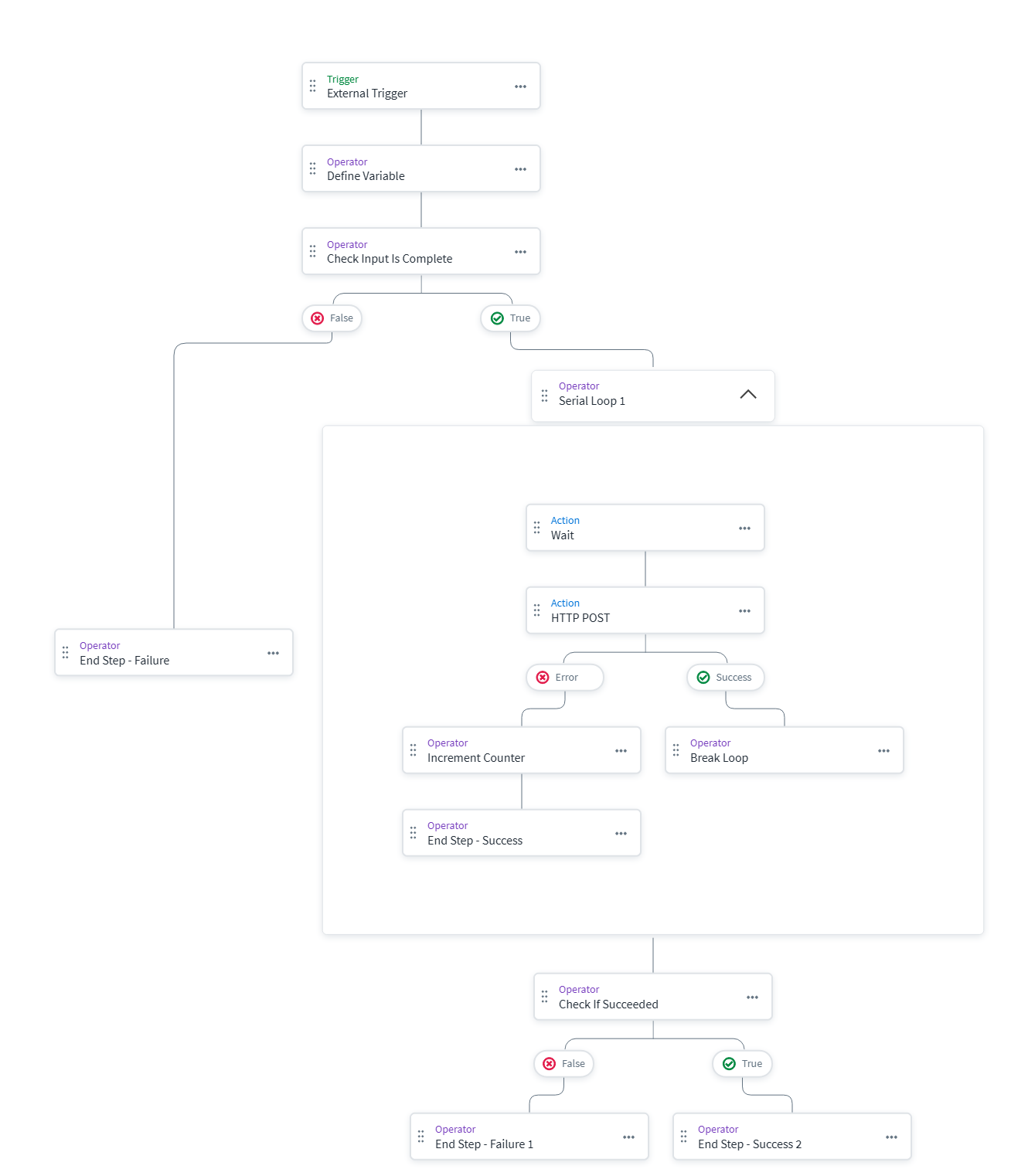
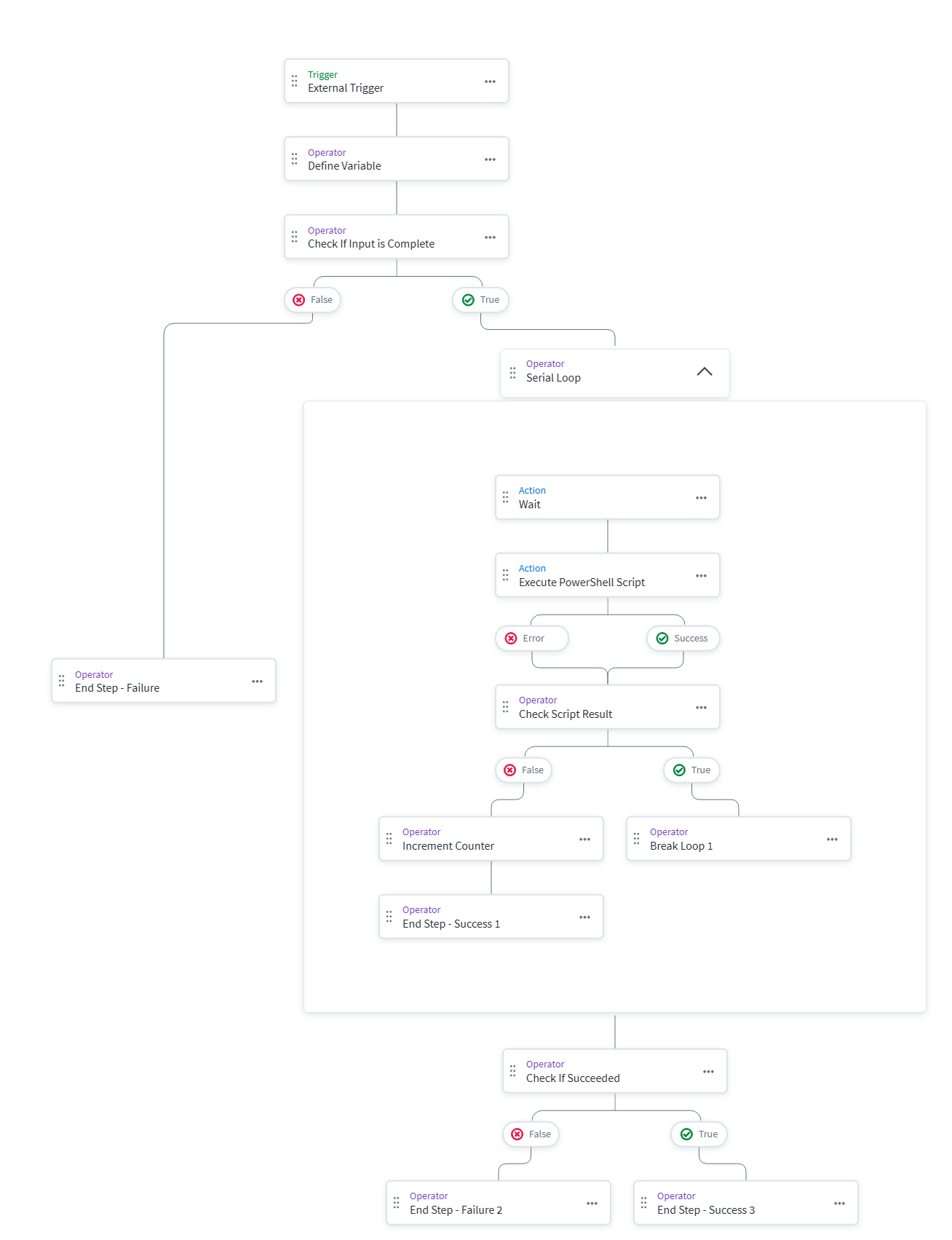
- Serial Loops with a Counter Variable: By using a
countervariable that increments (using "Update Variable") and aretrycountvariable that is passed in, our core engineering methodology structures the data layer to dynamically set how many retries should happen in your Serial Loop. - Input Validation: A "Check Input Is Complete" comparison step ensures that the caller passes the correct expected variables before proceeding.
- Break Loops: When the task is successful, a "Break Loop" operator halts the serial loop immediately and allows the workflow to close as successful.
- Checking Succeeded Loop Counts: When you use an "Update Variable" inside a loop, it doesn't always keep the value once you exit the loop. To get around this, we use a comparison check using the Serial Loop's "succeeded" count and compare that against the
retrycount. This accurately determines the outcome. - Two Primary Use Cases:
- Certification Launch & Poll: It takes time for a campaign to generate before you can run the
/activateAPI call. The polling solution allows you to continuously try to activate it without hardcoding massive "Wait" actions. - PowerShell Execution: Pass down the parameters for a Windows Server NTLM script execution and retry it safely on the target server.
- Certification Launch & Poll: It takes time for a campaign to generate before you can run the
- Bypassing the 1-Minute Minimum Wait Time: The UI makes you believe you can only input wait times in 1-minute increments. However, if you use a variable (e.g.,
waittime) with the value"20s", you can bypass that minimum and wait the actual amount of seconds you need. This gets passed to the retry workflow as well. - Modular Retry Workflows: This modular framework ensures that your ISC deployment avoids rigid configurations. We provided two common use cases, but you can build these for HTTP PATCH/PUT operations or Kerberos-based script executions. Since they are called externally, these retry workflows can be used from a variety of different initial workflows inside your tenant.
- Visibility & Debugging: By polling from the original workflow and returning an execution ID, any failure correctly bubbles up. Successful triggers will not mask failed back-end work.
JSON Payload Structures
When calling these retry workflows, you must pass the exact expected JSON format. If you do not have the correct structure and naming, the workflow will fail to parameterize into the correct API or PowerShell calls.
HTTP POST Request Payload
{
  "retrycount": 5,
  "waittime": "20s",
  "originalworkflow": "Test Launch Certification Campaign",
  "httprequest": {
    "url": "https://your-tenant.api.identitynow.com/v2026/campaigns/{{$.hTTPRequest.body.id}}/activate",
    "body": ""
  }
}
NTLM PowerShell Script Payload
{
  "retrycount": 5,
  "waittime": "20s",
  "originalworkflow": "Test PowerShell Script Execution",
  "windowsserver": {
    "connectionaddress": "10.0.0.100",
    "scriptpath": "C:\Scripts\TestScript.ps1",
    "scriptarguments": {},
    "outputformat": "text",
    "scriptsha512checksum": "",
    "powershellconfigurationname": "Microsoft.PowerShell",
    "scriptexecutiontimeout": 3600
  }
}
Note on originalworkflow: The originalworkflow parameter is used strictly for debugging purposes. If your retry workflow is being executed from multiple different parent workflows across your tenant, this parameter makes it immediately evident where the execution originated when you look at the execution logs.
Implementation Frameworks
Below are the 4 workflow JSON components and their corresponding architectural diagrams to visualize the data flow.
Important: Be sure to update your Client ID, Secrets, and Tenant URLs before deploying these configurations into your environment.
1. Dynamic Retry Workflow - HTTP POST Request
This is the core Retry Workflow for POST requests.
2. Dynamic Retry Workflow - NTLM PowerShell Script
This core Retry Workflow executes a PowerShell script on your Windows Server.
3. Test - Launch Certification Campaign
The initial testing workflow that creates a campaign and calls the POST Retry Workflow to activate it.
4. Test - PowerShell Script Execution
The initial testing workflow that passes variables down to the NTLM PowerShell Retry Workflow.
Considerations & Best Practices
- Permissions: Ensure your service account or PAT used to execute these external workflows has the necessary authorization scopes (like
idn:campaigns:managefor campaigns, etc.). - Error Handling: Many of the HTTP Request steps inside the retry loop will intentionally log as failures until they finally succeed. Use the execution ID and status check in your polling workflow to understand the final result.
- Payload Variables: The variables configured in
waittime(such as"20s") must be strictly formatted if you are trying to bypass the 1-minute limitation.
Conclusion
Using a parent-child workflow model via external triggers establishes a modular retry mechanism within your identity infrastructure. By passing strict payload parameters and polling for an execution ID, engineering teams achieve durable error handling without artificially clustering monolithic workflows.
A stalled identity governance rollout burns capital and stalls organizational momentum.
If your team is hitting configuration walls or struggling with complex Dynamic-Retry-Workflows integrations, stop guessing.