Building a Custom Identity Timeline Report in ISC

Tyler
IdentityEXE Founder
Introduction
- Why: During audits, governance reviews, or troubleshooting security events, administrators frequently need a single, chronological timeline of everything that has occurred for a specific identity in Identity Security Cloud (ISC). Reconstructing this path manually requires querying multiple disjointed areas of the UI and APIs—such as search history, access request logs, provisioning tasks, and manual work items.
- Problem: There is no out-of-the-box UI report in ISC that combines core identity lifecycle states, audit events, account provisioning activity, access requests, and manual work items into a single, unified chronological timeline.
- Goal: Create a self-service utility for administrators to select any identity, filter by event categories, and receive a comprehensive, sorted timeline report directly in their email.
Solution Overview
- Tech Stack: 1 Form + 1 Workflow + 1 Privileged Task Management (PAG/PTA) Gateway + 1 PowerShell Reporting Script.
- High-Level Flow:
- An administrator launches an Interactive Trigger workflow from the launchpad.
- An Interactive Form displays, allowing them to select the target identity and the desired event categories to include.
- The workflow retrieves the requester's email and passes the selections to a secure Windows Server on-premises.
- Execution is brokered securely using SailPoint's PAG (Privileged Access Gateway) / PTA (Privileged Task Management) connector.
- The PowerShell script executes on the server, authenticates to ISC via a Personal Access Token (PAT), retrieves and consolidates the event history, exports it to a CSV file, and emails the file to the requester.
- The administrator receives a confirmation notification directly in their launcher interface.
Dependencies & Infrastructure Requirements
Before setting up this solution, ensure you have the following components in place:
- PAG / PTA Virtual Appliance: A deployed and configured SailPoint Privileged Access Gateway / Privileged Task Management VA to bridge cloud workflows to on-premises scripting environments securely.
- Target Windows Server: A server configured with a PAG agent where your PowerShell script will be stored and executed (e.g. at
C:\\Scripts\\CustomIdentityReport.ps1). - SMTP Server: An active SMTP server (such as Purelymail, Office 365, or a local SMTP relay) allowing outbound mail to send the CSV reports.
- SailPoint PAT (Personal Access Token): A service account PAT with scopes to query search, access requests, and work items (
idn:sources:read/idn:sources:manageor equivalent query permissions).
User Interface (Interactive Form)
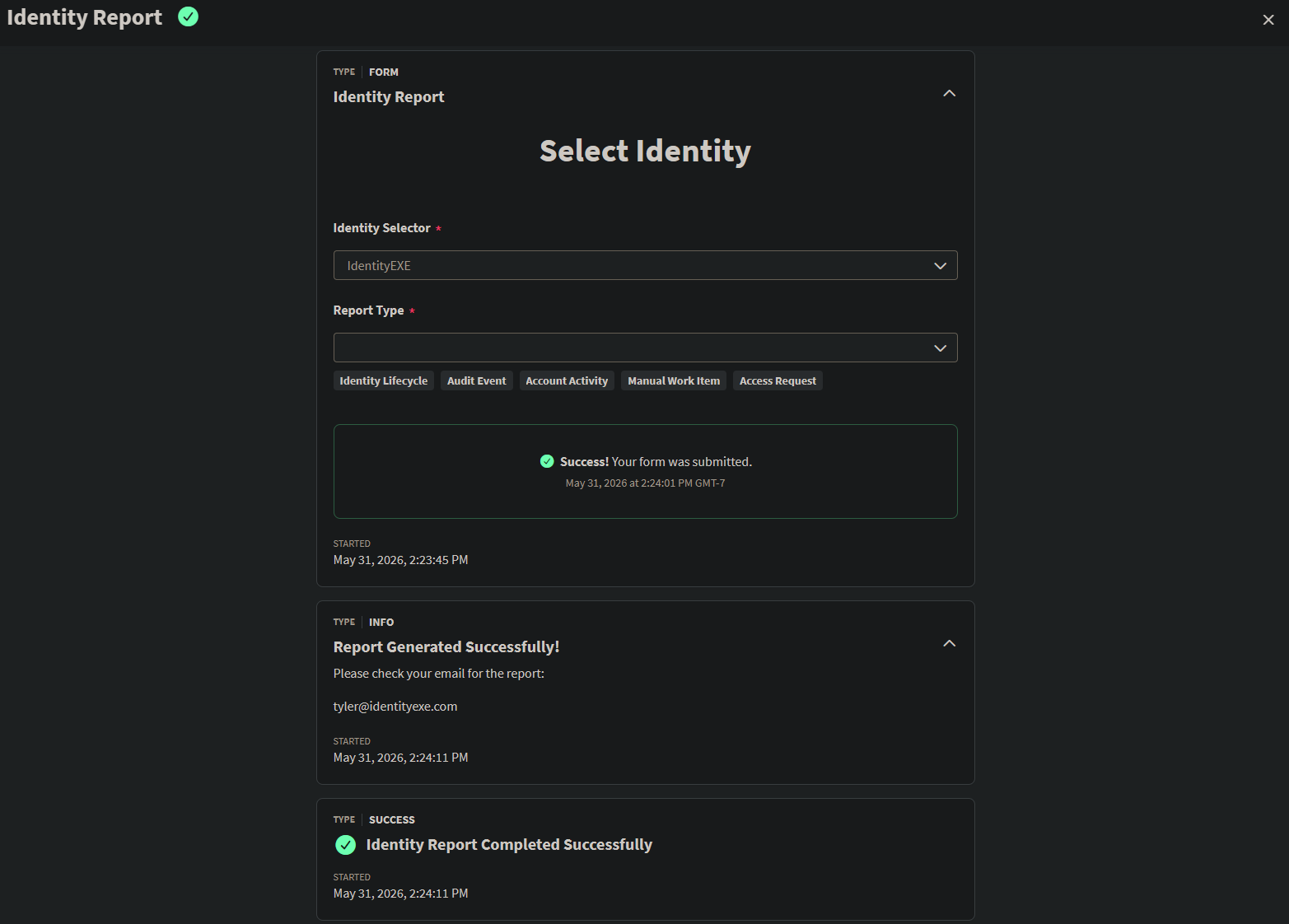
We use an interactive form in ISC to capture administrator inputs.
- Identity Selector: A dropdown utilizing the internal
IDENTITYdata source to search and select the target identity. - Report Type (Categories): A static multi-select list letting the administrator filter the report categories:
Identity LifecycleAudit EventAccount ActivityAccess RequestManual Work Item
Below is a preview of the interactive form where administrators select the identity and the event categories to include.
Form Definition Code
Here is the form JSON payload configuration representing the form layout above:
[
  {
    "version": 1,
    "self": {
      "type": "FORM_DEFINITION",
      "id": "FORMIDHERE",
      "name": "Select Identity"
    },
    "object": {
      "id": "FORMIDHERE",
      "name": "Select Identity",
      "description": "Select Identity",
      "owner": {
        "type": "IDENTITY",
        "id": "OWNERIDHERE",
        "name": "OWNERNAMEHERE"
      },
      "usedBy": [],
      "formInput": [],
      "formElements": [
        {
          "id": "682958831856",
          "elementType": "SECTION",
          "config": {
            "alignment": "CENTER",
            "description": "",
            "formElements": [
              {
                "config": {
                  "dataSource": {
                    "config": {
                      "objectType": "IDENTITY"
                    },
                    "dataSourceType": "INTERNAL"
                  },
                  "forceSelect": true,
                  "helpText": "",
                  "label": "Identity Selector",
                  "maximum": 1,
                  "placeholder": "",
                  "required": true
                },
                "elementType": "SELECT",
                "id": "69054743499",
                "key": "identitySelector",
                "validations": [
                  {
                    "validationType": "DATA_SOURCE"
                  },
                  {
                    "validationType": "REQUIRED"
                  }
                ]
              },
              {
                "config": {
                  "dataSource": {
                    "config": {
                      "options": [
                        {
                          "label": "Identity Lifecycle",
                          "sublabel": "",
                          "value": "Identity Lifecycle"
                        },
                        {
                          "label": "Audit Event",
                          "sublabel": "",
                          "value": "Audit Event"
                        },
                        {
                          "label": "Account Activity",
                          "sublabel": "",
                          "value": "Account Activity"
                        },
                        {
                          "label": "Access Request",
                          "sublabel": "",
                          "value": "Access Request"
                        },
                        {
                          "label": "Manual Work Item",
                          "sublabel": "",
                          "value": "Manual Work Item"
                        }
                      ]
                    },
                    "dataSourceType": "STATIC"
                  },
                  "forceSelect": true,
                  "helpText": "",
                  "label": "Report Type",
                  "maximum": 5,
                  "placeholder": "",
                  "required": true
                },
                "elementType": "SELECT",
                "id": "965457288184",
                "key": "reportType",
                "validations": [
                  {
                    "validationType": "DATA_SOURCE"
                  },
                  {
                    "validationType": "REQUIRED"
                  }
                ]
              }
            ],
            "label": "Select Identity",
            "labelStyle": "h1",
            "showLabel": true
          },
          "validations": []
        }
      ],
      "formConditions": [],
      "created": "2026-05-30T18:33:39.469Z",
      "modified": "2026-05-30T18:37:26.638Z"
    }
  }
]
Back End (Workflow)
The backend automation is built in ISC Workflows.
- Trigger (Interactive Form): Initiates when the launcher starts the process and captures form inputs.
- Get Identity: Resolves details of the user running the launcher to capture their email address.
- Define Variable: Sets context parameters, such as the ISC tenant name.
- Windows Server Action (PAG/PTA): Passes arguments to execution on your Windows server:
-IdentityId: The selected identity's ID.-Tenant: The defined tenant name.-Categories: The JSON representation of report categories chosen in the form.-RecipientEmail: The requester's email address.
- Interactive Message: Re-engages the user in the browser to notify them of successful execution.
Workflow Definition Code
The JSON schema workflow below handles state parameters and forwards inputs to the PAG Windows Server action:
{
"id": "WORKFLOWIDHERE",
"name": "Identity Report",
"description": "Identity Report",
"definition": {
"start": "Interactive Form",
"steps": {
"Define Variable": {
"actionId": "sp:define-variable",
"attributes": {
"id": "sp:define-variable",
"variables": [
{
"description": "",
"name": "identitySelector",
"transforms": [],
"variableA.$": "$.interactiveForm.formData.identitySelector"
},
{
"description": "",
"name": "tenant",
"transforms": [],
"variableA": "TENANTNAMEHERE"
}
]
},
"displayName": "",
"nextStep": "Windows Server",
"type": "Mutation"
},
"End Step - Failure": {
"actionId": "sp:operator-failure",
"displayName": "",
"failureDetails": "PTA Server Call Failed!",
"failureName": "PTA Server Call Failed!",
"type": "failure"
},
"End Step - Success": {
"actionId": "sp:operator-success",
"description": "PTA Server Script Ran Successfully.",
"displayName": "",
"type": "success"
},
"Get Identity": {
"actionId": "sp:get-identity",
"attributes": {
"id.$": "$.trigger.launchedBy.id"
},
"displayName": "",
"nextStep": "Define Variable",
"type": "action",
"versionNumber": 2
},
"Interactive Form": {
"actionId": "sp:interactive-form",
"attributes": {
"formDefinitionId": "FORMIDHERE",
"interactiveProcessId.$": "$.trigger.interactiveProcessId",
"message": "",
"ownerId.$": "$.trigger.launchedBy.id",
"title": "Identity Report"
},
"displayName": "",
"nextStep": "Get Identity",
"type": "action",
"versionNumber": 1
},
"Interactive Message": {
"actionId": "sp:interactive-message",
"attributes": {
"category": "INFO",
"interactiveProcessId.$": "$.trigger.interactiveProcessId",
"message": "<p>Please check your email for the report: </p>\n<p>{{$.getIdentity.emailAddress}}</p>",
"ownerId.$": "$.trigger.launchedBy.id",
"title": "Report Generated Successfully!"
},
"displayName": "",
"nextStep": "End Step - Success",
"type": "action",
"versionNumber": 1
},
"Windows Server": {
"actionId": "sp:pag-windows-server",
"attributes": {
"inputForPag_address": "WINDOWSSERVERIPHERE",
"inputForPag_auth_type": "ntlm",
"inputForPag_checksum": "",
"inputForPag_command_timeout_seconds": 3600,
"inputForPag_configuration_name": "Microsoft.PowerShell",
"inputForPag_kdc_port": 88,
"inputForPag_kdc_protocol": "udp",
"inputForPag_output_format": "text",
"inputForPag_script_arguments": {
"Categories": "{{$.interactiveForm.formData.reportType.JSON()}}",
"IdentityId": "{{$.defineVariable.identitySelector}}",
"RecipientEmail": "{{$.getIdentity.emailAddress}}",
"Tenant": "{{$.defineVariable.tenant}}"
},
"inputForPag_script_path": "C:\\Scripts\\CustomIdentityReport.ps1",
"inputForPag_use_ssl": true,
"inputForPag_verify_cert": false,
"pagCommandType": "pag:windows_server:execute_powershell_script",
"pagInstanceId": "PAGINSTANCEIDHERE",
"pagSpecId": "PAGSPECIDHERE",
"param_conn": {
"mapping": {
"address": "address"
},
"paramID": "",
"paramType": "2.3"
},
"param_connType": "paramInline",
"param_credential": {
"mapping": {
"auth_password": "password",
"auth_username": "username"
},
"paramID": "CREDENTIALIDHERE",
"paramType": "1.1",
"refID": "CREDENTIALREFIDHERE"
},
"param_credentialType": "paramSPS",
"param_kerberosType": "paramInline"
},
"catch": [
{
"next": "End Step - Failure"
}
],
"displayName": "",
"nextStep": "Interactive Message",
"type": "action",
"versionNumber": 1
}
}
},
"enabled": true,
"executionCount": 0,
"failureCount": 0,
"trigger": {
"type": "EVENT",
"attributes": {
"filter.$": "$[?(@.workflowId == 'WORKFLOWIDHERE')]",
"id": "idn:interactive-process-launched",
"integrationId": null
}
}
}PowerShell Script
The PowerShell script executes locally on the target Windows Server. It handles parameter normalization (including JSON string array formatting), authenticates to ISC, aggregates the events chronologically, formats the output, and emails the resulting CSV file back to the requester.
<#
.SYNOPSIS
    Generates a comprehensive chronological report of all events, account activities, access requests, and work items for a given Identity ID in SailPoint ISC.
#>

param (
    [Parameter(Mandatory = $true)]
    [string]$IdentityId,

    [Parameter(Mandatory = $true)]
    [string]$Tenant,

    [Parameter(Mandatory = $false)]
    [string[]]$Categories = @(
        'Identity Lifecycle',
        'Audit Event',
        'Account Activity',
        'Access Request',
        'Manual Work Item'
    ),

    [Parameter(Mandatory = $false)]
    [string]$RecipientEmail
)

# --- PARAMETER NORMALIZATION ---
# Handle cases where Categories is passed as a JSON array string or a comma-separated string
if ($Categories.Count -eq 1) {
    if ($Categories[0] -match '^\s*\[.*\]\s*$') {
        try {
            $Categories = ConvertFrom-Json $Categories[0]
        } catch {
            Write-Host "Warning: Failed to parse Categories parameter as JSON. Using original string."
        }
    } elseif ($Categories[0] -match ',') {
        $Categories = $Categories[0] -split ',' | ForEach-Object { $_.Trim() }
    }
}
# -------------------------------

# --- CONFIGURATION VARIABLES ---
# Replace these values with your SailPoint Personal Access Client Credentials
$ClientId     = "CLIENTIDHERE"
$ClientSecret = "CLIENTSECRETHERE"

$CurrentTime  = Get-Date -Format "yyyyMMdd_HHmmss"
$OutFile      = ".\Identity_Timeline_$($IdentityId)_$CurrentTime.csv" # Customize export path as needed
# -------------------------------

$BaseUrl = "https://$Tenant.api.identitynow-demo.com"
[Net.ServicePointManager]::SecurityProtocol = [Net.SecurityProtocolType]::Tls12

# --- 1. Authenticate and Get OAuth Token ---
Write-Host "Authenticating to $Tenant..."
$AuthBody = @{
    grant_type    = "client_credentials"
    client_id     = $ClientId
    client_secret = $ClientSecret
}
$TokenResponse = Invoke-RestMethod -Method Post -Uri "$BaseUrl/oauth/token" -Body $AuthBody
$Headers = @{
    "Authorization" = "Bearer $($TokenResponse.access_token)"
    "Content-Type"  = "application/json"
    "Accept"        = "application/json"
}

$TimelineEvents = @()
$IdentityName = ""

# --- 2. Identity Lifecycle Category (Day 0) ---
if ($Categories -contains 'Identity Lifecycle') {
    Write-Host "Fetching Core Identity Details..."

    $IdSearchPayload = @{
        indices = @("identities")
        query = @{ query = "id:\"$IdentityId\"" }
    }
    $IdentityResponse = Invoke-RestMethod -Method Post -Uri "$BaseUrl/v3/search" -Headers $Headers -Body ($IdSearchPayload | ConvertTo-Json -Depth 10)

    if ($IdentityResponse -and $IdentityResponse.Count -gt 0) {
        $IdData = $IdentityResponse[0]
        $IdentityName = $IdData.name

        $AuthSource = if ($IdData.source.name) { $IdData.source.name } else { "Unknown" }
        $Lcs = if ($IdData.attributes.cloudLifecycleState) { $IdData.attributes.cloudLifecycleState } else { "None" }

        $TimelineEvents += [PSCustomObject]@{
            Timestamp         = [datetime]$IdData.created
            Category          = "Identity Lifecycle"
            Action            = "Identity Created (Day 0)"
            Status            = "Complete"
            TargetObject      = $IdentityName
            Actor             = "System"
            TargetSource      = "ISC Core"
            ExactChanges      = "Authoritative Source: $AuthSource"
            AdditionalContext = "Initial State: $Lcs"
            TrackingId        = $IdData.id
        }
    }
} else {
    # If Identity Lifecycle is skipped, we still need the string alias to accurately query admin events below
    $IdSearchPayload = @{ indices = @("identities"); query = @{ query = "id:\"$IdentityId\"" } }
    $IdentityResponse = Invoke-RestMethod -Method Post -Uri "$BaseUrl/v3/search" -Headers $Headers -Body ($IdSearchPayload | ConvertTo-Json -Depth 10)
    if ($IdentityResponse) { $IdentityName = $IdentityResponse[0].name }
}

# --- 3. Search API Categories (Audit Events & Account Activities) ---
$RunAudit = $Categories -contains 'Audit Event'
$RunActivity = $Categories -contains 'Account Activity'

if ($RunAudit -or $RunActivity) {
    Write-Host "Querying Search API (Paginated)..."

    # Dynamically build the indices search target based on the category parameter selection
    $TargetIndices = @()
    if ($RunAudit) { $TargetIndices += "events" }
    if ($RunActivity) { $TargetIndices += "accountactivities" }

    $SearchPayload = @{
        indices = $TargetIndices
        query = @{
            query = "(target.id:\"$IdentityId\" OR actor.id:\"$IdentityId\" OR recipient.id:\"$IdentityId\" OR actor.name:\"$IdentityName\") AND NOT name:\"*Personal Access Token*\" AND NOT name:\"*Authenticate*\""
        }
        sort = @("-created")
    }

    $Offset = 0
    $Limit = 1000

    while ($true) {
        Write-Host "  -> Fetching search records $Offset to $($Offset + $Limit)..."
        $SearchUri = "$BaseUrl/v3/search?limit=$Limit&offset=$Offset"
        $SearchResponse = Invoke-RestMethod -Method Post -Uri $SearchUri -Headers $Headers -Body ($SearchPayload | ConvertTo-Json -Depth 10)

        if ($null -eq $SearchResponse -or $SearchResponse.Count -eq 0) { break }

        foreach ($Item in $SearchResponse) {
            if ($Item._type -eq "event" -and $RunAudit) {

                if ($Item.action -eq "IdentityCreated") { continue }
                $TargetObj = if ($Item.target.name) { $Item.target.name } else { "N/A" }

                # Extract and flatten all "Additional Event Attributes" dynamically
                $ExtendedAttrList = @()
                if ($Item.attributes) {
                    foreach ($Key in $Item.attributes.psobject.Properties.Name) {
                        # Ignore standard duplicate tracking properties if they creep into attributes
                        if ($Key -in @('id', 'name', 'action', 'status')) { continue }

                        $Val = $Item.attributes.$Key
                        if ($null -ne $Val) {
                            # Convert sub-objects/arrays to flat JSON strings so they don't break Excel/CSV formatting
                            if ($Val -is [System.Management.Automation.PSCustomObject] -or $Val -is [array]) {
                                $Val = $Val | ConvertTo-Json -Compress
                            }
                            $ExtendedAttrList += "$Key : $Val"
                        }
                    }
                }
                $FlattenedAttributes = if ($ExtendedAttrList.Count -gt 0) { $ExtendedAttrList -join ' | ' } else { "N/A" }

                $TimelineEvents += [PSCustomObject]@{
                    Timestamp         = [datetime]$Item.created
                    Category          = "Audit Event"
                    Action            = $Item.name
                    Status            = $Item.status
                    TargetObject      = $TargetObj
                    Actor             = $Item.actor.name
                    TargetSource      = "N/A (System Event)"
                    ExactChanges      = $FlattenedAttributes # Expanded with Additional Event Attributes
                    AdditionalContext = "Technical Name: $($Item.technicalName)"
                    TrackingId        = $Item.id
                }
            }
            elseif ($Item._type -eq "accountactivity" -and $RunActivity) {

                $SourceName = if ([string]::IsNullOrWhiteSpace($Item.sources)) { "N/A (No Downstream App Reached)" } else { $Item.sources -join ', ' }

                $ProvisioningDetails = @()
                if ($Item.accountRequests) {
                    foreach ($AcctReq in $Item.accountRequests) {
                        $AppTarget = if ($AcctReq.source.name) { "[App: $($AcctReq.source.name)]" } else { "[App: ISC Internal]" }
                        $Op = if ([string]::IsNullOrWhiteSpace($AcctReq.accountOperation)) { "Update/Sync" } else { $AcctReq.accountOperation }
                        $ProvisioningDetails += "$AppTarget Op: $Op"

                        if ($AcctReq.attributeRequests) {
                            foreach ($AttrReq in $AcctReq.attributeRequests) {
                                $Val = if ($AttrReq.value -is [array]) { $AttrReq.value -join ', ' } else { $AttrReq.value }
                                $ProvisioningDetails += " -> $($AttrReq.operation) '$($AttrReq.name)': $Val"
                            }
                        }
                    }
                }
                $ExactChangesStr = if ($ProvisioningDetails.Count -gt 0) { $ProvisioningDetails -join ' | ' } else { "No explicit attribute changes logged" }

                $ContextStr = @()
                if ($Item.errors) { $ContextStr += "ERRORS: $($Item.errors -join ' ; ')" }
                if ($Item.warnings) { $ContextStr += "WARNINGS: $($Item.warnings -join ' ; ')" }
                $FinalContext = if ($ContextStr.Count -gt 0) { $ContextStr -join ' | ' } else { "Clean Execution" }

                $TimelineEvents += [PSCustomObject]@{
                    Timestamp         = [datetime]$Item.created
                    Category          = "Account Activity (Provisioning)"
                    Action            = $Item.action
                    Status            = $Item.status
                    TargetObject      = $Item.recipient.name
                    Actor             = $Item.requester.name
                    TargetSource      = $SourceName
                    ExactChanges      = $ExactChangesStr
                    AdditionalContext = $FinalContext
                    TrackingId        = $Item.id
                }
            }
        }

        if ($SearchResponse.Count -lt $Limit) { break }
        $Offset += $Limit
    }
}

# --- 4. Access Request Category ---
if ($Categories -contains 'Access Request') {
    Write-Host "Querying Access Request Status API (Paginated)..." -ForegroundColor Cyan
    $ReqOffset = 0
    $ReqLimit = 250

    while ($true) {
        Write-Host "  -> Fetching access requests $ReqOffset to $($ReqOffset + $ReqLimit)..."
        $AccessRequestsUri = "$BaseUrl/v3/access-request-status?requested-for=$IdentityId&sorters=-created&limit=$ReqLimit&offset=$ReqOffset"
        $AccessRequestsResponse = Invoke-RestMethod -Method Get -Uri $AccessRequestsUri -Headers $Headers

        if ($null -eq $AccessRequestsResponse -or $AccessRequestsResponse.Count -eq 0) { break }

        foreach ($Req in $AccessRequestsResponse) {
            $RequestedItemsStr = if ($Req.name -and $Req.type) { "$($Req.type): $($Req.name)" } else { "Unknown Item" }

            $ExtractedComments = @()
            if ($Req.requesterComment) {
                foreach ($CommentObj in $Req.requesterComment) {
                    if ($CommentObj.comment) { $ExtractedComments += $CommentObj.comment }
                }
            }
            $ReqComment = if ($ExtractedComments.Count -gt 0) { "Comment: '$($ExtractedComments -join '; ')'" } else { "No Comment" }
            $PhaseProgression = if ($Req.accessRequestPhases) { $($Req.accessRequestPhases.state -join ' -> ') } else { "Unknown" }

            $TimelineEvents += [PSCustomObject]@{
                Timestamp         = [datetime]$Req.created
                Category          = "Access Request (Governance)"
                Action            = "Submit Access Request"
                Status            = $Req.state
                TargetObject      = $Req.requestedFor.name
                Actor             = $Req.requester.name
                TargetSource      = "N/A (Evaluated in ISC)"
                ExactChanges      = $RequestedItemsStr
                AdditionalContext = "Phases: $PhaseProgression | $ReqComment"
                TrackingId        = $Req.accessRequestId
            }
        }

        if ($AccessRequestsResponse.Count -lt $ReqLimit) { break }
        $ReqOffset += $ReqLimit
    }
}

# --- 5. Manual Work Item Category ---
if ($Categories -contains 'Manual Work Item') {
    Write-Host "Querying Manual Work Items (Paginated)..." -ForegroundColor Cyan
    $WorkItemLimit = 250

    # Pass 1: Work Items Assigned to the User (Owner)
    $WorkItemOffset = 0
    while ($true) {
        Write-Host "  -> Fetching assigned work items $WorkItemOffset to $($WorkItemOffset + $WorkItemLimit)..."
        $WorkItemsUri = "$BaseUrl/v3/work-items?ownerId=$IdentityId&sorters=-created&limit=$WorkItemLimit&offset=$WorkItemOffset"
        $WorkItemsResponse = Invoke-RestMethod -Method Get -Uri $WorkItemsUri -Headers $Headers

        if ($null -eq $WorkItemsResponse -or $WorkItemsResponse.Count -eq 0) { break }

        foreach ($WI in $WorkItemsResponse) {
            $TimelineEvents += [PSCustomObject]@{
                Timestamp         = [datetime]$WI.created
                Category          = "Manual Work Item"
                Action            = "Assigned: $($WI.type)"
                Status            = $WI.state
                TargetObject      = if ($WI.target.name) { $WI.target.name } else { "Unknown Target" }
                Actor             = if ($WI.owner.name) { $WI.owner.name } else { "System" }
                TargetSource      = "ISC Governance"
                ExactChanges      = "Description: $($WI.description)"
                AdditionalContext = "Completion Date: $($WI.completed)"
                TrackingId        = $WI.id
            }
        }

        if ($WorkItemsResponse.Count -lt $WorkItemLimit) { break }
        $WorkItemOffset += $WorkItemLimit
    }

    # Pass 2: Work Items Requested by the User (Requester)
    $ReqWorkItemOffset = 0
    while ($true) {
        Write-Host "  -> Fetching requested work items $ReqWorkItemOffset to $($ReqWorkItemOffset + $WorkItemLimit)..."
        $ReqWorkItemsUri = "$BaseUrl/v3/work-items?requesterId=$IdentityId&sorters=-created&limit=$WorkItemLimit&offset=$ReqWorkItemOffset"
        $ReqWorkItemsResponse = Invoke-RestMethod -Method Get -Uri $ReqWorkItemsUri -Headers $Headers

        if ($null -eq $ReqWorkItemsResponse -or $ReqWorkItemsResponse.Count -eq 0) { break }

        foreach ($WI in $ReqWorkItemsResponse) {
            $Exists = $TimelineEvents | Where-Object { $_.TrackingId -eq $WI.id -and $_.Category -eq "Manual Work Item" }
            if (-not $Exists) {
                $TimelineEvents += [PSCustomObject]@{
                    Timestamp         = [datetime]$WI.created
                    Category          = "Manual Work Item"
                    Action            = "Requested: $($WI.type)"
                    Status            = $WI.state
                    TargetObject      = if ($WI.target.name) { $WI.target.name } else { "Unknown Target" }
                    Actor             = if ($WI.owner.name) { $WI.owner.name } else { "System" }
                    TargetSource      = "ISC Governance"
                    ExactChanges      = "Description: $($WI.description)"
                    AdditionalContext = "Completion Date: $($WI.completed)"
                    TrackingId        = $WI.id
                }
            }
        }

        if ($ReqWorkItemsResponse.Count -lt $WorkItemLimit) { break }
        $ReqWorkItemOffset += $WorkItemLimit
    }
}

# --- 6. Sort and Export ---
Write-Host "Normalizing and exporting data..."

if ($TimelineEvents.Count -eq 0) {
    Write-Host "No events found for selected criteria."
    exit
}

# Sort chronologically (Descending = newest events at the top)
$SortedTimeline = $TimelineEvents | Sort-Object Timestamp -Descending

# Ensure the target directory exists
$ParentDir = Split-Path -Parent $OutFile
if ($ParentDir -and -not (Test-Path -Path $ParentDir)) {
    New-Item -ItemType Directory -Path $ParentDir -Force | Out-Null
}

$SortedTimeline | Export-Csv -Path $OutFile -NoTypeInformation
Write-Host "Success! Exported $($SortedTimeline.Count) comprehensive timeline records to $OutFile"

# --- 7. Send Email ---
if ($RecipientEmail) {
    Write-Host "Sending report via email to $RecipientEmail..."

    # SMTP Configuration (Customize to match your environment)
    $SmtpServer = "SMTPSERVERHERE"        # e.g., smtp.yourcompany.com
    $SmtpPort   = 587                      # Typical SMTP port (587 or 25)
    $FromEmail  = "SENDEREMAILHERE"        # e.g., noreply@yourdomain.com
    $Subject    = "Identity Timeline Report - $IdentityId ($Tenant)"

    # Credentials Setup
    $SmtpUsername    = "SMTPUSERNAMEHERE"
    $SmtpPassword    = "SMTPPASSWORDHERE"
    $SecPassword     = ConvertTo-SecureString $SmtpPassword -AsPlainText -Force
    $SmtpCredentials = New-Object System.Management.Automation.PSCredential ($SmtpUsername, $SecPassword)

    $CategoriesString = $Categories -join ', '

    $Body = @"
<html>
<body>
    <p>Hello,</p>
    <p>The SailPoint Identity Timeline Report has been generated successfully.</p>
    <p><b>Details:</b></p>
    <ul>
        <li><b>Identity ID:</b> $IdentityId</li>
        <li><b>Tenant:</b> $Tenant</li>
        <li><b>Categories:</b> $CategoriesString</li>
        <li><b>Record Count:</b> $($SortedTimeline.Count)</li>
        <li><b>Generated At:</b> $(Get-Date -Format "yyyy-MM-dd HH:mm:ss")</li>
    </ul>
    <p>The report has been attached to this email as a CSV file.</p>
    <br/>
    <p><i>This is an automated message. Please do not reply.</i></p>
</body>
</html>
"@

    $MailParams = @{
        To          = $RecipientEmail
        From        = $FromEmail
        Subject     = $Subject
        Body        = $Body
        BodyAsHtml  = $true
        SmtpServer  = $SmtpServer
        Port        = $SmtpPort
        Attachments = $OutFile
        UseSsl      = $true             # Set to $true if SSL/TLS is required by SMTP host
        Credential  = $SmtpCredentials
    }

    try {
        if ($SmtpPassword -eq "SMTPPASSWORDHERE") {
            Write-Host "SMTP credentials placeholder detected. Skipping actual email transmission."
            Write-Host "Please update \`$SmtpUsername\` and \`$SmtpPassword\` in the script to enable sending."
        } else {
            # Note: Send-MailMessage is obsolete in newer PowerShell Core versions,
            # but remains fully supported and recommended for Windows PowerShell 5.1.
            Send-MailMessage @MailParams
            Write-Host "Email sent successfully to $RecipientEmail."
        }
    }
    catch {
        Write-Warning "Failed to send email to $RecipientEmail. Error: $_"
    }
}
Execution & Output Demo
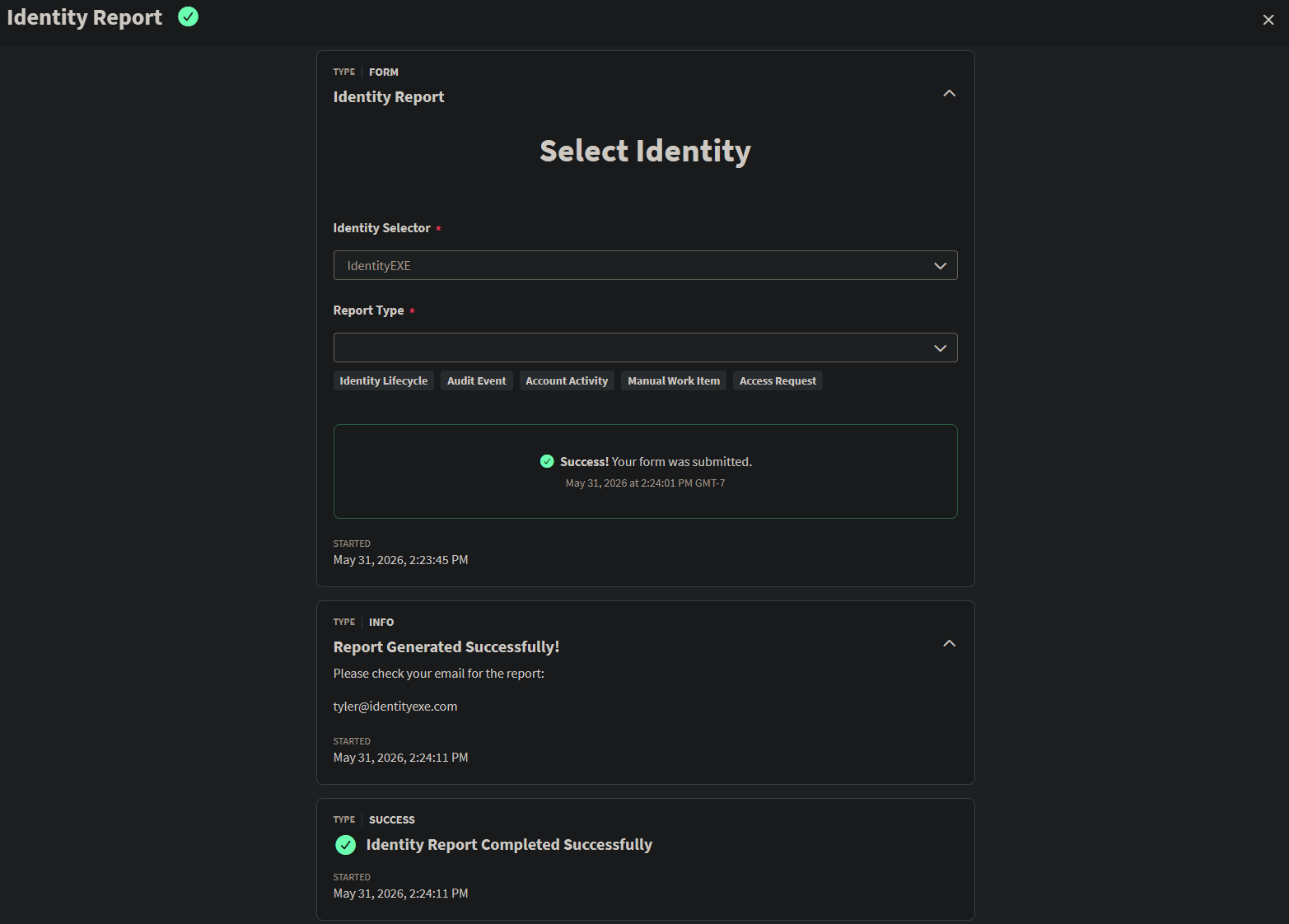
- 1. SailPoint Workflow Execution
Below is a preview showing what a successful execution looks like in the SailPoint Workflow execution UI. You will see the trigger from the Interactive Form, resolving the identity data, calling the Windows Server PAG agent successfully, and sending the final confirmation message.
 Successful Workflow History
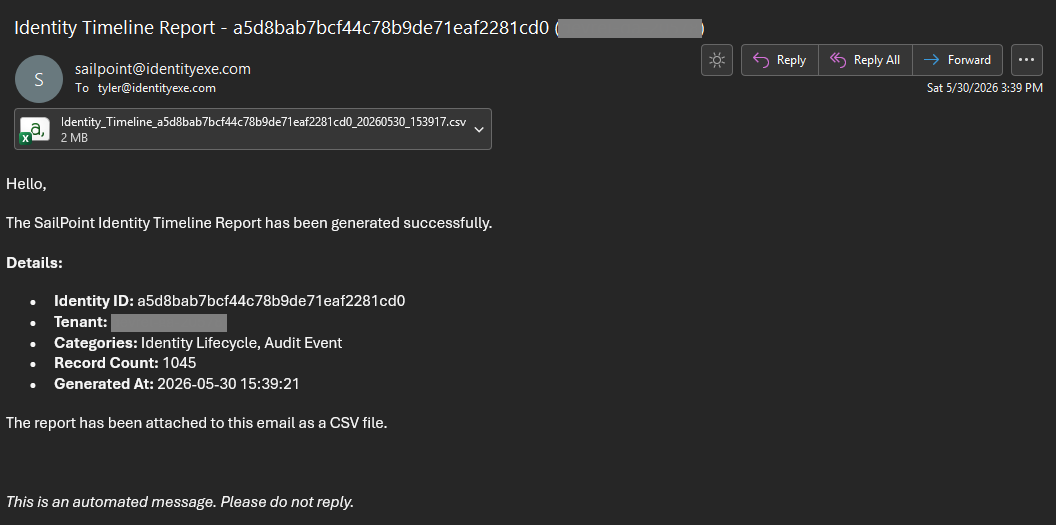
 - 2. Email Notification
The requester receives an automated HTML email from the configured SMTP server detailing the requested report parameters and containing the generated timeline CSV report attachment.
 HTML Email Output
Considerations & Best Practices
- Permissions & Security: Running administrative scripts on local target servers via PAG/PTA must be carefully restricted. Ensure the workflow interactive launcher is only shared with authorized IAM administrators in ISC.
- SMTP Settings: Make sure the target Windows Server hosting the script has network firewall access to communicate with your SMTP server (e.g. on port 587 or 25).
- Workflows API Limits & Timeouts: If an identity has a massive amount of historical search records, the script handles page limits automatically using native PowerShell loops, keeping each query structured and compliant with API rate limits.
Conclusion
By combining interactive forms, custom workflows, and secure Windows Server script execution via SailPoint PAG/PTA, you can provide administrators with a powerful, self-service chronological timeline utility for identity audit and troubleshooting.
If you have comments, suggestions, or ideas for extending this script (e.g., adding certification history or role changes), feel free to post below!
Configuration Snippets & Downloads
1. Identity Selector (Form)
Interactive selection form capturing target identity and target event categories.
2. Identity Report (Workflow)
Orchestration engine calling PAG task agent on the local Windows scripting environment.
3. Aggregation Script (PowerShell)
PowerShell engine aggregating search history and emailing output CSV reports.
Need a custom reporting or governance dashboard?
Whether you are developing complex multi-source aggregations, automating task gateways, or deploying customized alert dashboards, custom expert support helps you deploy safely.