Automating Per-Source Access Revocation

Tyler
IdentityEXE Founder
Executive Summary
A frequent architectural limitation when configuring SailPoint ISC Identity Profiles is managing how access is removed when a user leaves the company. Out of the box, there is only a global "Remove All Access" toggle. When enabled, it blindly revokes all access across every single source in ISC as soon as a lifecycle state change triggers it.
Leaving this aggressive revocation unmanaged creates severe operational chaos. Mass unmanaged revocations can accidentally disable critical accounts, leading to failed compliance audits, massive deployment lag, and severe manager approval fatigue when access must be rapidly reprovisioned. In extreme cases, blind revocations open up security vulnerabilities by breaking downstream dependencies and automated workflows.
To resolve this permanently, we don't just deploy a one-off script. We engineered a repeatable architectural methodology designed by IdentityEXE. This modular framework integrates directly with SailPoint Workflows and custom connector attributes to intelligently filter and selectively revoke access only on specific, flagged sources, ensuring your core deployments remain completely stable.
Solution Overview
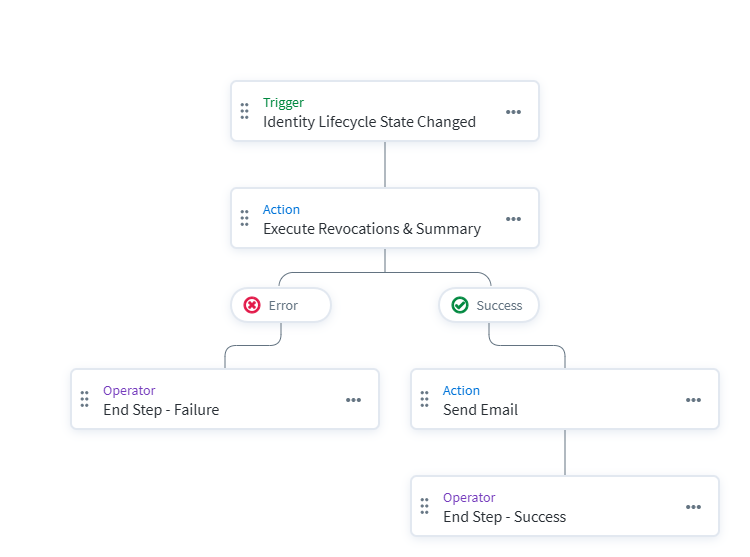
When we architect this solution for our enterprise clients, we utilize a custom PowerShell script triggered by SailPoint Workflows. It allows administrators to flag individual sources that should be completely revoked during termination, leaving other unflagged sources completely untouched.
- Dynamic Source Identification: Uses the
/sources/v1API to dynamically identify all sources with a custom connector attributeRevokeAllset toTrue. Includes pagination to support tenants with over 250 sources. - Targeted Access Revocation: Automatically submits revocation requests for all revocable Entitlements and Access Profiles belonging to those identified sources.
- Workflow Native: Executed natively via the ISC Workflow "Windows Server" action. Note that this requires utilizing a PAG (Privileged Action Gateway) configured in your environment to execute the script.
- Rate Limit Safe: Safely processes bulk revocations by submitting them individually with unique
clientMetadataand a 2-second delay to avoid tripping SailPoint's API rate limits or deduplication logic. - Dynamic Summary Generation: The script automatically generates a clean HTML summary table of exactly what was removed (or states if nothing was removed) and outputs it as a standard JSON payload. This payload feeds directly into the native SailPoint Workflow "Send Email" step.
- Audit & Logging: Full execution logging is captured on the server via
Start-Transcript.
IdentityEXE Blueprint: Per-Source LCS Revocation
Our core engineering methodology structures the data layer to ensure robust and safe execution. The general flow is as follows:
- Trigger: An "Identity Lifecycle State Changed" trigger fires in the workflow. A JSONPath filter (
$[?(@.newLifecycleState == 'terminated')]) ensures it only triggers on terminations. Note: This filter entirely depends on your environment's LCS options and which states you want to execute removals on. - Execution: The Workflow invokes
Revoke-LcsAccess.ps1via WinRM, passing the Identity's UUID as an argument. - Evaluation: The script pulls the user's access via the Search API and cross-references it against all
RevokeAll = Truesources. - Action: The script submits individual Access Requests for each matching Entitlement and Access Profile.
- Notification: The script builds an HTML summary of the actions taken and returns it as a JSON
Bodyproperty. The workflow passes thisBodydirectly to a "Send Email" step to notify administrators.
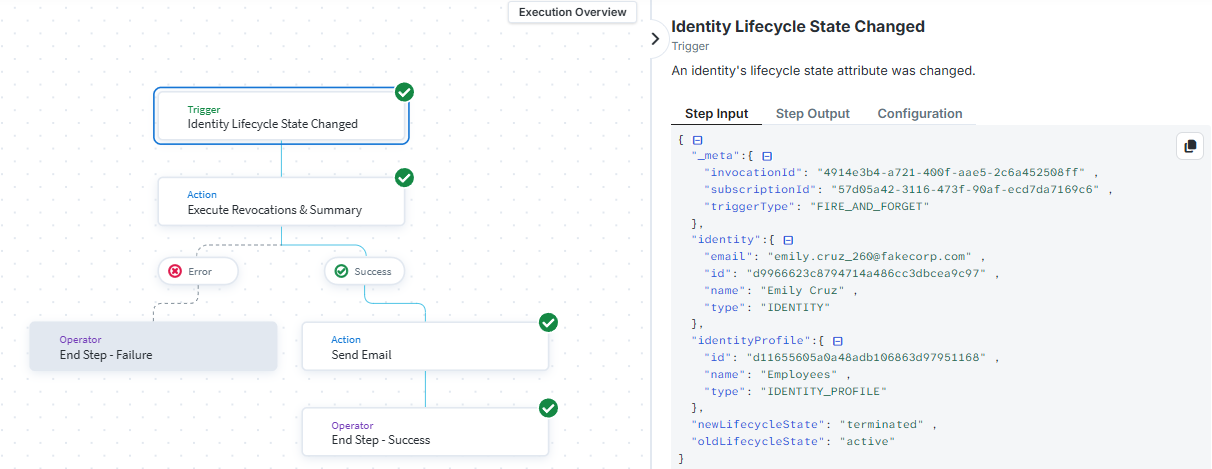
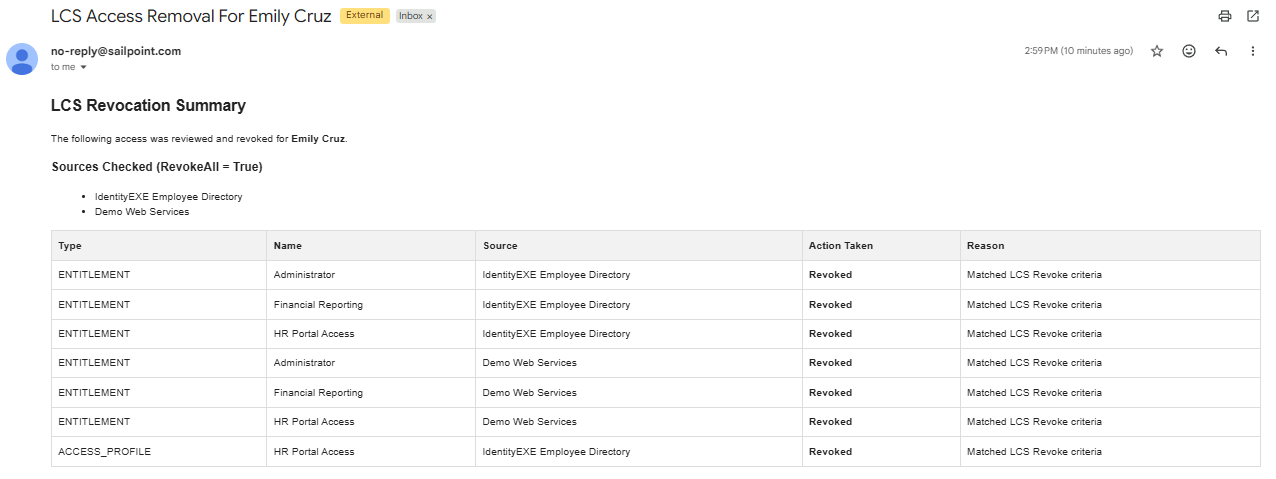
This modular framework ensures that your ISC deployment avoids silent failures. Here are examples of the email output when no revocable access is found, or when no sources have the flag enabled:


Implementation Framework: Core Execution
The Revoke-LcsAccess.ps1 script acts as the core engine for evaluating and removing access. Here is a breakdown of the technical decisions made in the script:
1. Source Identification (Pagination & RevokeAll flag)
The script iterates through the /sources/v1 API using a paginated loop to handle tenants with hundreds of sources. During this loop, it checks every source for a custom connector attribute: RevokeAll. If marked with RevokeAll: True, it acts as the list of sources that are going to have access removed.
$fullRevokeSourceIds = @()
foreach ($source in $sources) {
    if ($source.connectorAttributes.RevokeAll -eq $true -or $source.connectorAttributes.RevokeAll -eq 'True') {
        $fullRevokeSourceIds += $source.id
    }
}
2. Targeted Access Evaluation via Search API
Instead of pulling the user's entire identity cube and iterating through it, the script uses a targeted Search API query. This fetches only the relevant access profiles and entitlements assigned to the identity.
$searchPayload = @{
    indices = @("identities")
    query = @{
        query = "id:`"$IdentityId`" AND @access(type:ENTITLEMENT OR type:ACCESS_PROFILE)"
    }
    includeNested = $true
    queryResultFilter = @{
        includes = @("id", "name", "access")
    }
} | ConvertTo-Json -Depth 10
3. Filtering & Safety Checks
For each access item, the script respects ISC's native revocable flag, skipping items that cannot be removed through automated provisioning. It then cross-references the access item's source ID against our generated list. This guarantees we leave unflagged source access completely untouched.
foreach ($accessItem in $identity.access) {
    if ($accessItem.revocable -ne $false) {
        if ($fullRevokeSourceIds -contains $accessItem.source.id) {
            $itemsToRevoke += @{
                type = $accessItem.type
                id = $accessItem.id
            }
        }
    }
}
4. Rate-Limit Safe Revocation Submissions
When the script submits requests, it loops through the filtered items one by one. It uses unique clientMetadata for each request and implements a 2-second delay. This explicit delay prevents the script from tripping SailPoint's API rate limits and avoids potential request deduplication issues.
foreach ($item in $itemsToRevoke) {
    $accessRequestPayload = @{
        requestedFor = @($identityId)
        requestType = "REVOKE_ACCESS"
        requestedItems = @($item)
        clientMetadata = @{
            itemId = $item.id
            sourceName = "LCS Automated Revocation"
        }
    } | ConvertTo-Json -Depth 10

    Invoke-RestMethod -Uri "$TenantUrl/access-requests/v1" -Headers $headers -Method Post -Body $accessRequestPayload
    Start-Sleep -Seconds 2
}
5. Dynamic HTML Summary & Logging
Instead of a plain text message, the script generates a clean HTML table summarizing exactly which access items were revoked. Built-in transcript logging also captures all console output for server auditing.
$jsonResponse = @{
    Body = $htmlSummary
    status = "success"
} | ConvertTo-Json -Depth 2

Write-Output $jsonResponse
Code & Design Resources
You can utilize the resources below to deploy this in your environment. Make sure to update the PowerShell script variables to match your tenant configuration. Ensure secure credentials handling via DPAPI or a similar secrets manager.
Conclusion
This architectural blueprint provides a targeted, automated approach to access revocation during termination, solving the aggressive global revocation problem. By leveraging custom connector attributes and a workflow-triggered script, organizations gain fine-grained control over which sources should have their access fully revoked.
Stop Guessing with Identity Governance
An unoptimized identity governance rollout wastes capital and paralyzes organizational momentum. If your team is hitting configuration walls or struggling to implement reliable, targeted access revocations, stop guessing.
Book Your SailPoint Architecture Review