ArchitectureMay 2026
Bringing IIQ Maintenance Mode to ISC

Tyler
IdentityEXE Founder
Introduction
- Why: During a recent IIQ to ISC migration, a key requirement was to replicate IIQ's Maintenance Mode functionality. Currently, ISC does not offer an OOTB equivalent, and there is no immediate roadmap for its implementation. If you need to ensure sources stop "pinging" or interacting with destination applications during a window, this solution is for you.
- Problem: Currently there is no way to ensure that an ISC source doesn't attempt to ping the end system in the UI because of the health check functionality. The only way possible is using a combination of API calls to change the configuration of the source.
- Goal: A solution that matches IIQ's Maintenance Mode checkbox as close as possible in ISC.
Solution Overview
- Tech Stack: 1 Form + 1 Workflow + 1 PowerShell Reporting Script.
- High-Level Flow: Through an interactive form and custom workflow approach, I've created a launcher where any source can be toggled from Maintenance Mode On/Off. This solution also includes a PowerShell script that reports on the status of all sources with Maintenance Mode currently enabled.
- Behavior Note: For those familiar with SailPoint IIQ, Maintenance Mode marks an application as offline for a defined period, which causes scheduled activities (such as aggregations) to be skipped. This ISC workflow replicates that behavior by taking the source completely offline for a specified timeframe, pausing all automated tasks. If your operational requirements dictate that a source must remain continuously active, this Maintenance Mode workflow should not be applied.
User Interface
Input Fields
- Enable / Disable - Dropdown Field
- Source Selector - Predefined Sources Dropdown Field
- Reason - Text Field
User Experience
Since there's currently no option to add customized fields into the source UI, I thought the next best was an interactive form. Also, there are many options for customizing this form to your exact org's needs if you need additional fields.
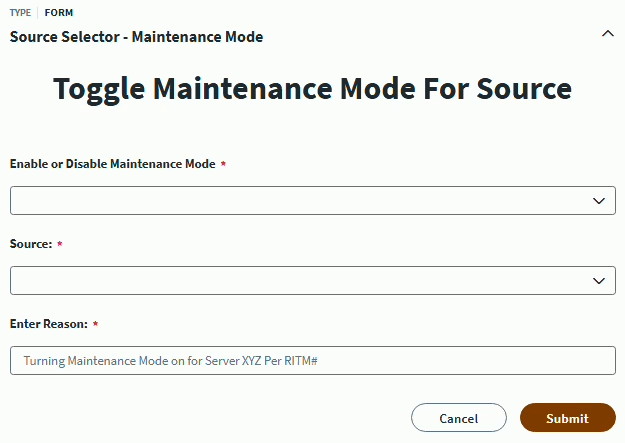
Form Definition Code:Form-MaintenanceMode_final.json
Back End
- Trigger: This solution utilizes an
Interactive Triggerso we can use the interactive forms options in the next step of the workflow. - Interactive Form: You'll select the form in the section above in this Action step so the user can see and fill out the form in the launcher.
- Enable or Disable: In the 5th step of the workflow, it branches into two different options (Enable or Disable) and this is controlled by using a compare strings operator which checks the option they selected in the form. Based on that selection, the workflow will do different API calls (shown in the API Calls section below).
- After API Calls: Once all the API calls are completed to update the selected source, an interactive message & email are sent to the user using the launcher as well as an email configured in the
Send Emailstep. This will notify the user that it was completed successfully as well as provide an audit email that shows what was selected in the form. This is useful if you have a team distribution list that should know when a source is put into Maintenance Mode.
Workflow Code:Workflow-MaintenanceMode_final.json
API Calls
Enable Maintenance Mode API Calls
- GET Source by ID - /v2026/sources/{{$.interactiveForm.formData.sources}}
- GET Group Aggregation Schedule - /v2026/sources/{{$.interactiveForm.formData.sources}}/schedules/GROUP_AGGREGATION
- GET Account Aggregation Schedule - /v2026/sources/{{$.interactiveForm.formData.sources}}/schedules/ACCOUNT_AGGREGATION
- DELETE Current Group Aggregation Schedule - /v2026/sources/{{$.interactiveForm.formData.sources}}/schedules/GROUP_AGGREGATION
- DELETE Current Account Aggregation Schedule - /v2026/sources/{{$.interactiveForm.formData.sources}}/schedules/ACCOUNT_AGGREGATION
- PATCH Source Connector Attributes - /v2026/sources/{{$.interactiveForm.formData.sources}}
[
  { "op": "add", "path": "/connectorAttributes/enableProvisioningFeature", "value": false },
  { "op": "add", "path": "/connectorAttributes/disable_health_check", "value": true },
  { "op": "replace", "path": "/features", "value": [] },
  { "op": "add", "path": "/connectorAttributes/groupaggregationschedule", "value": "{{$.hTTPRequest1.body.cronExpression}}" },
  { "op": "add", "path": "/connectorAttributes/accountaggregationschedule", "value": "{{$.hTTPRequest2.body.cronExpression}}" },
  { "op": "add", "path": "/connectorAttributes/maintenancemode", "value": true }
]
Disable Maintenance Mode API Calls
- GET Source by ID - /v2026/sources/{{$.interactiveForm.formData.sources}}
- PATCH Source by ID - /v2026/sources/{{$.interactiveForm.formData.sources}}
- POST Group Aggregation Schedule - /v2026/sources/{{$.interactiveForm.formData.sources}}/schedules
- POST Account Aggregation Schedule - /v2026/sources/{{$.interactiveForm.formData.sources}}/schedules
- PATCH Source Connector Attributes - /v2026/sources/{{$.interactiveForm.formData.sources}}
[
  { "op": "add", "path": "/connectorAttributes/enableProvisioningFeature", "value": true },
  { "op": "add", "path": "/connectorAttributes/disable_health_check", "value": false },
  { "op": "add", "path": "/connectorAttributes/maintenancemode", "value": false }
]
Monitoring & Audit
- Purpose: A script to quickly audit which sources are currently in Maintenance Mode.
- Functionality: The script queries the
/sourcesendpoint to grab all the sources in the tenant with the connectorAttributemaintenancemode== true. It exports a list of all the sources that contain that flag and puts them into a CSV file with the current date & time. In my environment, it currently runs as a scheduled task on a windows server, but you can modify it to fit your org's needs. - Why it’s necessary: Preventing "zombie" sources that were put in Maintenance Mode and forgotten. Also, if Audit ever questions why a source didn't do something automatically during a period of time, you can look at the Maintenance Mode reports to determine if the source was in Maintenance Mode during that time.
$clientId     = "ENTERYOURCLIENTIDHERE"
$clientSecret = "ENTERYOURCLIENTSECRETHERE"
$tenantName   = "ENTERYOURTENANTNAMEHERE"
$baseUrl      = "https://$tenantName.api.identitynow.com"
$exportPath   = "ISC_MaintenanceMode_Sources_$(Get-Date -Format 'MM-dd-yyyy').csv"

$tokenBody = @{
    grant_type    = "client_credentials"
    client_id     = $clientId
    client_secret = $clientSecret
}

try {
    $tokenResponse = Invoke-RestMethod -Method Post -Uri "$baseUrl/oauth/token" -Body $tokenBody
    $accessToken = $tokenResponse.access_token
} catch {
    Write-Error "Failed to authenticate with SailPoint ISC: $($_.Exception.Message)"
    exit
}

$headers = @{
    "Authorization" = "Bearer $accessToken"
    "Content-Type"  = "application/json"
}

$allSources = @()
$limit = 250
$offset = 0
$totalCount = 0

do {
    $uri = "$baseUrl/v3/sources?limit=$limit&offset=$offset&count=true"
    $response = Invoke-WebRequest -Method Get -Uri $uri -Headers $headers

    if ($offset -eq 0) {
        $totalCount = [int]$response.Headers["X-Total-Count"]
    }

    $sources = $response.Content | ConvertFrom-Json
    $allSources += $sources
    $offset += $limit

} while ($offset -lt $totalCount)

$timestamp = Get-Date -Format "yyyy-MM-dd HH:mm:ss"

$results = $allSources | ForEach-Object {
    $mMode = $_.connectorAttributes.maintenancemode

    if ($mMode -eq "true" -or $mMode -eq $true) {
        [PSCustomObject]@{
            SourceName      = $_.name
            SourceId        = $_.id
            ConnectorType   = $_.type
            MaintenanceMode = $true
            ExportedAt      = $timestamp
        }
    }
}

if ($results) {
    $results | Export-Csv -Path $exportPath -NoTypeInformation
    Write-Host "Success! Found $($results.Count) sources in maintenance mode. Exported to: $exportPath"
} else {
    Write-Host "No sources found with maintenancemode set to true."
}
Considerations & Best Practices
- Permissioning: The launcher should only be granted to admins in ISC as this will basically give you access to disable provisioning/aggregations/health checks completely for a source.
- Error Handling: Many of the HTTP Request steps in the workflow will log as failures and thus show in your execution logs as a failure for you to investigate. If you're seeing any weird behavior, the easiest way to check if it performed the execution successfully is by viewing the source configuration in VSCode and looking if the proper connectorAttributes were set.
- PAT Needed to Run: When setting the PAT client ID and secret for all of the HTTP Requests, ensure your service account that holds this PAT has ORG_ADMIN. You should only need the scopes necessary to update source configurations on your PAT:
idn:sources:manage&idn:sources:read
Conclusion
This is a solid architectural workaround if your organization requires Maintenance Mode functionality in ISC and previously relied on it in IIQ or another legacy system.
Struggling with complex SailPoint workflows?
Implementing interactive forms, lifecycle triggers, and automated API patches in SailPoint ISC requires custom tuning. Connect with me directly to design your workflows.