Paginated Role Refresher in Identity Security Cloud

Tyler
IdentityEXE Founder
Executive Summary
In SailPoint Identity Security Cloud (ISC), enterprise engineering teams often encounter a critical architectural limitation: the inability to refresh a single role without triggering an "Apply Changes" for the entire tenant. While a global role refresh might be feasible for smaller organizations, executing this across environments with 100k+ identities consumes significant time and system resources.
When this architectural problem remains unsolved, the commercial and operational impacts are severe. Relying on global tenant refreshes causes massive deployment lag and introduces unmanageable bottlenecks in identity lifecycle operations. Furthermore, manual workarounds or delays in access provisioning can lead to failed compliance audits, severe manager approval fatigue, and unaddressed security vulnerabilities due to prolonged inappropriate access.
To overcome this, IdentityEXE designed a repeatable architectural methodology to streamline role processing. This is not just a script, but a modular implementation framework designed to allow administrators to select an individual role and intelligently refresh only the identities associated with that specific role.
Solution Overview
- Tech Stack: 1 Custom Form + 2 Workflows (Launcher & Paginated Worker)
- High-Level Flow: Using a custom interactive form, an administrator can select the specific role they wish to refresh. A primary workflow takes this input and sends the role data to a dedicated "Paginated Worker" external trigger workflow. This worker handles the pagination and identity refresh API calls in chunks of 250, avoiding timeouts and efficiently processing the users.
IdentityEXE Blueprint: What It Can and Cannot Do
When we architect this solution for our enterprise clients, it is important to understand the boundaries of this solution. Our core engineering methodology structures the data layer to handle the following:
What It Can Do:
- Entitlement Updates: Update Entitlement/Access Profile membership when a new item is added to the role membership.
- Adding Users: Update when a user is added to the role via the identity list. It adds the role to their cube along with the assigned Entitlements/APs.
- Removing Users: Update when a user is removed via the identity list. It removes the role and the associated Entitlements/APs.
- Criteria Changes: Update when a membership criteria is removed, causing an identity to fall out of the role. The workflow will remove the user from the role and strip the assigned Entitlements/APs.
What It Cannot Do:
- Refresh Newly Added Role Membership Criteria: For this scenario, you still need to use the native "Apply Changes" button.
- When Removing Entitlements From Roles: This modular framework does not automatically remove the access from the user. You must remove them from the membership of the role for the access to be completely removed from the user.
User Interface (Forms)
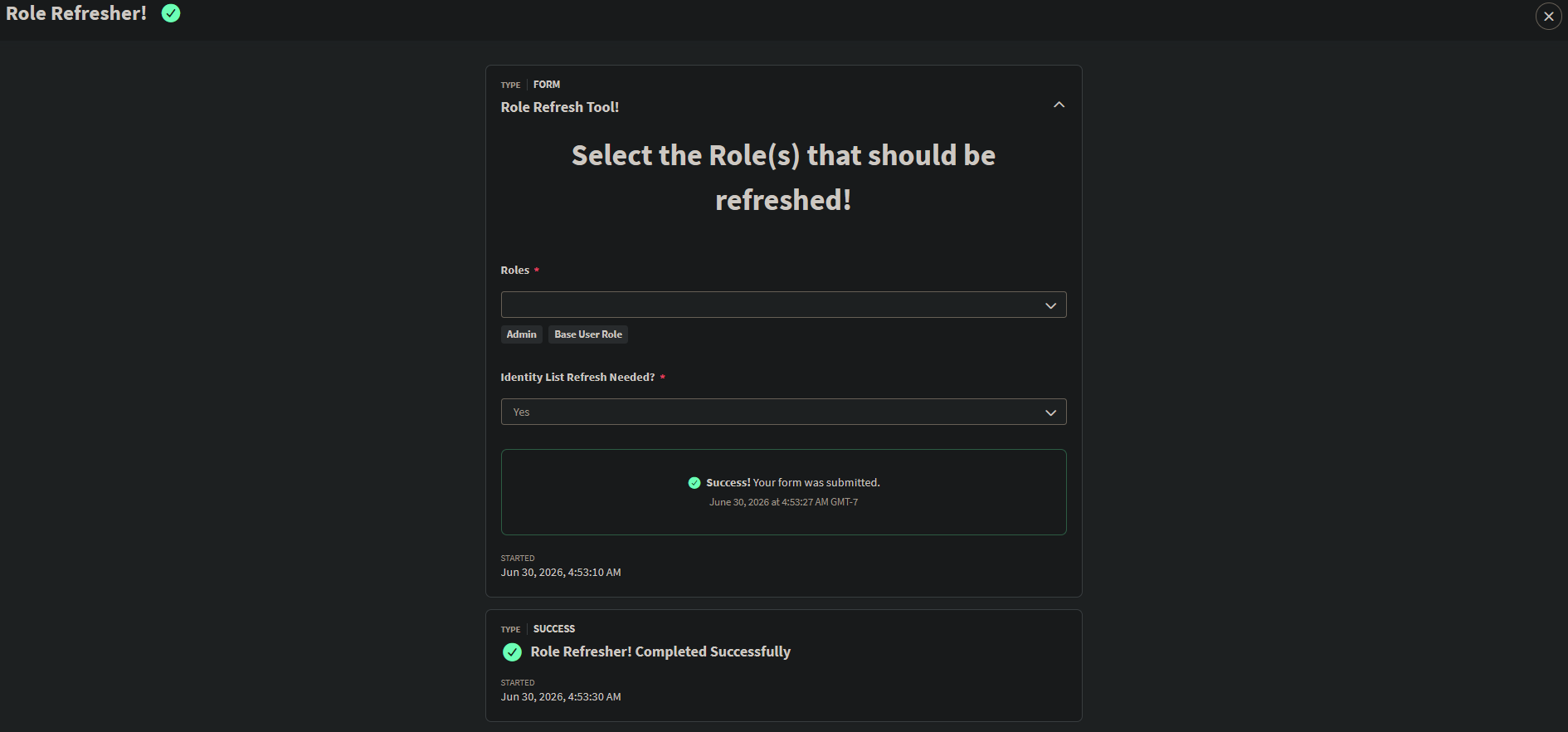
We start with an interactive form. Since we cannot build this directly into the role management UI, the form provides a simple drop-down to pick the role and a toggle for "Identity List Refresh Needed?" This option is crucial because roles can have members assigned via criteria or specifically via an identity list, and they require different API approaches to refresh.
Implementation Frameworks
This modular framework ensures that your ISC deployment avoids rigid boundaries, relying on two workflows working together.
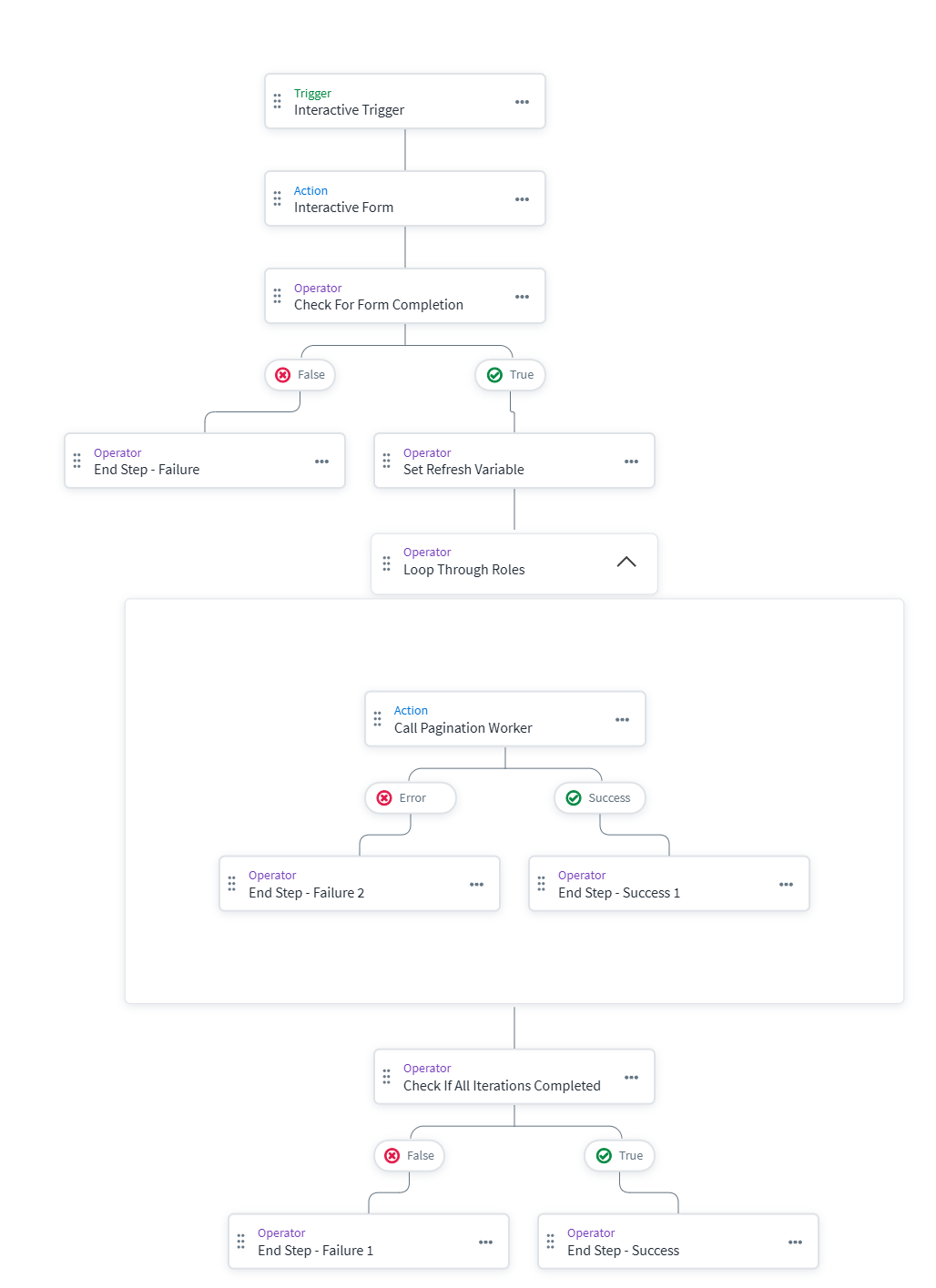
1. The Launcher Workflow (Role Refresher)
This workflow uses an Interactive Trigger. When launched, it presents the form to the user. Once submitted, a loop iterates through the selected roles and makes an HTTP request to our secondary worker workflow, passing along the role ID and the user's choice for the identity list refresh.
2. The Paginated Worker Workflow
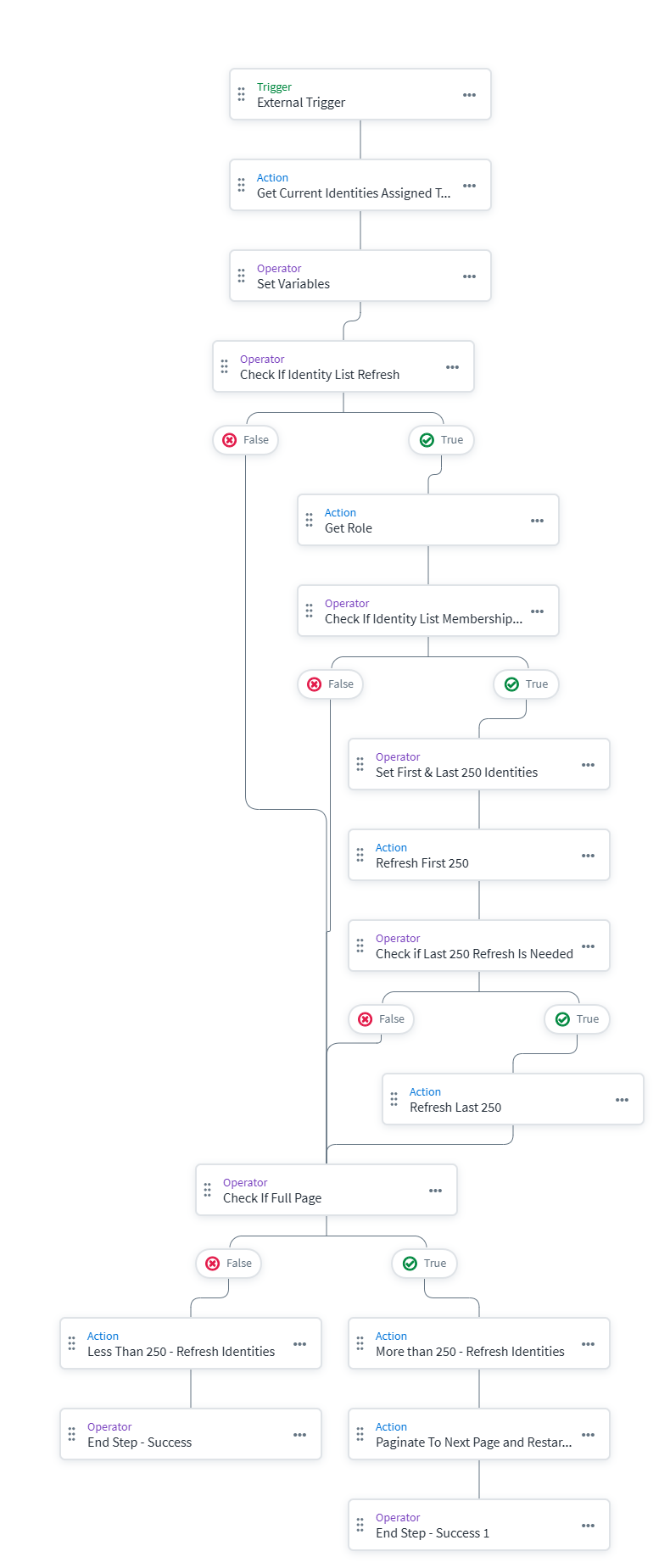
This is an External Trigger workflow where the heavy lifting and API calls occur. Based on the form input, it branches into two different paths:
- Path A: Standard Assigned Identities (Pagination)
If the user selected "No" for the identity list refresh, the workflow uses the/roles/v1/{roleId}/assigned-identitiesendpoint.
- It fetches the assigned identities in chunks of 250.
- JSONPath Conversion: The API returns an array of objects, but the process endpoint expects a simple array of strings (Identity IDs). We use a custom Define Variable step with the JSONPath expression$.hTTPRequest.body[*].idto cleanly extract just the IDs into a new array.
- It then submits this array to the/identities/v1/processAPI. If exactly 250 identities are returned, the workflow recursively calls itself with the offset increased by 250, paginating through all members. - Path B: Identity List Refresh (No Pagination)
If the user selected "Yes" for the identity list refresh, the workflow takes a different route because fetching the identity list requires a direct GET to the/roles/v1/{roleId}endpoint.
- The Limitation: Role objects currently limit the returned identity list membership array to a maximum of 500 users. Because of this, this path does not perform recursive pagination.
- The Workaround: To process up to the 500 maximum, we use Define Variable steps with JSONPath slicing. We grab the first 250 users ($.hTTPRequest4.body.membership.identities[0:250].id) and the last 250 users ($.hTTPRequest4.body.membership.identities[-250:].id). We then execute the/identities/v1/processAPI calls sequentially for both slices.
Considerations & Best Practices
- Permissions: Restrict access to this form to administrators who understand the impact of manual identity processing.
- API Limits: The
/identities/v1/processendpoint is powerful. Paginating at 250 ensures we stay within acceptable processing limits and timeouts. - Testing: Always validate the form and workflows in a sandbox or non-production tenant before deploying.
Conclusion
This architecture provides a targeted approach to role refreshing, bypassing the need for global tenant changes. By leveraging our framework, identity teams save massive amounts of operational time and system resources, ensuring agile and resilient lifecycle governance.
A stalled identity governance rollout burns capital and stalls organizational momentum.
If your team is hitting configuration walls or struggling with complex Paginated-Role-Refresher integrations, stop guessing.