Automating Source Access Cleanup in Identity Security Cloud

Tyler
IdentityEXE Founder
Executive Summary
When onboarding legacy applications and directories into SailPoint Identity Security Cloud (ISC), enterprise sources arrive laden with accounts and entitlements belonging to users who separated months or years prior. A standard architectural limitation of ISC is that native Lifecycle State (LCS) deprovisioning triggers exclusively on real-time state transitions—such as an identity moving from Active to Terminated. ISC does not perform recurring, retroactive evaluations across accounts whose corresponding identity records were already placed into a Terminated or Inactive state prior to application aggregation.
Leaving this architectural gap unaddressed exposes the enterprise to immediate commercial and operational liabilities. Organizations fail SOX, SOC 2, and ISO 27001 compliance audits when auditor samples surface active credentials assigned to departed employees on newly onboarded systems. Deployment velocity grinds to a halt as identity engineering teams burn weeks on error-prone CSV reconciliations, while downstream access certifications trigger severe manager approval fatigue over phantom accounts. Crucially, dormant privileged entitlements remain unmonitored, expanding the lateral attack surface.
IdentityEXE designed a repeatable architectural methodology to solve this baseline gap: the Source Access Cleaner framework. Rather than forcing administrators to rely on unverified, one-off PowerShell scripts, this modular engineering framework unifies SailPoint Interactive Workflows, dynamic ISC Forms, and a resilient, rate-limited PowerShell execution engine on a Windows Server host. It delivers an interactive preview widget directly inside SailPoint, dispatches an audit-ready CSV report, and safely executes granular remediations to establish a clean security baseline before day-to-day Joiner-Mover-Leaver automation takes over.
Solution Overview
- Tech Stack: 1 Interactive Workflow + 2 Interactive Forms + 3 PowerShell Scripts (WinRM / Windows Server execution host).
- High-Level Flow: Launched on demand directly from the SailPoint Launchpad, the workflow dynamically queries all active Lifecycle States across your tenant's Identity Profiles. The operator selects the target application source, target lifecycle state(s), and desired remediation posture. The engine calculates affected identities via modern ISC APIs, displays an interactive HTML preview table directly inside a confirmation Form, and executes surgical removals upon administrator approval.
- Four Modular Remediation Modes:
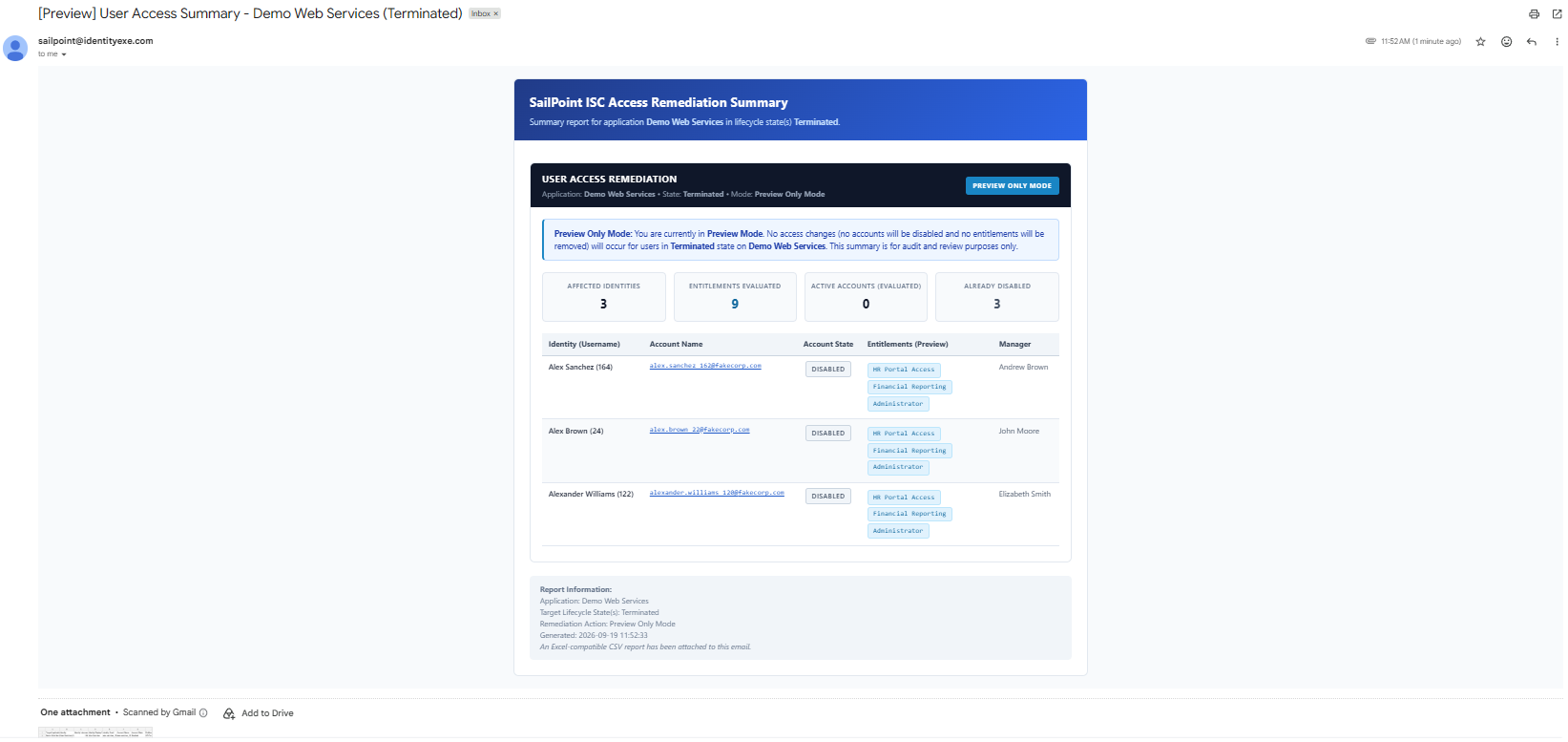
- Preview Only Mode: Safely audits and presents all affected accounts and permissions without executing changes. Ideal for compliance spot checks, application owner alignment, and pre-deployment reviews.
- Remove Entitlements and Disable Accounts: Complete access baseline remediation. Submits access request revocations for all assigned permissions and suspends active application accounts.
- Remove Entitlements Only: Strips away assigned permissions and entitlements while keeping the underlying application account active.
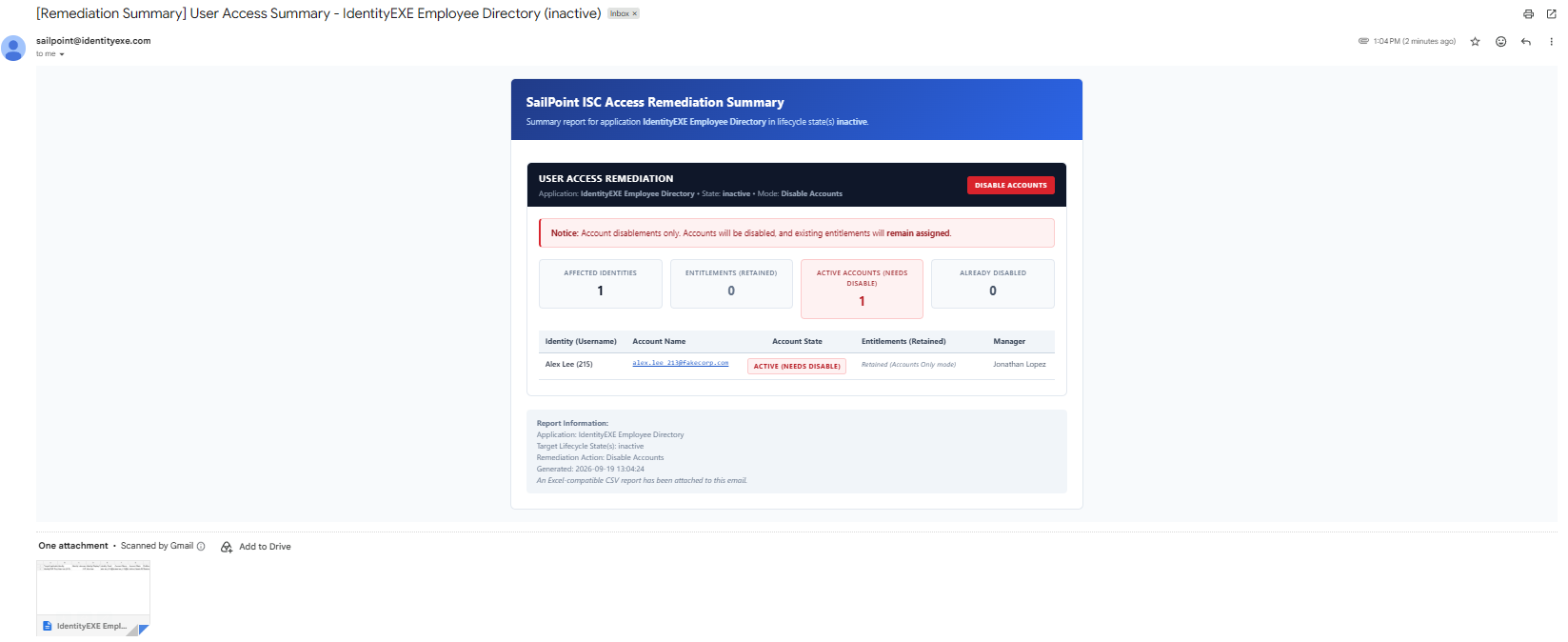
- Disable Accounts Only: Suspends the target application account while preserving existing entitlement assignments for audit hold or forensic requirements.
Architecture Requirement & Secrets Governance
When we architect this solution for our enterprise clients, the execution engine runs on a dedicated Windows Server host via the Privileged Access Gateway (PAG) or Windows Server workflow action. Never hardcode plain text secrets into workflow definitions or script arguments. Store client credentials within your enterprise secrets vault (CyberArk, Azure Key Vault, or AWS Secrets Manager) and retrieve them at execution runtime.
IdentityEXE Blueprint: Interactive UI & Decision Gates
When we architect this solution for our enterprise clients, we utilize a two-stage guided interface within SailPoint Forms. This ensures complete operator visibility and prevents unauthorized or blind remediations against production identity repositories.
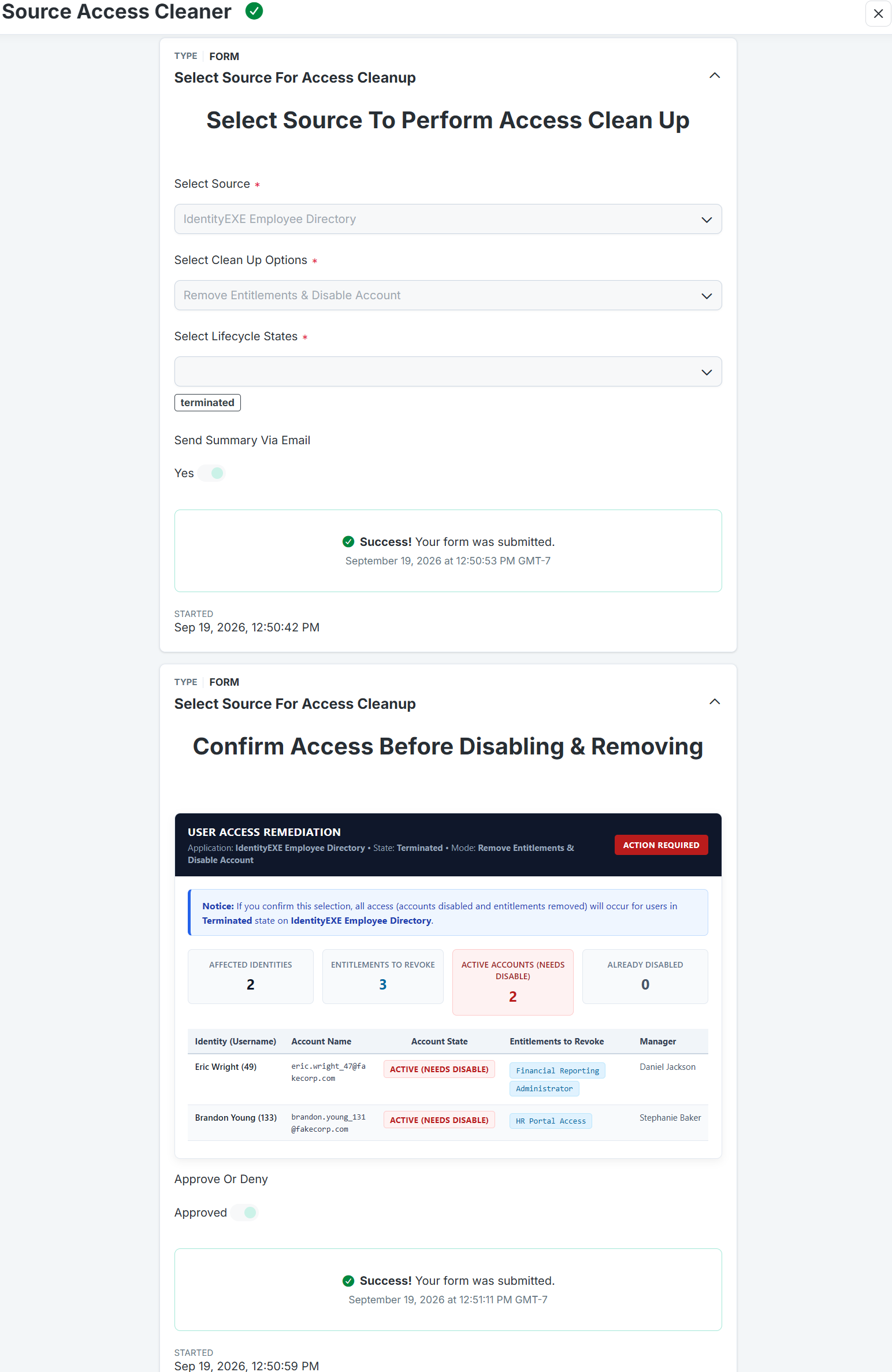
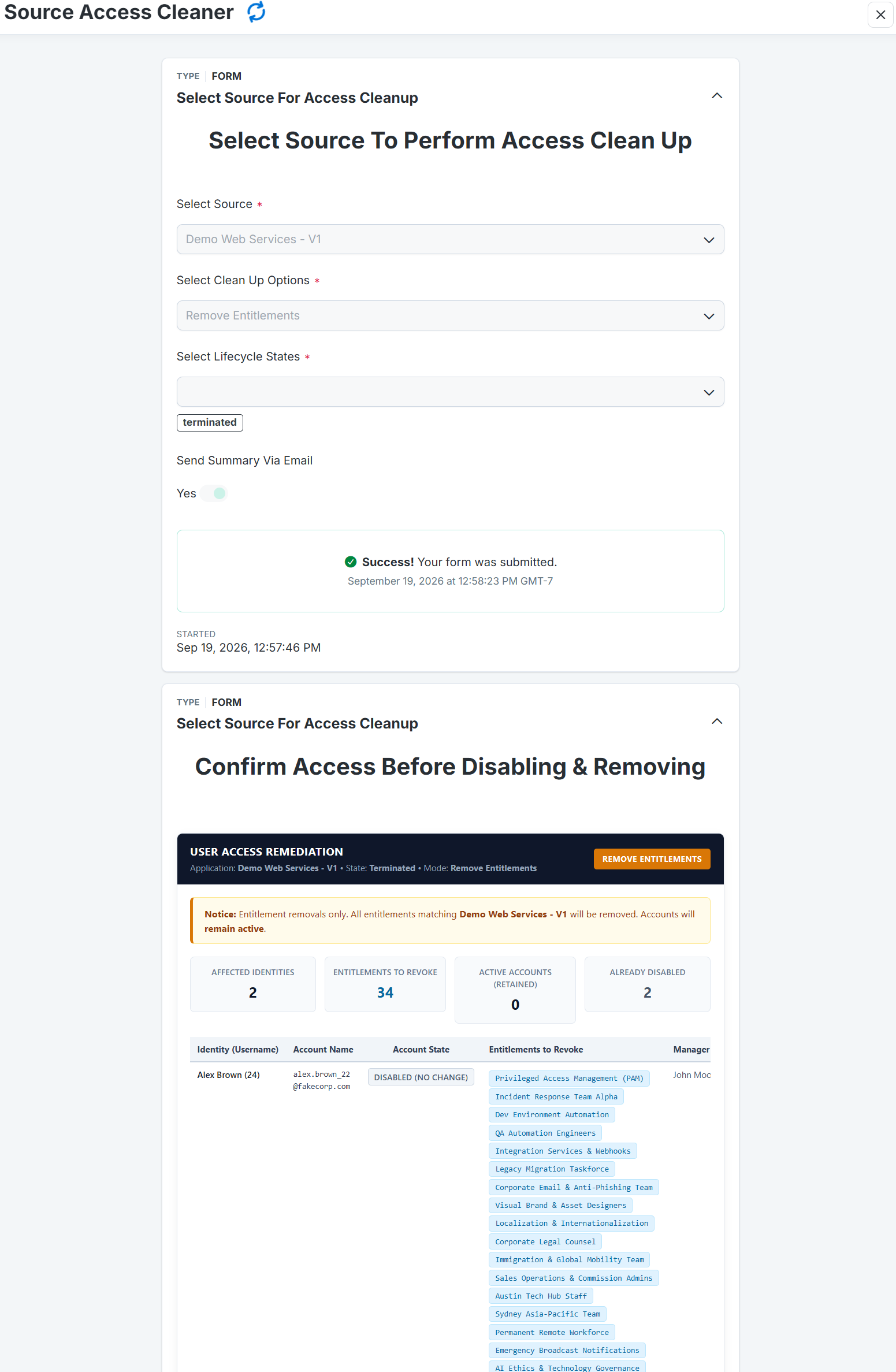
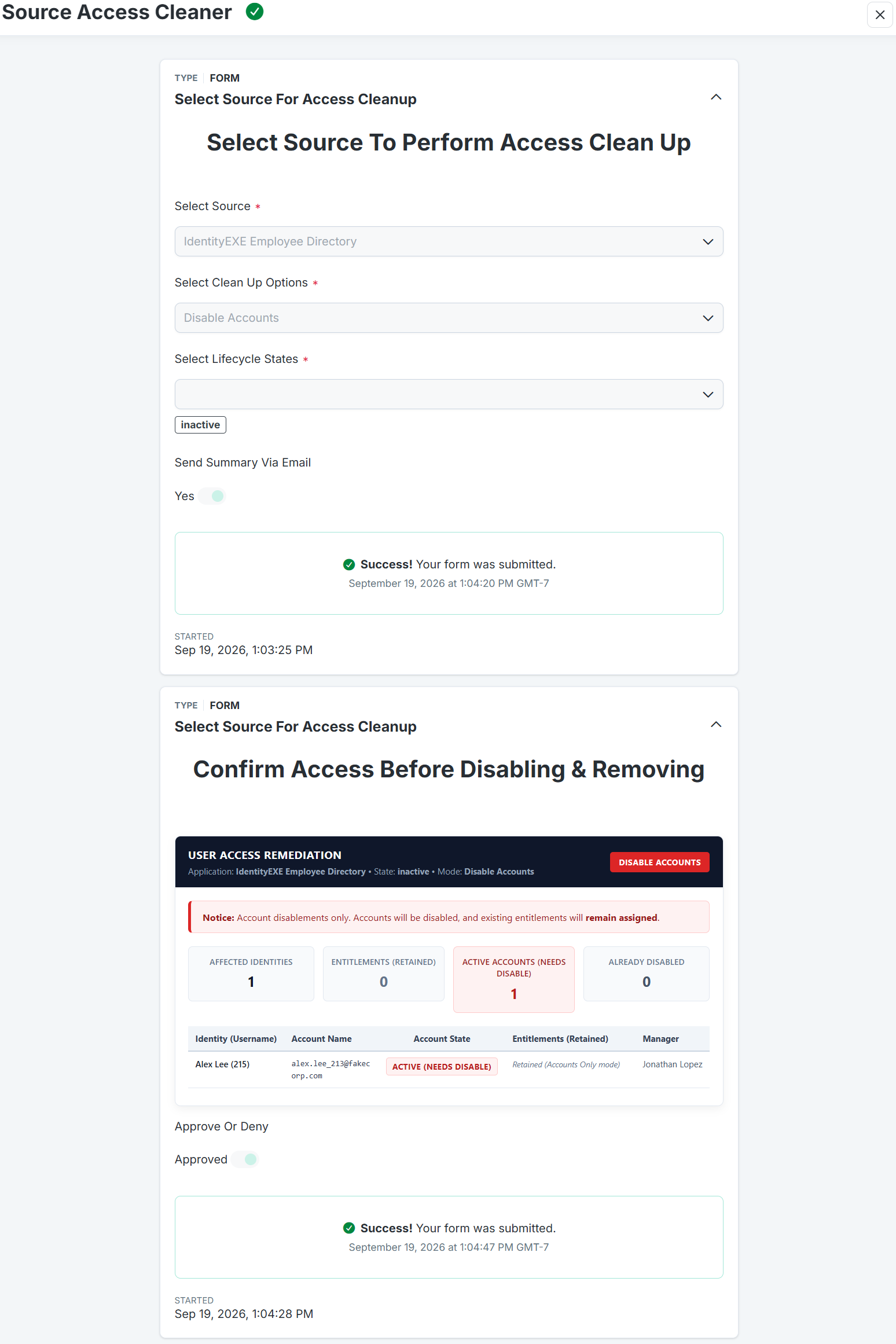
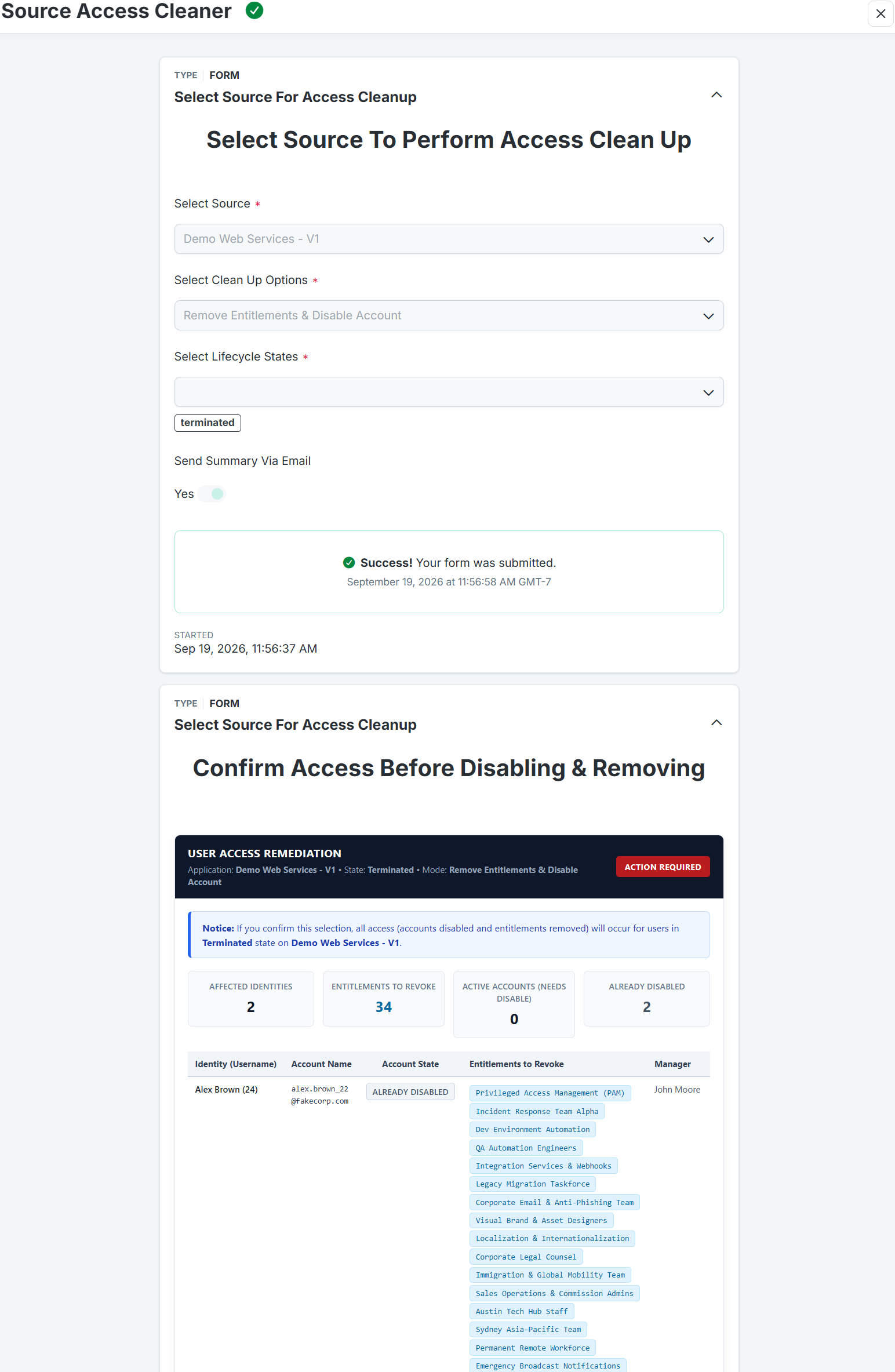
Stage 1: Scope Selection (Form 1 - Source Selector)
Initiated directly from the Launchpad, the primary form presents dynamic operational parameters. Rather than relying on hardcoded profile values, the form's multi-select dropdown is dynamically populated with every active Lifecycle State across all tenant Identity Profiles:
- Select Source: The target connected application to audit and baseline.
- Select Clean Up Options: Dropdown configuring the remediation posture (Preview, Full Removal, Entitlements Only, Disable Accounts Only).
- Select Lifecycle States: Dynamic multi-select pre-populated with tenant states (e.g., Terminated, Inactive, Extended Leave).
- Send Summary Via Email: Boolean toggle to dispatch an executive HTML summary and Excel-ready CSV report.
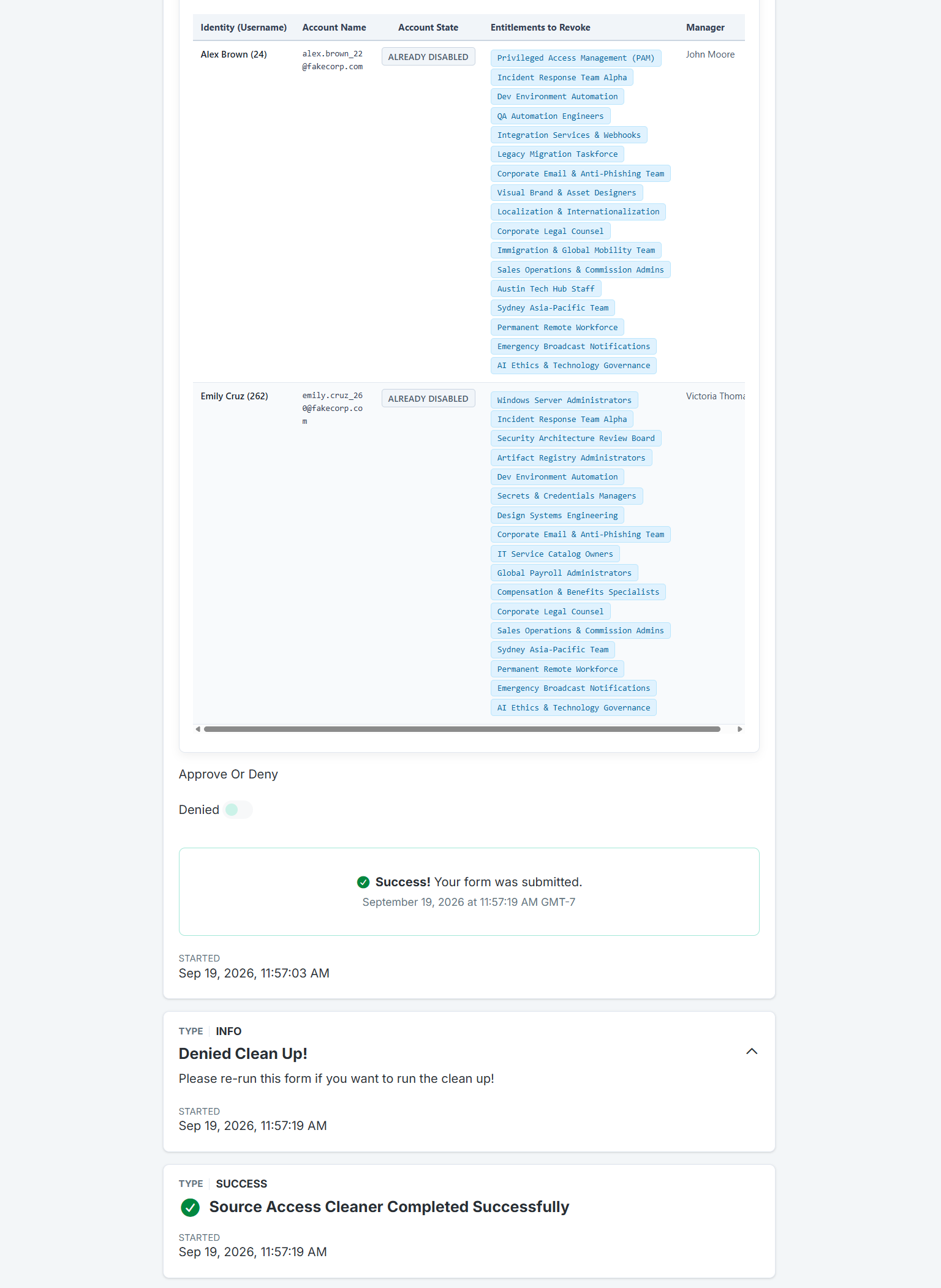
Stage 2: Interactive Review & Confirmation (Form 2 - Confirm Source Selection)
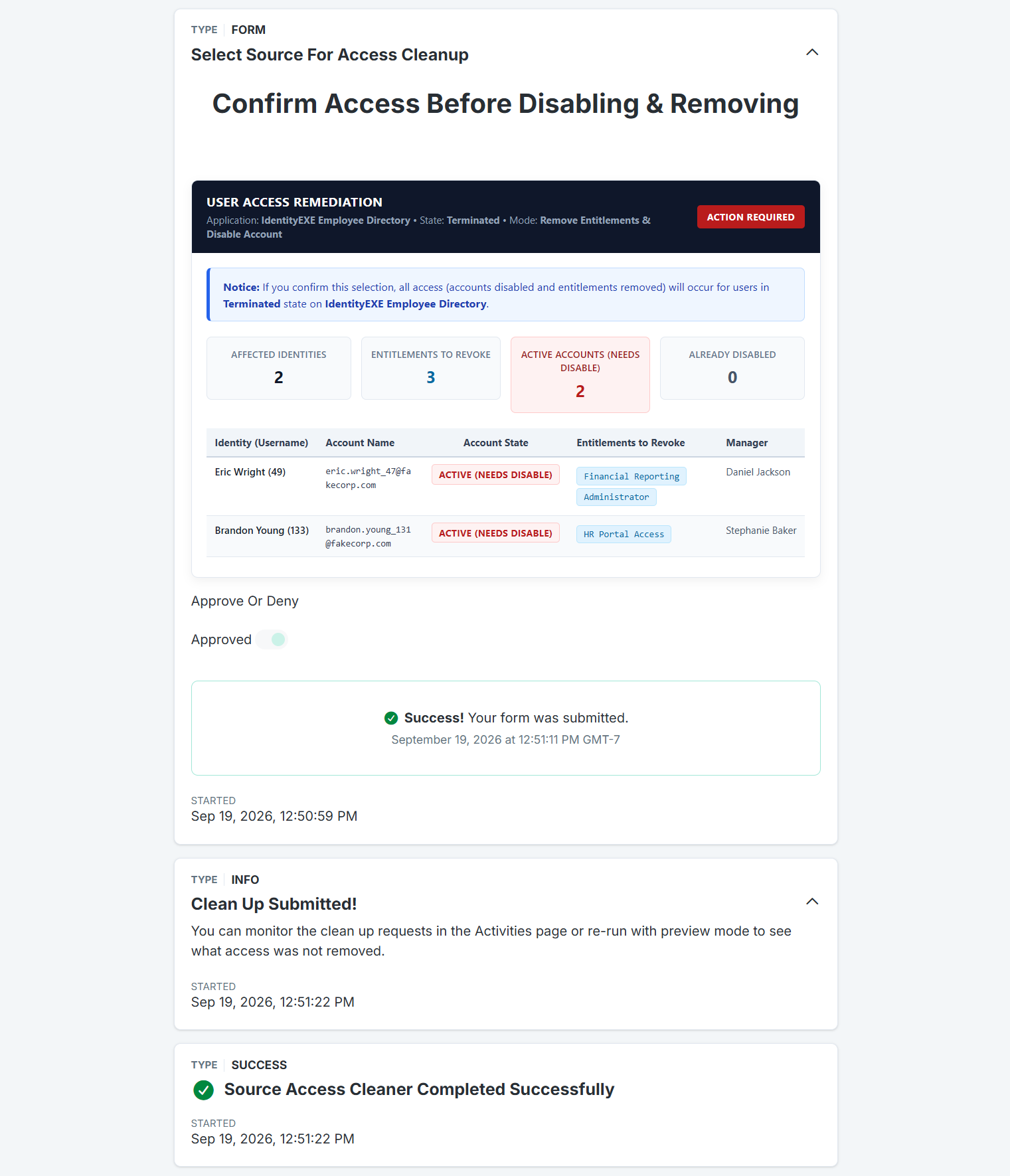
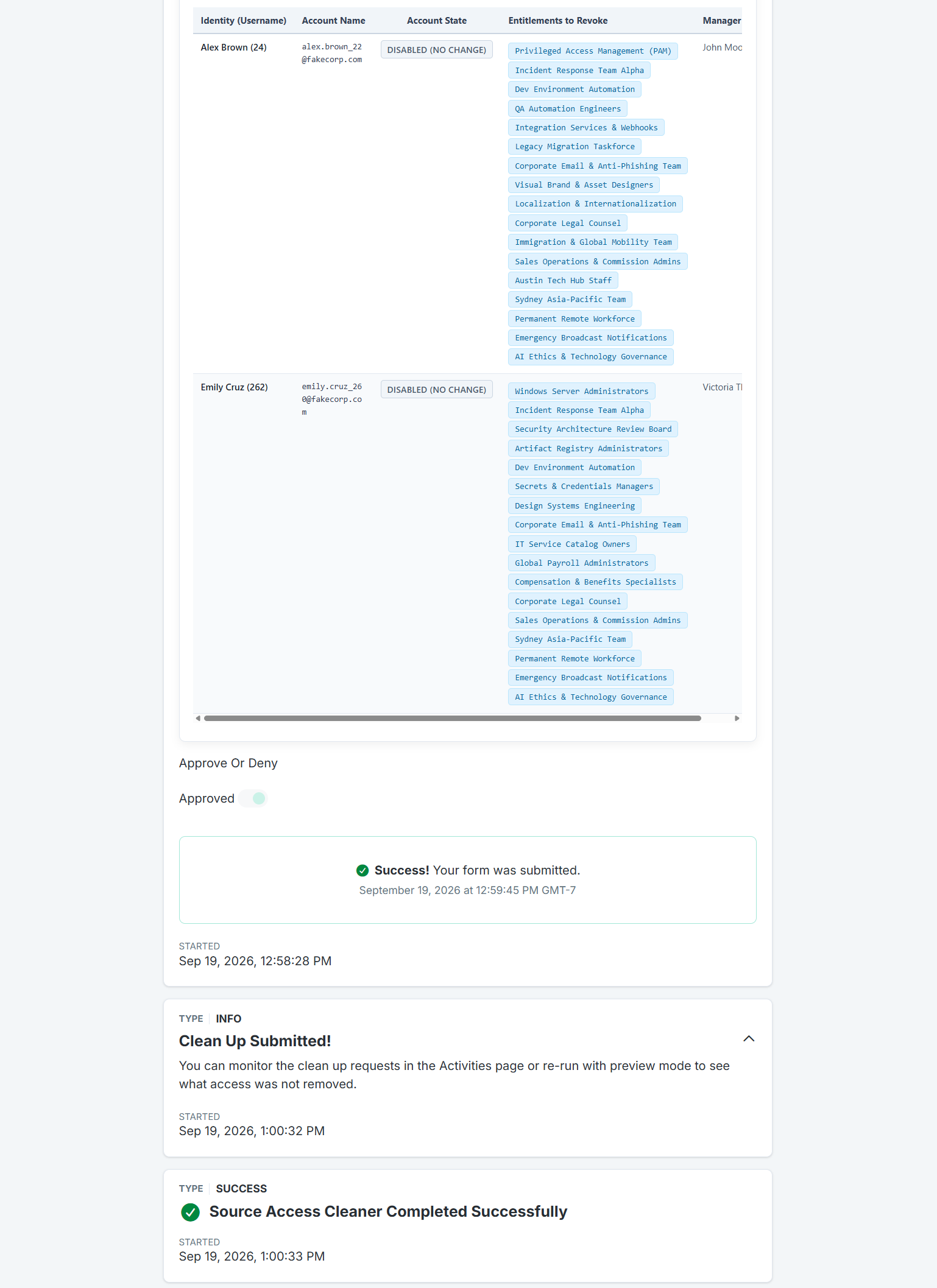
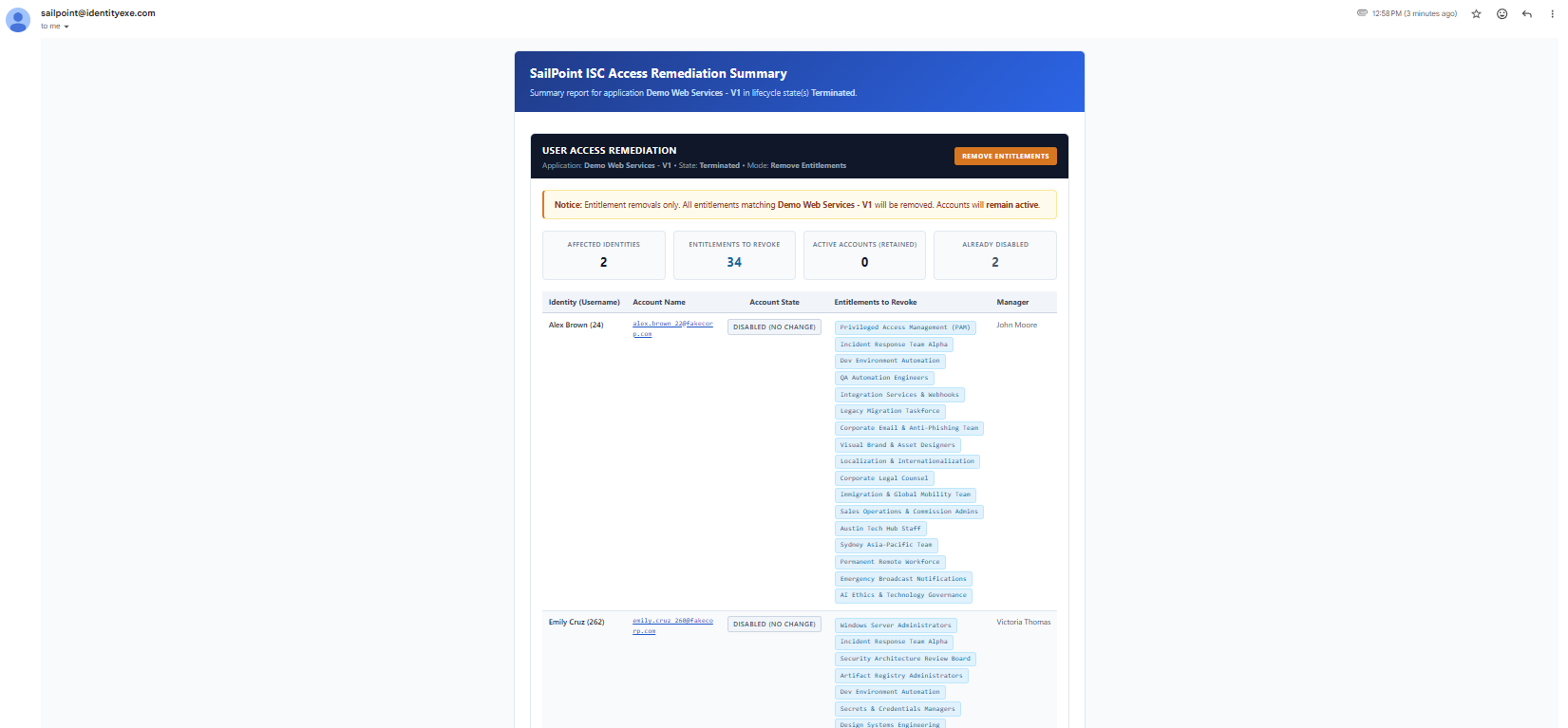
Our core engineering methodology structures the data layer to compile an interactive HTML preview table passed directly into Form 2 via the formTableHtml attribute. Administrators review high-level metric cards (Affected Identities, Entitlements to Revoke, Accounts Needing Disablement, and Already Disabled Accounts) alongside an identity-by-identity audit roster before approving execution.
Fail-Safe Exits & Zero-Impact Safeguards
This modular framework ensures that your ISC deployment avoids unintended modifications by enforcing three deterministic safety exits:
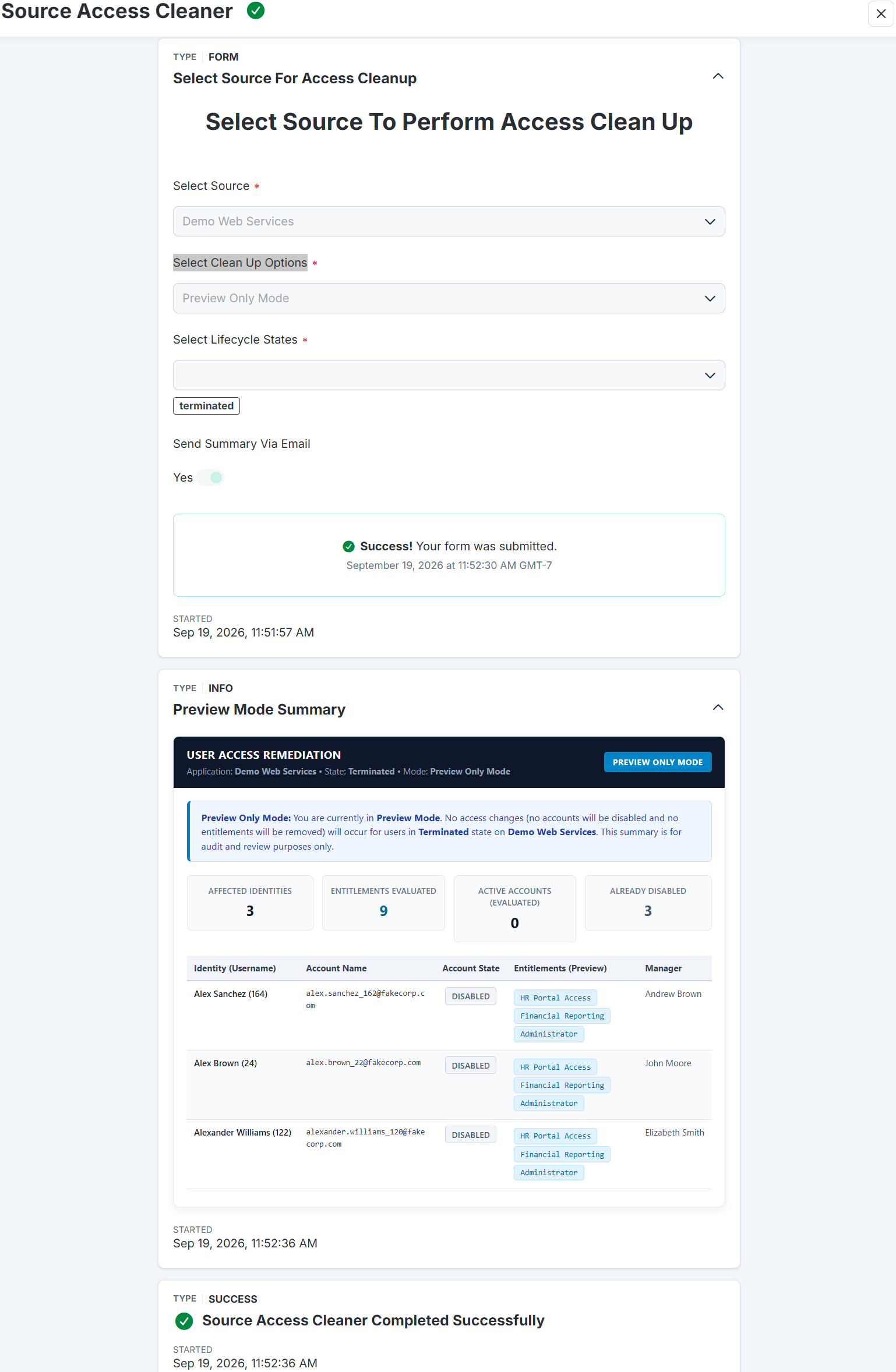
- Preview Mode Safe Exit: If the operator selects Preview Only Mode, the workflow bypasses all write actions, renders the interactive preview widget inside an informational message, and safely terminates.
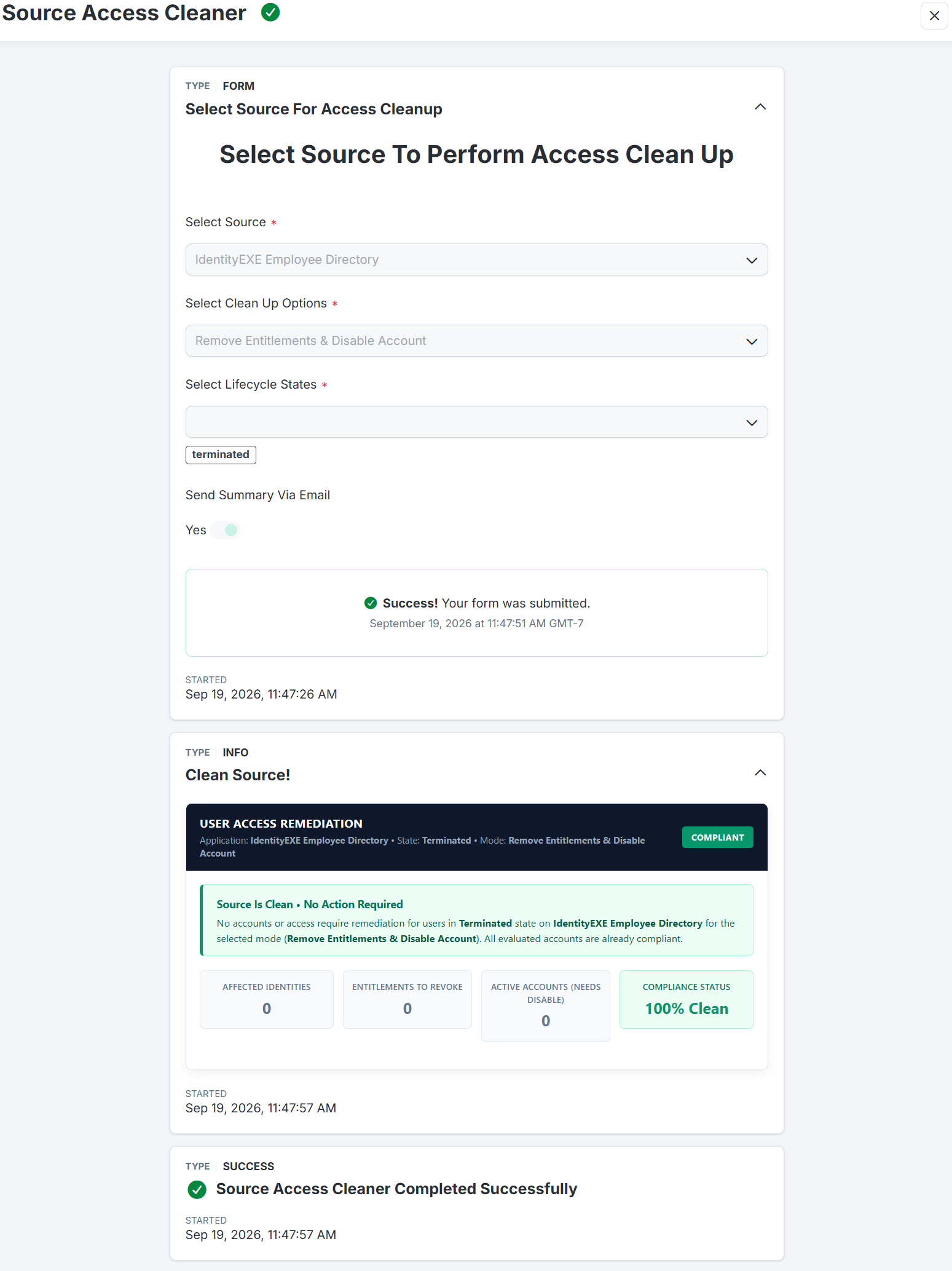
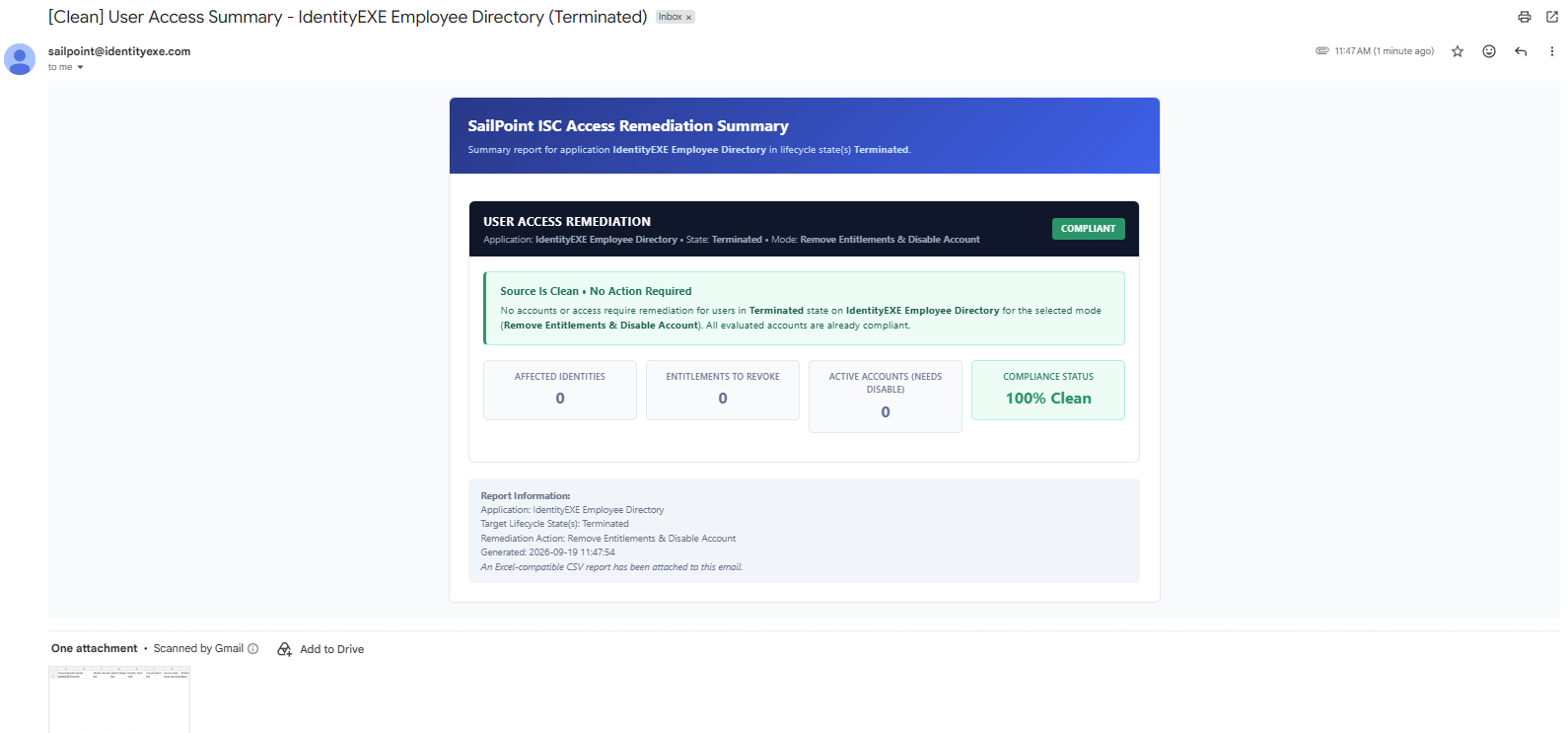
- Clean Source Bypass: If the audit engine determines that the target source contains zero stale accounts or entitlements for the target lifecycle states, the workflow displays a verified "Compliant" badge and exits immediately, preventing wasteful approval cycles.
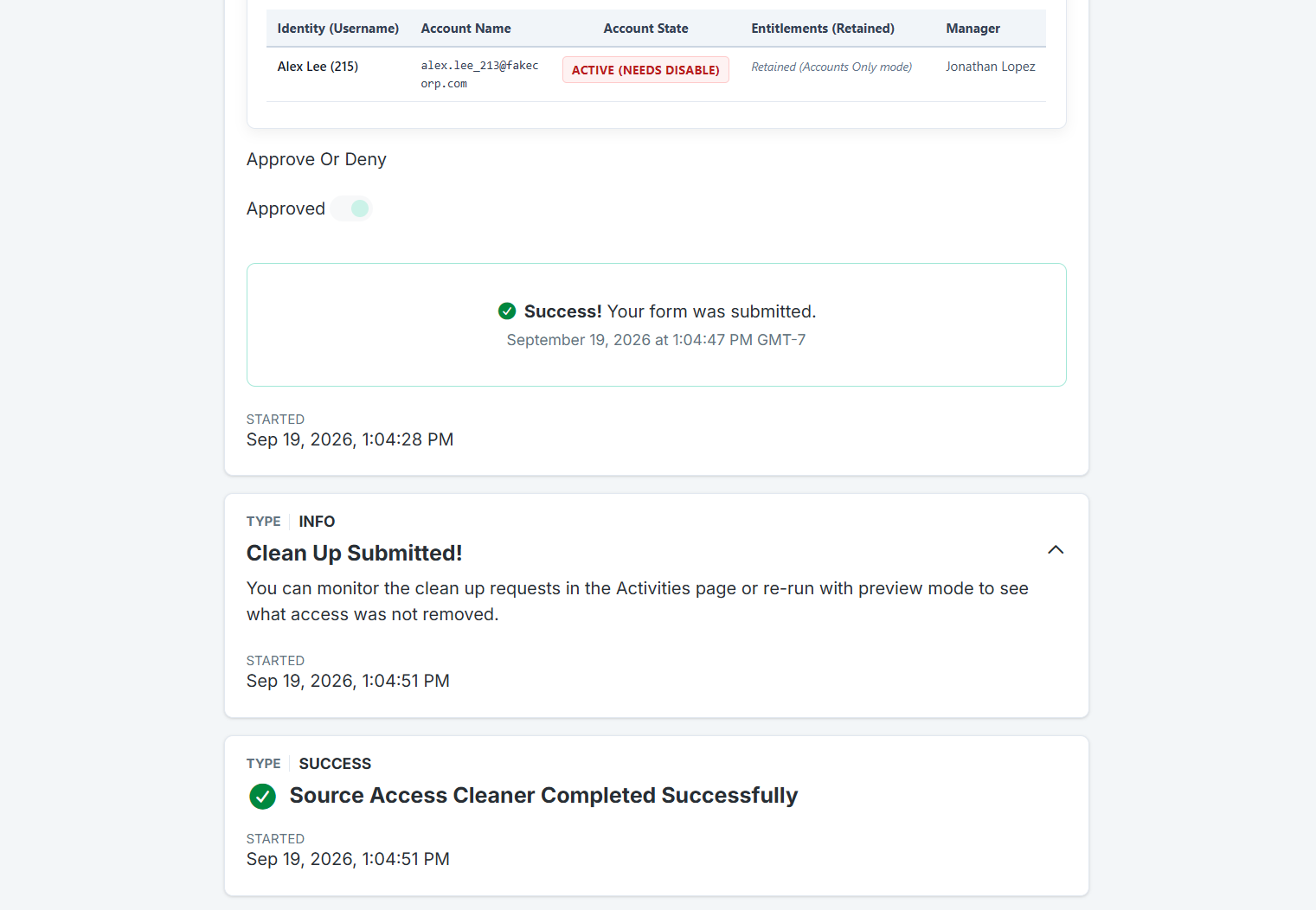
- Operator Denial Safeguard: If the administrator toggles the "Approve Or Deny" switch to false during confirmation, the workflow aborts execution instantly with zero modifications applied to the target application.
Workflow Orchestration & Script Routing
The SailPoint Workflow acts as the central control plane, bridging user interaction via SailPoint Forms with backend PowerShell automation executing on the Windows Server host.
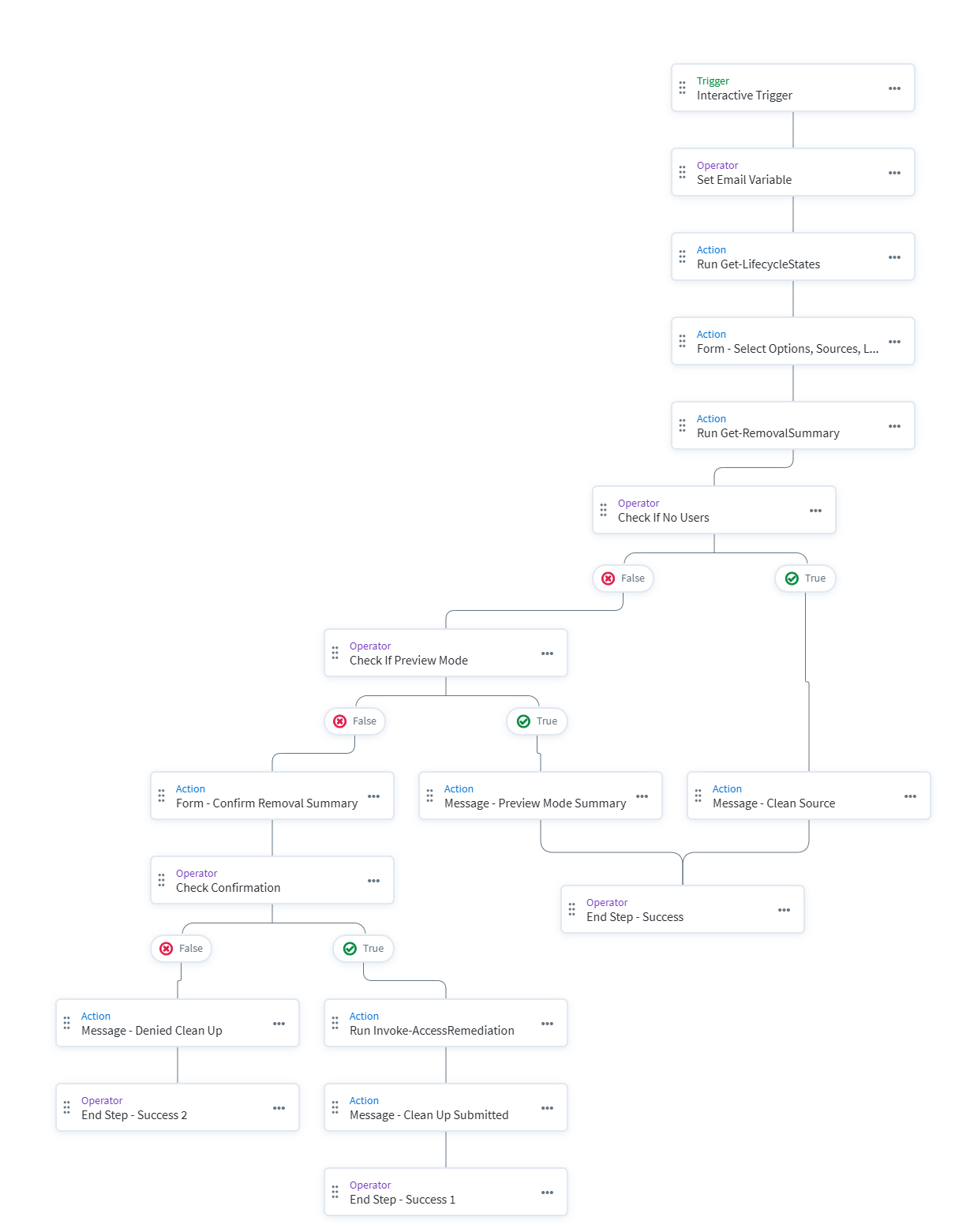
Four Sequential Operational Phases:
- Phase 1: Pre-Form Initialization & Dynamic Discovery (
Get-LifecycleStates.ps1)Triggered directly from the Launchpad, the workflow initializes session variables and executes
Get-LifecycleStates.ps1via the Windows Server action. The script queries/identity-profiles/v1and each profile's/lifecycle-statesendpoint, returning a structured JSON array (LCSName,IDPName,LCSID). This array is mapped into Form 1, eliminating static configurations. - Phase 2: Scope Collection & Audit Calculation (
Get-RemovalSummary.ps1)Capturing the administrator's selections (
SourceName,LifecycleStateId,ActionMode,SummaryEmail), the workflow triggersGet-RemovalSummary.ps1. The script runs an Elasticsearch query against/search/v1, cross-references live account objects via/accounts/v1to eliminate search indexing delay, generates the responsive HTML widget, builds the machine-readableremediationMap, and optionally sends the summary email with the CSV attachment. - Phase 3: Decision Routing & Safety Gates
The workflow inspects
$.windowsServer.result.data.metrics.status. If the source is clean, it routes directly to the Clean Source notification. If Preview Mode was selected, it displays the preview widget without requesting confirmation. For active remediation modes, it embedsformTableHtmlinto Form 2 alongside theapproveOrDenytoggle. If denied, it exits cleanly. - Phase 4: Remediation Execution Engine (
Invoke-AccessRemediation.ps1)Upon confirmation, the workflow passes
$.windowsServer.result.data.remediationMap.JSON()intoInvoke-AccessRemediation.ps1. The execution engine submits native access revocations viaPOST /access-requests/v1(REVOKE_ACCESS) and account suspensions viaPOST /accounts/v1/{id}/disable, displaying a real-time completion status.
Technical Deep Dive: The PowerShell & API Engine
Our core engineering methodology structures the data layer to interface with SailPoint ISC's modern /v1 endpoints with strict idempotency and zero search-index race conditions.
| Endpoint | Method | Purpose |
|---|---|---|
| /oauth/token | POST | Authenticate via OAuth2 Client Credentials |
| /identity-profiles/v1 | GET | List all active Identity Profiles across tenant |
| /identity-profiles/v1/{id}/lifecycle-states | GET | Retrieve dynamic Lifecycle States for Form 1 dropdown |
| /sources/v1 & /sources/v1/{id} | GET | Resolve source name, UUID, and connector configurations |
| /search/v1 | POST | Elasticsearch query filtering target source and LCS users |
| /accounts/v1 & /accounts/v1/{id} | GET | Real-time validation of account status (disabled, hasEntitlements) |
| /accounts/v1/{id}/disable | POST | Native account disablement |
| /access-requests/v1 | POST | Standard access revocation (REVOKE_ACCESS) |
1. Dynamic Lifecycle State Discovery (Get-LifecycleStates.ps1)
Hardcoding lifecycle states like "terminated" into static forms creates failure points when organizations introduce customized states (such as "pre-hire", "leave-of-absence", or "contractor-expired"). The initialization script dynamically resolves all states:
# Query lifecycle states across all Identity Profiles
$LcsResults = [System.Collections.Generic.List[PSCustomObject]]::new()

foreach ($profile in $ProfilesList) {
    $LcsUri = "$BaseUrl/identity-profiles/v1/$($profile.id)/lifecycle-states"
    $States = Invoke-RestMethod -Method Get -Uri $LcsUri -Headers $Headers

    foreach ($state in $States) {
        $lcsNameValue = if ($state.technicalName) { $state.technicalName } else { $state.name }
        $LcsResults.Add([ordered]@{
            "LCSName" = $lcsNameValue
            "IDPName" = $profile.name
            "LCSID"   = $state.id
        })
    }
}
2. Search Index Latency Mitigation (Get-RemovalSummary.ps1)
SailPoint's Elasticsearch index (/search/v1) is near-real-time, but pending background aggregations or identity refresh tasks introduce indexing latency. To prevent attempting to disable accounts that are already disabled or revoking entitlements that no longer exist, our script executes a real-time batch lookup against the authoritative /accounts/v1 endpoint:
# Resilient search query across accounts and access
$FinalSearchQuery = "(@accounts(source.id:`"$ResolvedSourceId`") OR access.source.id:`"$ResolvedSourceId`") AND $lcsSearchPart"

# Live account verification to prevent search index race conditions
$filterStr = 'id in ("' + ($pageAccountIds -join '","') + '")'
$accQueryUri = "$BaseUrl/accounts/v1?filters=" + [System.Uri]::EscapeDataString($filterStr) + "&limit=50"
$liveAccounts = Invoke-RestMethod -Method Get -Uri $accQueryUri -Headers $Headers

foreach ($la in $liveAccounts) {
    $LiveAccountMap[$la.id] = [PSCustomObject]@{
        disabled        = [bool]$la.disabled
        hasEntitlements = if ($null -ne $la.hasEntitlements) { [bool]$la.hasEntitlements } else { $true }
    }
}
3. Standard Governance Revocation Engine (Invoke-AccessRemediation.ps1)
This modular framework ensures that your ISC deployment avoids unmonitored back-channel deletions. By utilizing the official /access-requests/v1 endpoint with REVOKE_ACCESS, every removal creates a standard governance line item routed through native provisioning pipelines:
# 1. Submit Entitlement Revocation via Native Access Requests API
$revokePayload = [ordered]@{
    requestedFor   = @($identityId)
    requestType    = "REVOKE_ACCESS"
    requestedItems = @(
        [ordered]@{
            type    = "ENTITLEMENT"
            id      = $entitlementId
            comment = "Automated user access remediation - source access cleanup"
        }
    )
}
$reqResponse = Invoke-RestMethod -Method Post -Uri "$BaseUrl/access-requests/v1" -Headers $Headers -Body ($revokePayload | ConvertTo-Json -Depth 5)

# 2. Submit Native Account Disablement via Accounts API
$disResponse = Invoke-RestMethod -Method Post -Uri "$BaseUrl/accounts/v1/$accountId/disable" -Headers $Headers -Body "{}"
Governance Audit Trail, Notifications & Reporting
In regulated enterprise environments, remediating access without forensic proof is unacceptable. The framework generates a closed-loop audit trail across CSV exports, SMTP executive summaries, and native ISC activity tracking.
1. Excel-Ready CSV Audit Roster
When the email summary toggle is active, Get-RemovalSummary.ps1 compiles an audit CSV capturing the pre-remediation state of every affected identity:
| Target App | Identity | Account State | Entitlements | Action Mode | LCS |
|---|---|---|---|---|---|
| Corporate HR Directory | Eric Wright (1042) | Active (Needs Disable) | Financial Reporting; Administrator | Full Removal | Terminated |
| Corporate HR Directory | Brandon Young (1133) | Active (Needs Disable) | HR Portal Access | Full Removal | Terminated |
"Target Application","Identity","Identity Username","Identity Display Name","Identity Email","Account Name","Account State","Entitlements","Entitlement Count","Manager","Action Mode","Lifecycle State(s)","Generated At"
"Corporate HR Directory","Eric Wright (1042)","1042","Eric Wright","eric.wright@example.com","eric.wright@example.com","Active (Needs Disable)","Financial Reporting; Administrator","2","Daniel Jackson","Remove Entitlements & Disable Account","Terminated","2026-09-19 12:44:34"
"Corporate HR Directory","Brandon Young (1133)","1133","Brandon Young","brandon.young@example.com","brandon.young@example.com","Active (Needs Disable)","HR Portal Access","1","Stephanie Baker","Remove Entitlements & Disable Account","Terminated","2026-09-19 12:44:34"
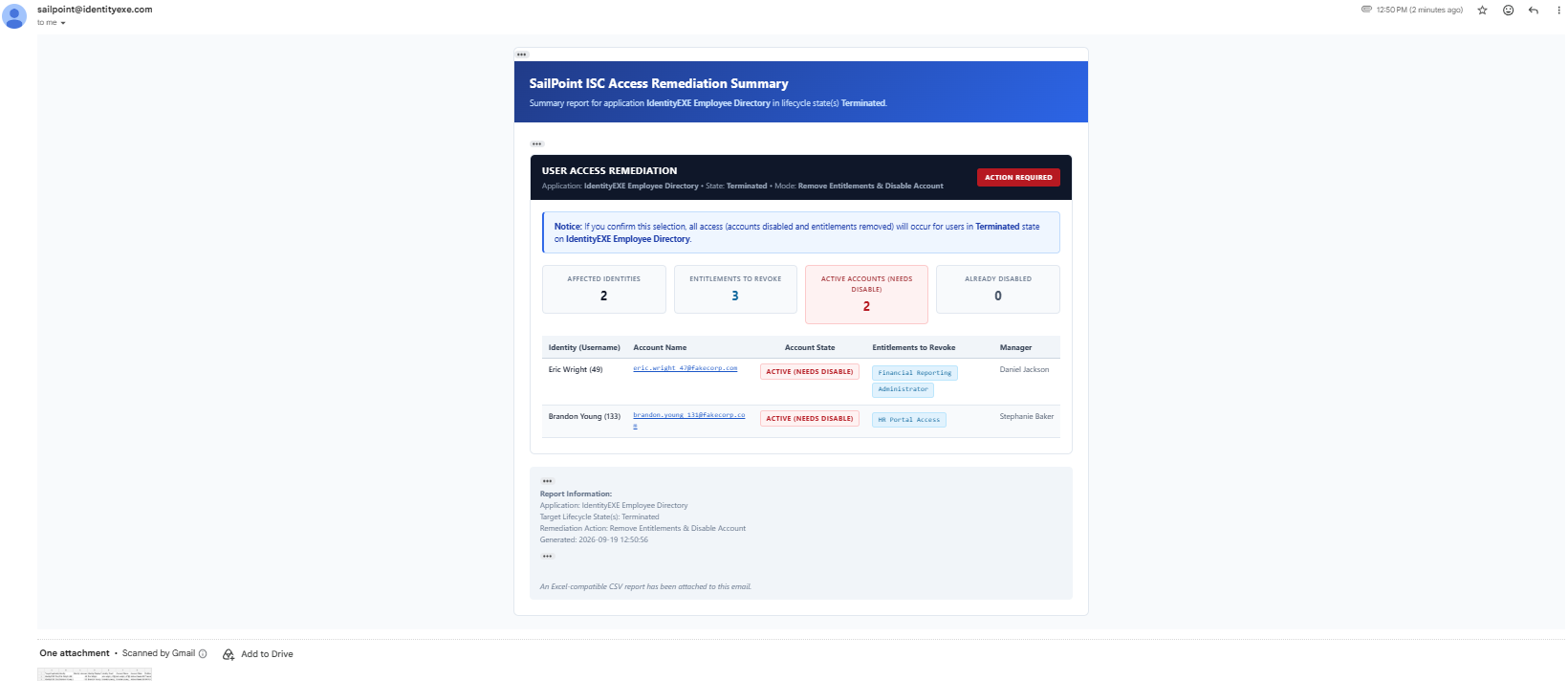
2. Executive Summary Email Notifications
Delivered directly via SMTP, formatted executive emails keep compliance stakeholders informed with visual metrics and direct attachments:
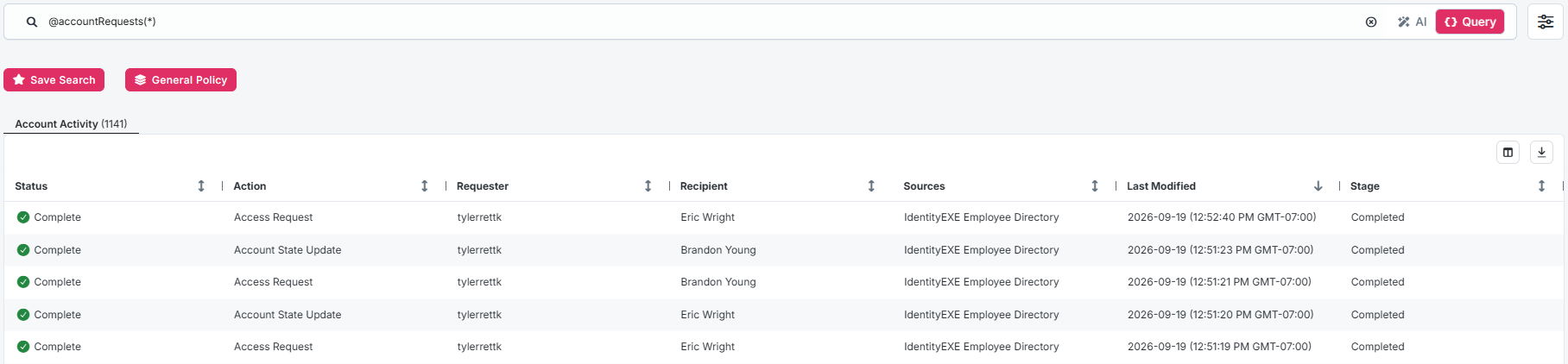
3. Native Tracking in ISC Activities
Because access revocations route through the native /access-requests/v1 engine, administrators can monitor request fulfillment in real time inside the standard SailPoint ISC UI under Search > Activities:
Considerations & Best Practices
- Post-Onboarding Baseline SOP: Embed this workflow as a mandatory standard operating procedure (SOP) on your enterprise application onboarding checklist. Running Source Access Cleaner immediately after initial account aggregation establishes a verified, clean baseline before enabling event-driven LCS rules.
- Windows Server & Gateway Security: Ensure the execution host has outbound HTTPS connectivity to your tenant's API gateway (
https://{tenant}.api.identitynow.com). Protect API client credentials using enterprise secrets management. - API Rate Limiting & Backoff:
Invoke-AccessRemediation.ps1includes a configurable$RateLimitDelaySecondsparameter (defaulting to 1 second) between consecutive calls to keep enterprise deployments well within SailPoint tenant API thresholds. - UI Table Clipping Safeguard: To prevent browser timeouts during large directory reconciliations, the interactive HTML table clips display rendering at the first 100 users, displaying an advisory directing the administrator to the attached CSV report for the complete roster.
- Required API Scopes: The Personal Access Token (PAT) or OAuth client requires the following least-privilege scopes:idn:identity-profile:readidn:sources:readidn:search:readidn:accounts:readidn:accounts:manageidn:access-request:create
Downloads & Implementation Code
All production workflow definitions, interactive form schemas, PowerShell scripts, and audit templates are available for direct implementation:
1. Main Workflow Definition
2. Interactive Form Blueprints
3. Execution Scripts & Audit Template
Conclusion
Onboarding connected applications into SailPoint Identity Security Cloud without baselining existing accounts leaves a dangerous governance blind spot. By implementing this architectural methodology, identity teams bridge the native lifecycle gap, enforce zero-trust least privilege across newly connected systems, and eliminate the audit findings that plague enterprise rollouts.
A stalled identity governance rollout burns capital and stalls organizational momentum.
If your team is hitting configuration walls or struggling with complex source-access-cleaner integrations, stop guessing. Book a targeted SailPoint Architecture Review directly with our engineering team to map out a clear path forward.