Managing Timezone Transforms & Daylight Savings

Tyler
IdentityEXE Founder
Executive Summary
If your engineering team manages time-dependent logic in SailPoint Identity Security Cloud (ISC), you likely know the severe architectural limitation of daylight savings time. Hardcoding offsets like +5h in a dateMath transform works perfectly until the time changes. Once daylight savings begins or ends, your local midnight calculations, grace periods, and lifecycle states start triggering an hour early or an hour late, breaking time-dependent logic across your tenant.
When this architectural limitation remains unsolved, the operational impact is immense. If a timezone shift miscalculates a termination date by a single day, it creates a severe security vulnerability. Manager approvals and contractor expiration warnings trigger at the wrong times, causing severe manager approval fatigue and missed SLAs. Ultimately, compliance audits fail because critical offboarding workflows aren't executed exactly at local midnight or the end of the business day.
To resolve this permanently, IdentityEXE engineered a repeatable architectural methodology. This is not just a one-off script, but a dynamic framework utilizing scheduled Workflows to automatically update base timezone Transforms when daylight savings occurs, ensuring all nested date calculations remain accurate year-round.
Solution Overview
- Tech Stack: 2 Workflows + 2 Base Transforms.
- High-Level Flow: We establish two foundational transforms:
EST To UTCandUTC To EST. All other time-based transforms reference these two base transforms instead of hardcoding their own offsets. We then deploy two scheduled Workflows—one for entering daylight savings and one for exiting. These workflows automatically run on the specific Sundays when time changes and use the ISC API to update thedateMathexpressions inside our base transforms. - Global Scalability: Note: This blueprint assumes a single timezone (EST/EDT) for simplicity. If your tenant supports global users, you would incorporate a lookup transform to map the correct offset based on the user's location.
IdentityEXE Blueprint: Base Components
When we architect this solution for our enterprise clients, we utilize a single source of truth for timezone offsets. First, you need to create the two base transforms that will act as the foundation for your architecture.
1. Base Transforms
EST To UTC Transform:
{
  "id": "d9df51b1-5d08-43ac-9e8a-7069e17282b7",
  "name": "EST To UTC",
  "type": "dateMath",
  "attributes": {
    "expression": "+5h"
  },
  "internal": false
}UTC To EST Transform:
{
  "id": "71f3f59a-8172-4cc4-a08e-b0960c8e7604",
  "name": "UTC To EST",
  "type": "dateMath",
  "attributes": {
    "expression": "-5h"
  },
  "internal": false
}Implementation Framework: Automated Workflows
Our core engineering methodology structures the data layer to automatically manage the offset shift. We configure the workflows that handle the offset adjustments. The "Enter Daylight Savings" workflow triggers yearly on the second Sunday of March, while the "Exit Daylight Savings" workflow triggers on the first Sunday of November.
Both workflows utilize the sp:http action to send PUT requests to the /transforms/v1/{id} endpoint, updating the dateMath expressions (e.g., changing -5h to -4h). The JSON body payload for the API call looks like this:
{
  "name": "EST To UTC",
  "type": "dateMath",
  "attributes": {
    "expression": "+4h"
  }
}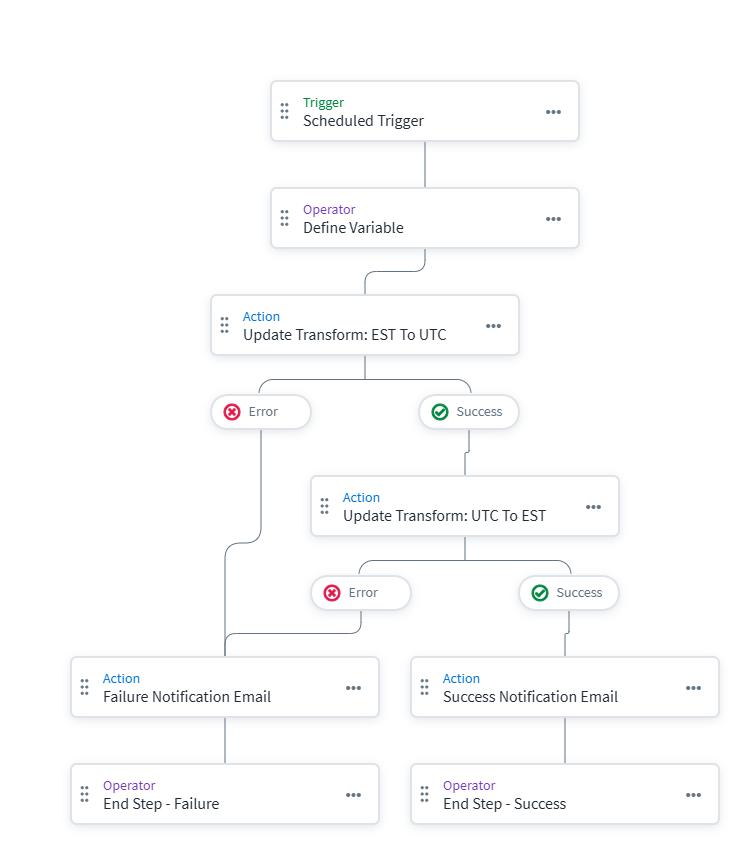
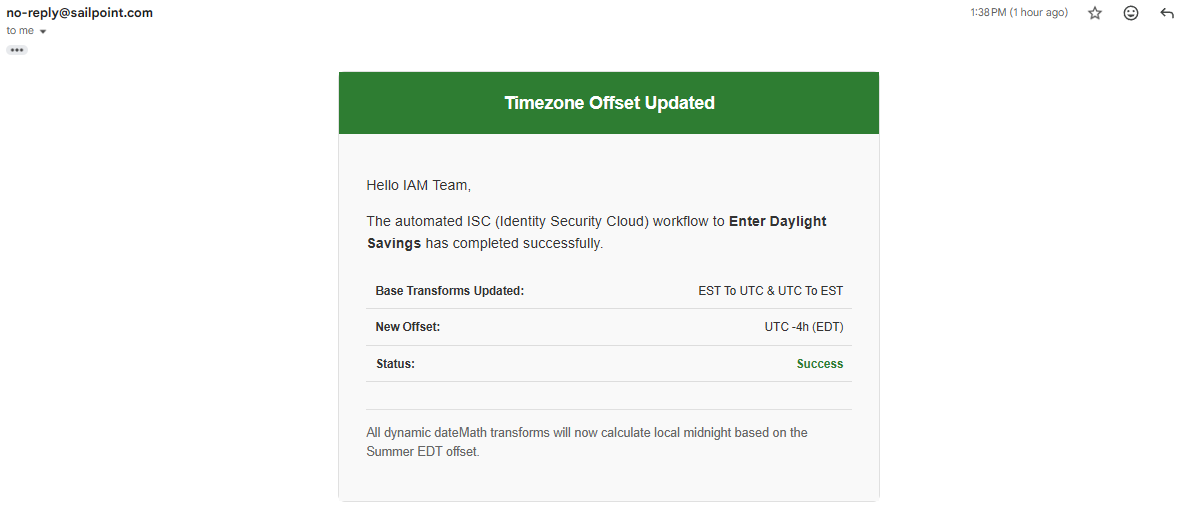
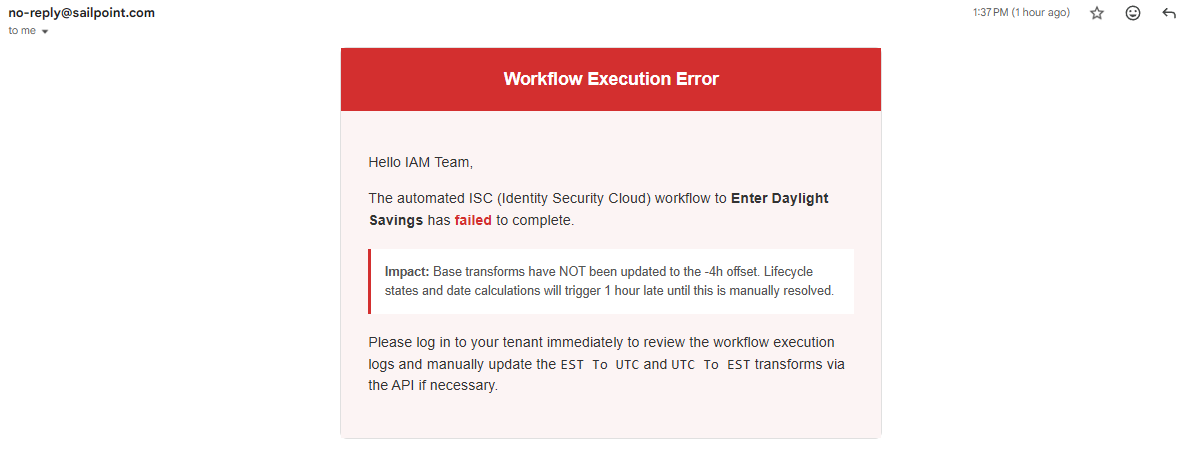
If the API calls fail or succeed, the workflow catches the result and sends an alert email to the IAM team. This modular framework ensures that your ISC deployment avoids silent failures and the engineering team is well-aware that the offset adjustments went through smoothly!
Transform Use Cases
Now that the foundation is set, you can build reliable, timezone-aware transforms. Here are practical examples of how to utilize the base transforms. Notice how each date math expression leverages rounding /d to dynamically interact with midnight.
Important Note: In these examples, the accountAttribute fetches are wrapped in a firstValid to handle empty fields and prevent AttributePromotionException errors. They are then wrapped in a dateFormat to standardize the incoming string into ISO8601. The dateMath engine strictly requires ISO8601 formatted strings to perform timezone math successfully!
1. Get Current Local Midnight
Standardizes a date so that it evaluates exactly to local midnight rather than shifting by UTC hours. The core of this logic uses the dateMath expression "/d", which rounds the provided date down to the start of the day (midnight).
2. Cloud Life Cycle State
Compares the user's termination date against the current local date to calculate their lifecycle state. The magic here is using the dateMath expression "now" wrapped with the EST To UTC / UTC To EST logic and rounding down via "/d". This ensures evening timezone offsets do not trigger terminations a day early.
3. HireDate (First Hour of Start Day)
Uses local timezone boundaries to reliably calculate the first hour of a user's start day, such as 1:00 AM local time. This is done by appending +1h to the date rounding: "/d+1h".
4. End of Business Day Disablement
Calculates exactly 5:00 PM (17:00) in the local timezone for a given date to enforce grace periods before disabling an account. The dateMath logic dynamically adds 17 hours after rounding: "+17h/d".
5. Contractor Expiration Warning
Calculates exactly 8:00 AM local time, 7 days prior to a contractor's end date, ensuring expiration warnings go out at the correct time regardless of the season. This expression is slightly more complex, utilizing "-7d/d+8h" to manipulate the target time precisely.
6. Inactive for 90 Days
Rounds the user's last login date down to local midnight and subtracts 90 days to establish an exact, timezone-aware threshold for stale account cleanups. We achieve this by simply subtracting 90 days from the rounded date: "-90d/d".
7. Standardize Date Format to UTC
Properly ingests localized date strings and shifts them to represent local midnight in UTC format so ISC correctly anchors the date. This requires no custom math expressions, only standardizing the incoming format before it runs through the EST To UTC transform.
Considerations & Best Practices: requiresPeriodicRefresh
You might notice that the Cloud Life Cycle State example uses the "requiresPeriodicRefresh": true attribute as a boolean. This is a critical parameter when working with time-dependent logic.
What it does:
It allows the transform to be checked at the nightly refresh, even if no upstream account data changed. Note that ISC will always perform the daily 8 AM refresh whether this flag is set or not. It is designed for values that can change organically over time.
When to use it:
- Time-dependent logic (e.g., age/tenure bands, grace-period flags, or "isContractEndingIn30Days").
- Calculations using "now" or the current date.
- Any output that should update on a cadence regardless of new source events.
When NOT to use it:
- Simple mappings like
accountAttribute,firstValid, or string manipulation that only change when source attributes change. - Static defaults and normalization that do not depend on time.
Be selective when enabling this flag. Turning it on everywhere forces the Identity Refresh process to do extra work for no benefit, which can noticeably increase your refresh duration and queue load.
Conclusion
Handling timezone offsets and daylight savings inside ISC transforms does not have to be a manual headache. By centralizing your offsets into two base transforms and automating their updates via scheduled workflows, you can build a robust date calculation architecture that works flawlessly year-round.
Stop Guessing with Identity Governance
A stalled identity governance rollout burns capital and stalls organizational momentum. If your team is hitting configuration walls or struggling with complex transform-timezone-management integrations, stop guessing.
Book Your SailPoint Architecture Review