Bringing the IIQ Debug Page to ISC: The Administrator Console UI Plugin

Tyler
IdentityEXE Founder
Executive Summary
Every engineer who has administered SailPoint IdentityIQ (IIQ) relies on the built-in /debug page (debug.jsf) to inspect raw backend objects, modify configurations, test rules, and troubleshoot connectors from a single browser tab. In SailPoint Identity Security Cloud (ISC), those underlying object definitions are abstracted behind dozens of disparate REST API endpoints. While external utilities like Postman collections and the SailPoint VS Code Extension provide API access, enterprise administrators are forced to context-switch between the ISC browser UI, Postman, VS Code, and local text editors just to inspect a raw JSON object, evaluate a transform against an identity, edit a JSON-escaped BeanShell connector rule, export tenant configurations, or trigger an unoptimized source aggregation. Worse yet, dispatching raw PUT or PATCH payloads from external API clients lacks native pre-commit validation, making it easy to overwrite production configurations without reviewing a line-by-line diff first.
Leaving this architectural fragmentation unsolved creates immediate operational and commercial risk. A single malformed PUT request or an unverified JSON Patch array against a production Source, Identity Profile, or Role can break downstream provisioning, corrupt identity attributes, or strip birthright access across thousands of users. When identity engineers spend hours manually unescaping BeanShell strings or hunting through disconnected tools to diagnose a connector failure, source onboarding timelines stall and deployment lag compounds. Blind configuration overwrites introduce untracked configuration drift between sandbox and production environments, triggering failed SOX and SOC 2 compliance audits, security vulnerabilities from misconfigured access boundaries, and severe manager approval fatigue when emergency remediation campaigns are launched to clean up broken access states.
To eliminate this operational bottleneck, IdentityEXE engineered a repeatable architectural methodology: the in-tenant Administrator Console UI Plugin. Built natively on the SailPoint UI Plugin Framework, this implementation framework embeds a complete VS Code-style workbench and the operational speed of the classic IIQ Debug page directly inside the ISC browser UI. By unifying a 19-category object explorer, dedicated Transform and Connector Rule development studios, one-click source diagnostics, automated SP-Config packaging, a pre-commit GitHub-style differential review engine, and a live REST API traffic logger into a single sandboxed workspace, enterprise identity teams gain complete configuration governance without ever leaving their tenant.
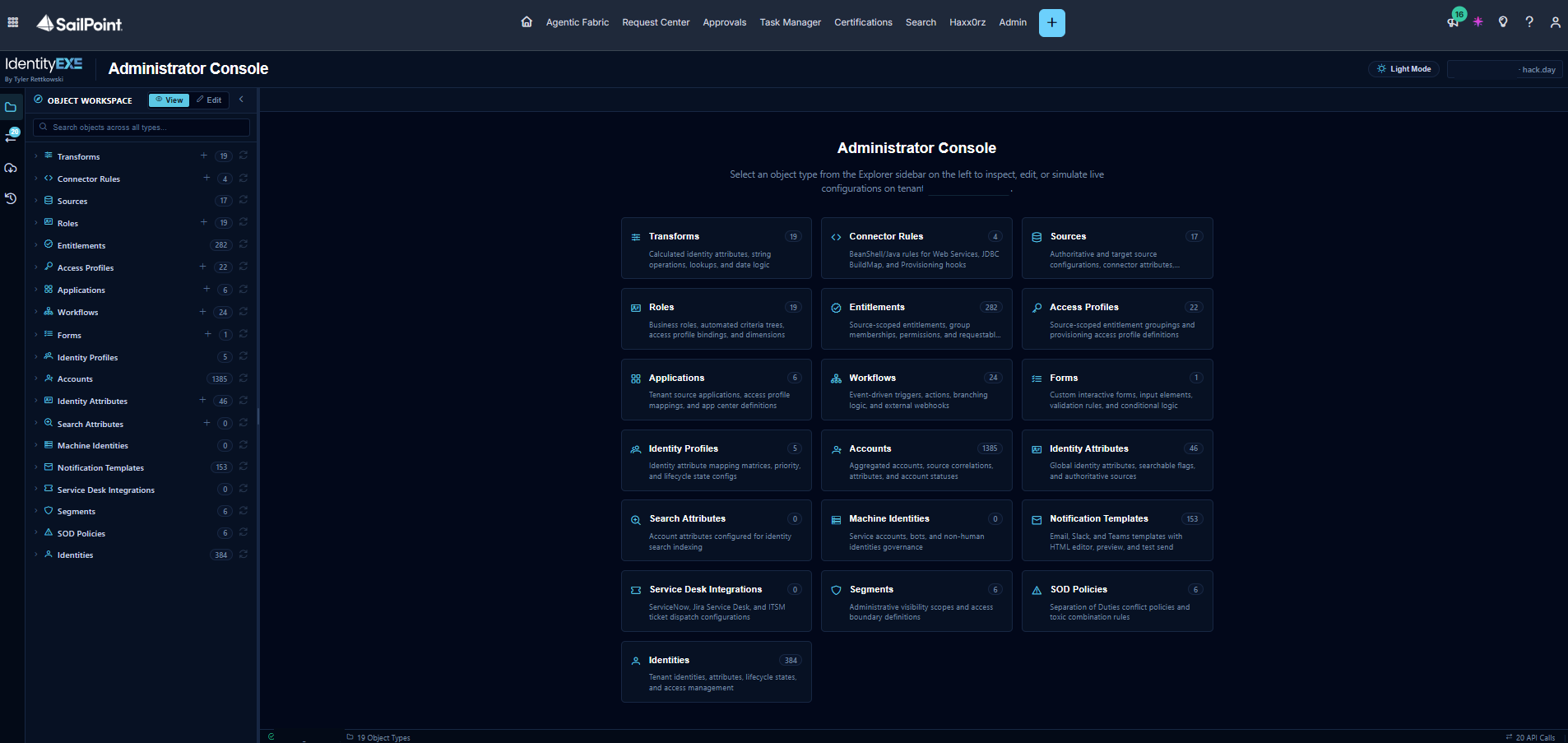
Solution Overview & Architectural Flow
Enterprise Platform Availability Note
The SailPoint UI Plugin framework is currently rolling out across enterprise tenants. Our engineering team provides live architectural demonstrations of the Administrator Console inside our dedicated sandbox tenant for organizations evaluating in-tenant extensibility.
When we architect this solution for our enterprise clients, we utilize the official SailPoint UI Plugin Framework (@sailpoint/ui-plugin-sdk), Angular 21, TypeScript, PrimeNG, and modern SailPoint /v1 REST APIs.
Our core engineering methodology structures the data layer to load inside a sandboxed full-pageiframe within the ISC Admin portal while synchronizing in real time with the administrator's Light or Dark theme. From a single consolidated workbench, administrators can:
- Browse, search, create, clone, export, edit, and delete objects across 19 ISC object categories.
- Open purpose-built studios for Transforms (with live identity preview simulation) and Connector Rules (with unescaped Java/BeanShell editing and server-side validation).
- Trigger administrative Source operations (aggregations, resets, connection health checks, live object peeking, VA cluster pings, and trace debug logging) and inspect nested schemas, provisioning policies, and sync configs.
- Package and migrate Tenant Configurations (SP-Config) across 12 object types with a visual selector and one-click export/import.
- Test Workflows, inspect Identity access and events, send test Notification Templates, and track background jobs.
- Review every single modification in a GitHub-style side-by-side or unified diff modal before dispatching
PUTor auto-generated RFC 6902PATCHoperations to the tenant. - Inspect all underlying REST API calls in a built-in API & Network Activity Log with one-click
cURLcommand generation.
1. The VS Code Workbench & 19-Object Explorer
This modular framework ensures that your ISC deployment avoids fragmented tooling by consolidating the entire developer and administrator workflow into one unified workspace. When you launch the Administrator Console from the ISC navigation bar, you are presented with an interactive overview grid and a resizable left Object Explorer sidebar covering 19 core ISC object types: Transforms, Connector Rules, Sources, Roles, Entitlements, Access Profiles, Applications, Workflows, Forms, Identity Profiles, Accounts, Identity Attributes, Search Attributes, Machine Identities, Notification Templates, Service Desk Integrations, Segments, SOD Policies, and Identities.
- Live Tenant Counts & Search: Each category automatically resolves and displays its live tenant object count (
X-Total-Countand/search/v1/count) and supports instant search filtering and pagination. - Multi-Tab Editor & Global View/Edit Toggle: Clicking any object opens it in a workspace tab. A global View / Edit mode toggle in the top left keeps all open tabs safely read-only until you explicitly switch to Edit mode.
- Guided Object Creation, Cloning & Deletion: Clicking the
+button next to any supported category opens a creation modal pre-loaded with valid schema templates (automatically resolving required tenant Sources or Owner Identities under the hood). Existing objects can also be cloned, exported to JSON, or opened directly in the native ISC Admin UI with one click.
2. Source Associated Objects, Aggregations, Resets & Diagnostics
In the standard ISC UI, inspecting a source's underlying schemas, provisioning policies, or attribute sync configuration requires navigating through several nested screens, and critical operations—such as unoptimized aggregations, source resets, or peeking raw connector objects—require external API calls.
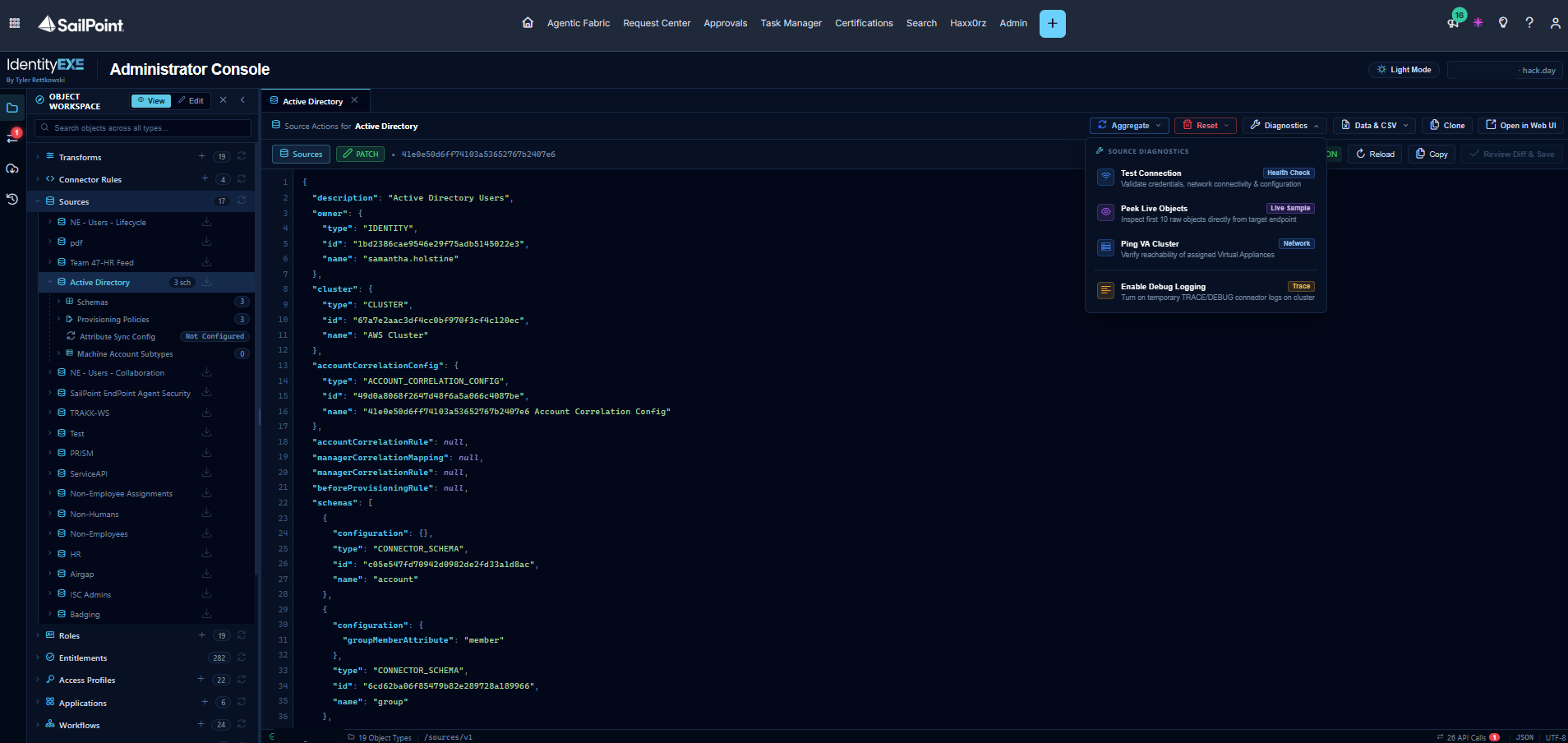
- Associated Sub-Objects Tree: Expanding a Source (such as
Active Directoryabove) in the explorer tree pulls its nested Schemas, Provisioning Policies, Attribute Sync Config, Machine Account Subtypes, and attached Connector Rules directly underneath the source node so you can open and edit each sub-object in its own tab. - Source Quick-Action Bar: When viewing a Source tab, the top toolbar exposes operational dropdown menus backed by a safety confirmation modal and a live background Task Tracker:
- Aggregate: Trigger Aggregate Accounts, Aggregate Accounts (Unoptimized) (
disableOptimization=true), or Aggregate Entitlements. - Reset: Execute Reset Accounts, Reset Entitlements, or a Full Source Reset.
- Diagnostics: Run a live Test Connection health check, Peek Live Objects (inspecting the first 10 raw objects directly from the target endpoint), Ping VA Cluster to verify Virtual Appliance reachability, or Enable Debug Logging to turn on temporary
TRACE/DEBUGconnector logs on the cluster.
- Aggregate: Trigger Aggregate Accounts, Aggregate Accounts (Unoptimized) (
3. Transform Studio & Live Identity Preview Simulator
Writing complex nested transforms in raw JSON is notoriously error-prone when you cannot immediately see the output. When we architect this solution for our enterprise clients, we utilize the integrated Transform Studio whenever a Transform object is opened in the workspace.
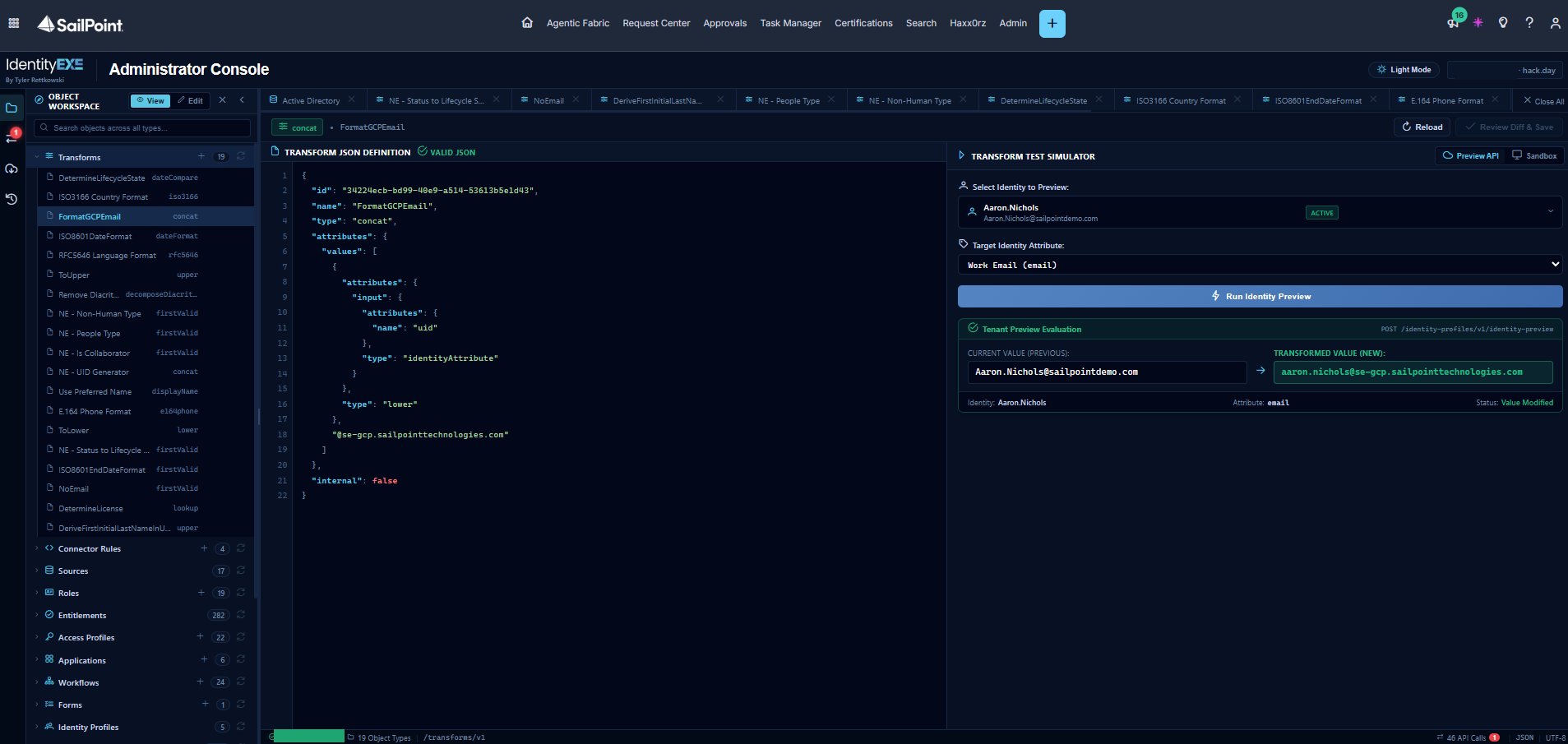
- Live Identity Preview (
POST /identity-profiles/v1/identity-preview): In the screenshot above, theFormatGCPEmail(concat) transform is open on the left while the Transform Test Simulator is active on the right. By selecting a live tenant identity (Aaron.Nichols) and a target attribute (Work Email (email)), clicking Run Identity Preview evaluates the transform against the live tenant API and displays the Current Value (Previous) alongside the Transformed Value (New) (aaron.nichols@se-gcp.sailpointtechnologies.com). - Offline Sandbox Mode: Administrators can also toggle from Preview API to Sandbox mode to test string manipulations (
lower,upper,substring,replace,concat,lookup,firstValid,dateFormat, etc.) against custom mock inputs on the fly.
4. Connector Rule Studio (Unescaped BeanShell Editor)
Connector Rules in ISC store their Java/BeanShell code inside a JSON-escaped string (sourceCode.script). Editing raw escaped strings with \n and \" characters in Postman is slow and introduces syntax defects. Opening any rule in the plugin launches Connector Rule Studio.
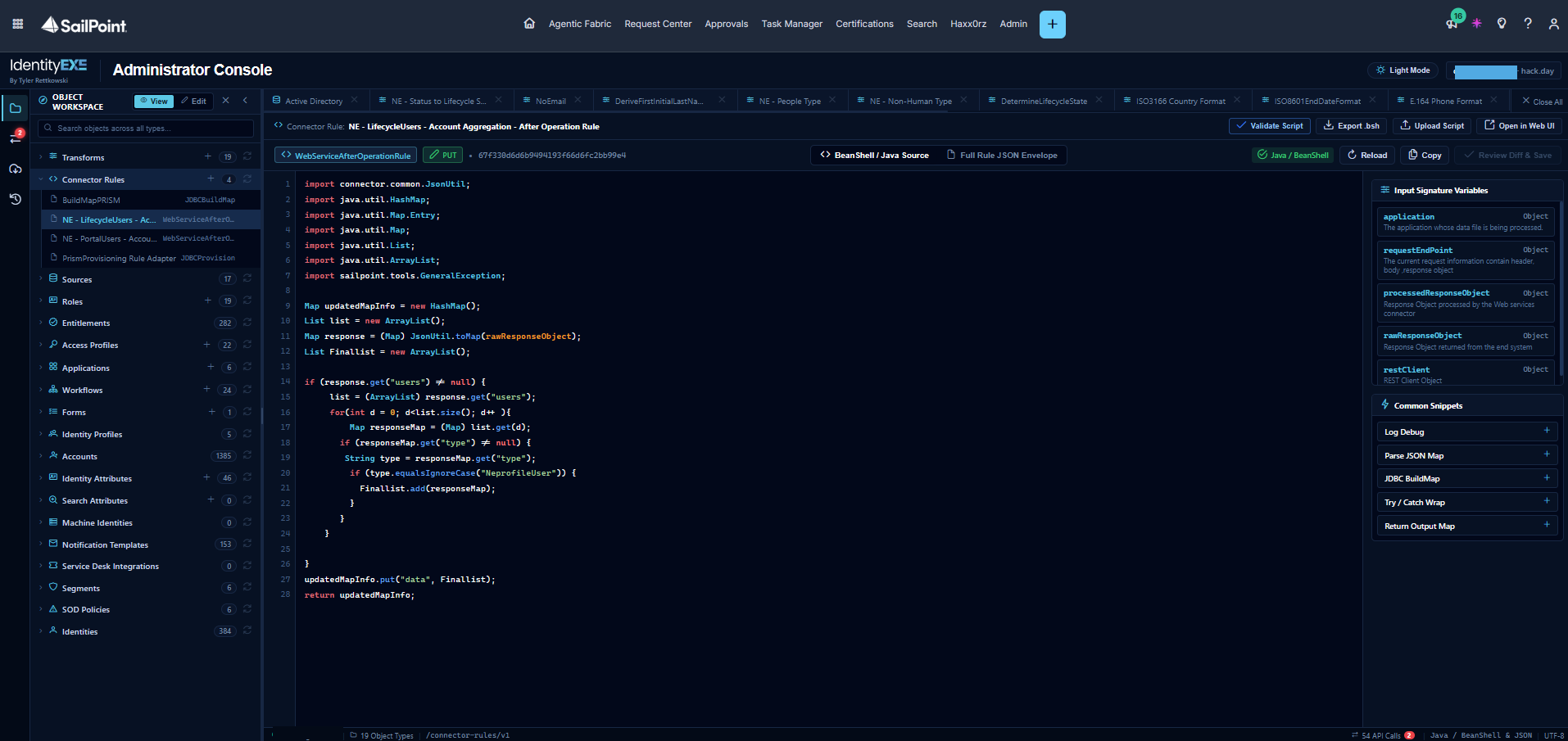
- Unescaped Java/BeanShell Editor: Extracts
sourceCode.scriptinto a dedicated code editor (BeanShell / Java Source) with full syntax highlighting while maintaining bidirectional sync with the Full Rule JSON Envelope sub-tab. Engineers can also download the raw.bshfile or upload an external script file directly into the editor. - Input Signature Variables & Common Snippets: The right-hand sidebar automatically inspects and lists the rule's declared input variables (
application,requestEndPoint,processedResponseObject,rawResponseObject,restClient, etc.) alongside one-click Common Snippets (Log Debug,Parse JSON Map,JDBC BuildMap,Try / Catch Wrap,Return Output Map). - Server-Side Script Validation: Clicking Validate Script dispatches the script to
POST /connector-rules/v1/validateto verify syntax and compilation before saving.
5. Tenant Configuration Packaging (SP-Config Export & Import)
Promoting configurations between sandbox and production tenants or capturing point-in-time backups before executing major updates typically requires configuring external CLI scripts or Postman jobs. Clicking the cloud icon in the left Activity Bar opens the built-in Tenant Configuration (SP-Config) manager.
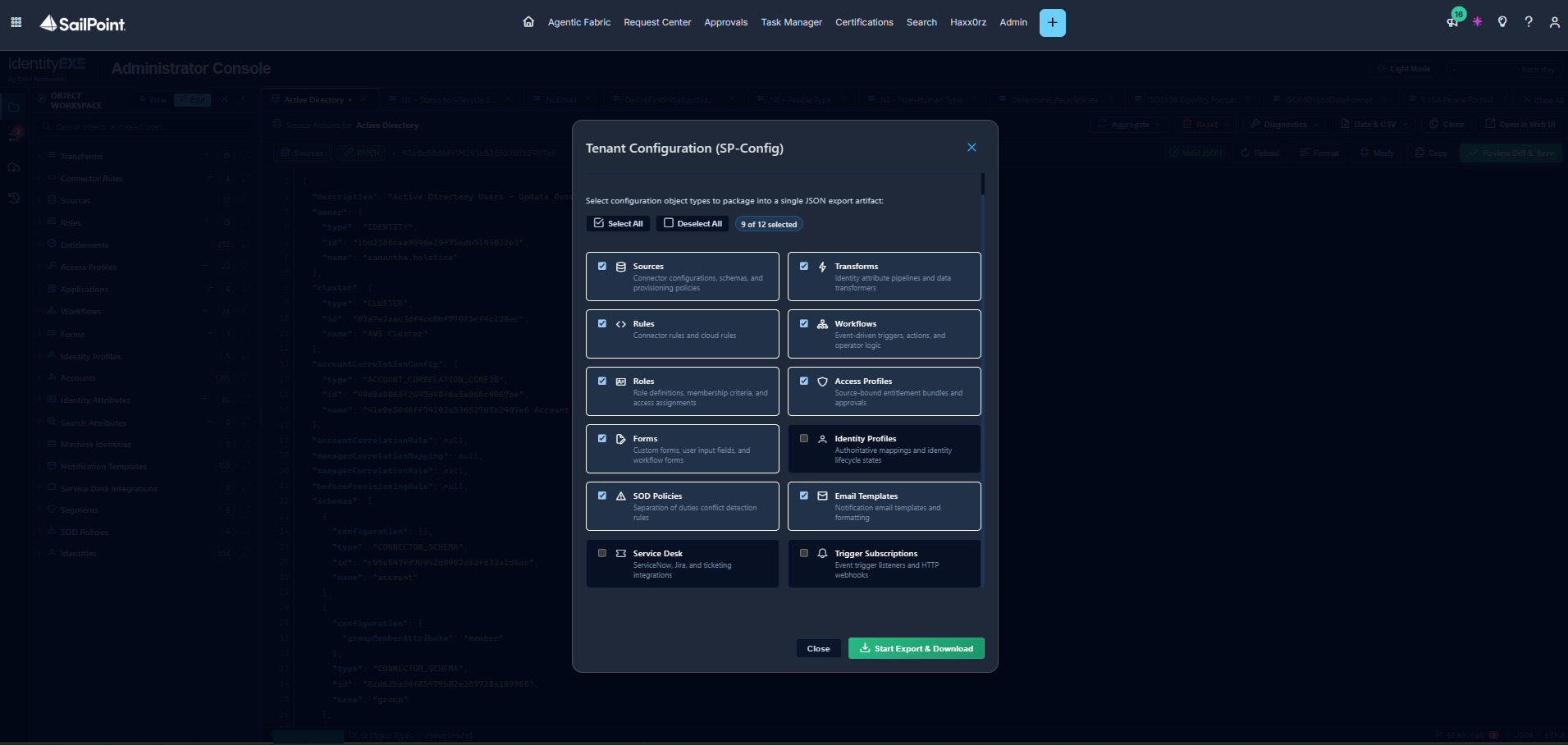
- Visual Object Type Selector: Choose any combination of the 12 supported SP-Config object types (
Sources,Transforms,Rules,Workflows,Roles,Access Profiles,Forms,Identity Profiles,SOD Policies,Email Templates,Service Desk, andTrigger Subscriptions) using quick Select All / Deselect All controls. - One-Click Export & Import: Clicking Start Export & Download queues the
/sp-config/v1/exportjob, polls its completion status automatically, and downloads the resulting JSON artifact straight to the local workstation. Administrators can also upload and preview SP-Config JSON bundles via/sp-config/v1/import.
6. Pre-Commit GitHub-Style Differential Review
This modular framework ensures that your ISC deployment avoids accidental configuration overwrites. The plugin never blindly commits an object when you click Review Diff & Save.
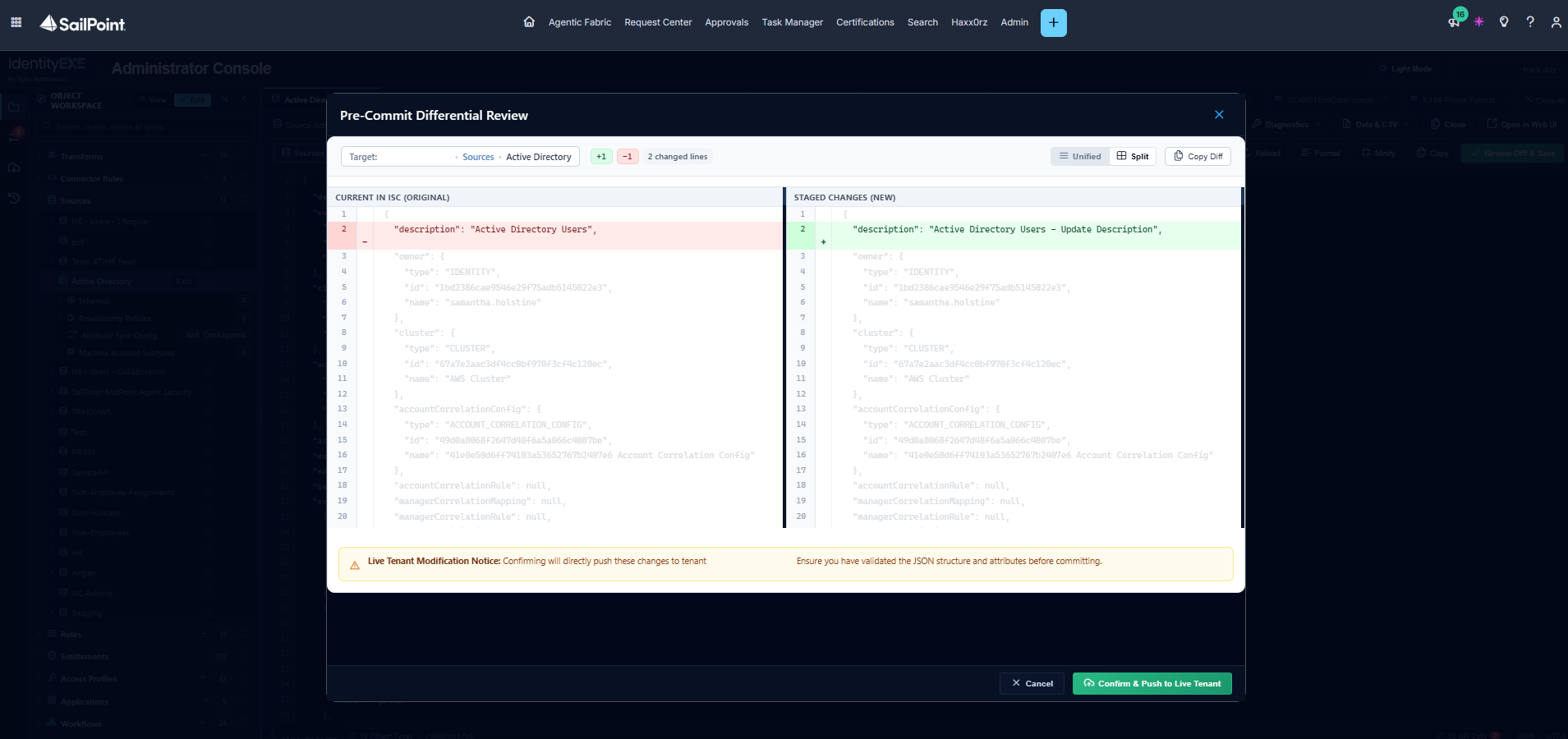
- Unified & Split Diff Views: An in-memory Longest Common Subsequence (LCS) diff engine compares Current in ISC (Original) against Staged Changes (New), highlighting exact line deletions in red (
-), additions in green (+), and word-level token differences. Engineers can switch between Unified and Split side-by-side layouts or copy the diff to the clipboard for change-control tickets. - Automatic RFC 6902 JSON Patch Generation: Once changes are verified and the administrator clicks Confirm & Push to Live Tenant, the service automatically dispatches either a full
PUTpayload or compiles the minimal RFC 6902PATCHoperations (add,remove,replace) required by that specific endpoint.
7. Built-In API & Network Activity Log Viewer
For identity architects who need to inspect the exact REST calls executing behind the scenes, troubleshoot a 400 Bad Request validation error, or export a request into an external automation script, the left Activity Bar includes a live API & Network Activity console.
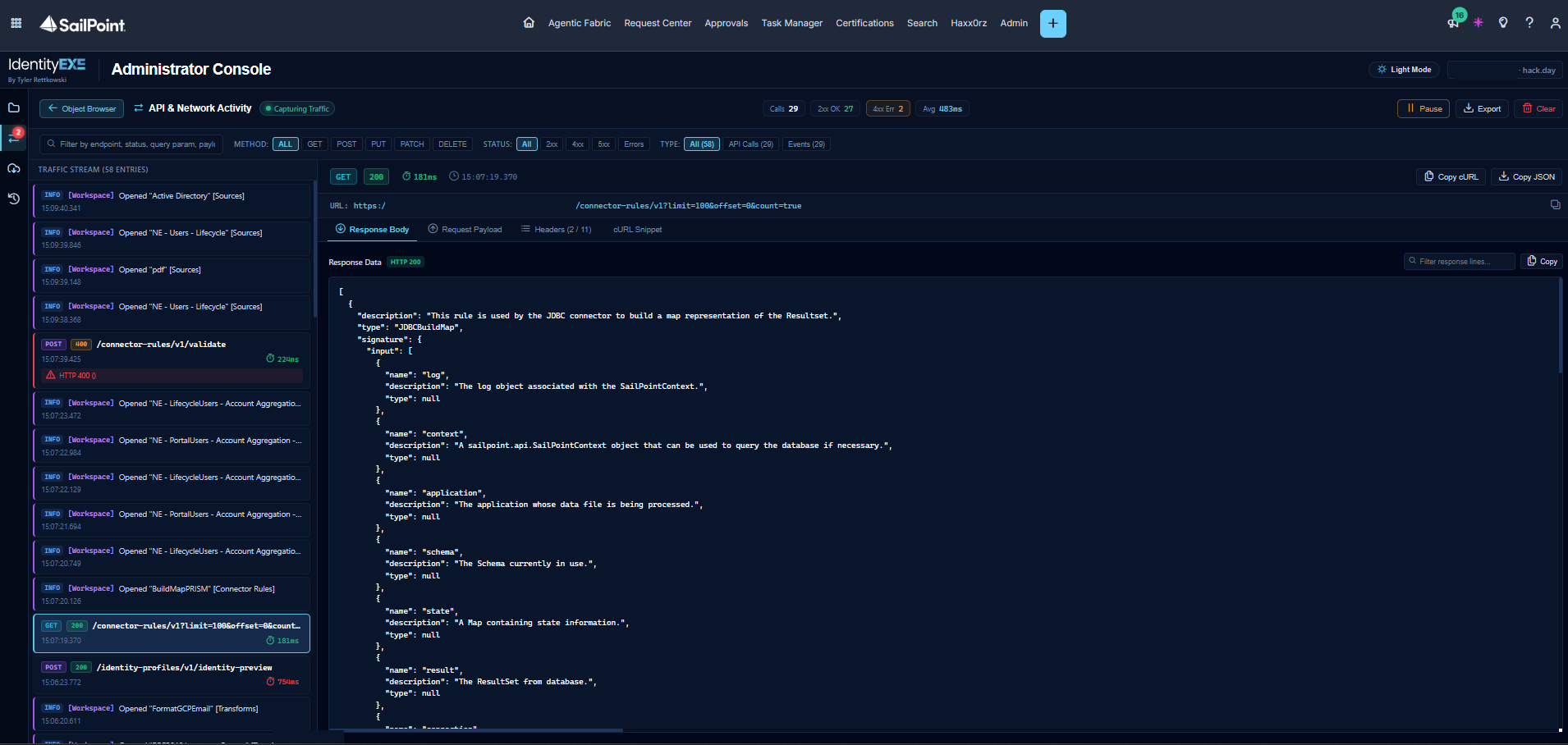
- 100% Traffic Interception & Filtering: Every outbound API request and workspace event is captured in real time, displaying total call counts,
2xx OKvs.4xx/5xxerror badges, and average roundtrip latency (Avg 483ms). You can filter the stream by HTTP method (GET,POST,PUT,PATCH,DELETE), status code, or keyword. - Payload Inspector & One-Click
Copy cURL: Selecting any entry inspects its Response Body, Request Payload, Headers, and cURL Snippet, with one-click Copy cURL and Copy JSON buttons in the upper right.
Architecture & Key Code Highlights
Our core engineering methodology structures the data layer around three foundational components inside the IdentityEXE implementation blueprint:
1. UI Plugin Manifest (sp-ui-plugin.json)
The plugin is packaged and deployed via the SailPoint CLI (sail ui-plugins upload). It mounts into the full-page slot and communicates with the ISC host frame through @sailpoint/ui-plugin-sdk without exposing static client credentials in the browser:
{
  "version": 1,
  "manifest": {
    "alias": "isc-debug-mode-identityexe",
    "name": {
      "en": "Administrator Console"
    },
    "description": {
      "en": "VS Code-style backend object browser, specialized studios, JSON code editor, and differential change engine for SailPoint Identity Security Cloud"
    },
    "apiScopes": [
      "sp:scopes:all"
    ],
    "contentSecurityPolicies": {},
    "permissionPolicy": {},
    "iframeAllow": {},
    "state": "ENABLED",
    "slots": [
      {
        "slotId": "full-page"
      }
    ]
  },
  "build": {
    "outDir": "./dist/isc-debug-mode-identityexe/browser",
    "port": 4200
  }
}
2. Automatic RFC 6902 JSON Patch Generation (diff-engine.service.ts)
Different ISC endpoints enforce different update semantics: endpoints like /transforms/v1 and /connector-rules/v1 expect a full PUT replacement, while endpoints like /sources/v1, /roles/v1, and /access-profiles/v1 require an RFC 6902 PATCH array. Rather than forcing engineers to hand-write JSON Patch arrays, DiffEngineService recursively walks the baseline JSON tree against the edited JSON tree and compiles the exact patch operations automatically:
generateJsonPatch(originalObj: Record<string, unknown>, modifiedObj: Record<string, unknown>): JsonPatchOp[] {
  const ops: JsonPatchOp[] = [];

  const walk = (orig: unknown, mod: unknown, path: string) => {
    if (orig === mod) return;

    if (orig === null || orig === undefined || typeof orig !== 'object' ||
        mod === null || mod === undefined || typeof mod !== 'object' ||
        Array.isArray(orig) !== Array.isArray(mod)) {
      ops.push({ op: 'replace', path: path || '/', value: mod });
      return;
    }

    if (Array.isArray(orig) && Array.isArray(mod)) {
      if (JSON.stringify(orig) !== JSON.stringify(mod)) {
        ops.push({ op: 'replace', path, value: mod });
      }
      return;
    }

    const origKeys = Object.keys(orig as Record<string, unknown>);
    const modKeys = Object.keys(mod as Record<string, unknown>);

    for (const k of origKeys) {
      if (!(k in (mod as Record<string, unknown>))) {
        ops.push({ op: 'remove', path: `${path}/${k}` });
      }
    }

    for (const k of modKeys) {
      const origVal = (orig as Record<string, unknown>)[k];
      const modVal = (mod as Record<string, unknown>)[k];

      if (!(k in (orig as Record<string, unknown>))) {
        ops.push({ op: 'add', path: `${path}/${k}`, value: modVal });
      } else {
        walk(origVal, modVal, `${path}/${k}`);
      }
    }
  };

  walk(originalObj, modifiedObj, '');
  return ops;
}
3. Live Transform Preview Evaluation (debug-mode-api.service.ts)
To evaluate transforms against live identities in Transform Studio, our API orchestration layer wraps the transform reference into an identityAttributeConfig payload and posts it directly to /identity-profiles/v1/identity-preview:
async previewTransformOnIdentity(
  identityId: string,
  transformName: string,
  attributeName = 'displayName'
): Promise<IdentityPreviewResult> {
  const payload = {
    identityId,
    identityAttributeConfig: {
      enabled: true,
      attributeTransforms: [
        {
          identityAttributeName: attributeName,
          transformDefinition: {
            type: 'reference',
            attributes: { id: transformName },
          },
        },
      ],
    },
  };

  const res = await this.plugin.post<any>('/identity-profiles/v1/identity-preview', payload);
  const previewAttrs = Array.isArray(res?.previewAttributes) ? res.previewAttributes : [];
  const targetAttr = previewAttrs.find((a: any) => a.name === attributeName) || previewAttrs[0];

  return {
    success: !targetAttr?.errorMessages?.length,
    identityName: res?.identity?.name || identityId,
    attributeName: targetAttr?.name || attributeName,
    previousValue: targetAttr ? targetAttr.previousValue : null,
    newValue: targetAttr ? targetAttr.value : null,
    rawResponse: res,
  };
}
Considerations & Production Best Practices
When deploying the Administrator Console UI Plugin across enterprise ISC environments, enforce the following operational guardrails:
- Read-Only by Default: Keep the workspace in View mode during routine troubleshooting and inspection. Only toggle Edit mode when you intend to stage and review modifications.
- Always Inspect the Pre-Commit Diff: Before committing changes to shared objects like Sources, Identity Profiles, or Roles, verify the green (
+) and red (-) lines in the Pre-Commit Differential Review modal to ensure no unintended attributes were altered. - Take SP-Config Snapshots Before Major Edits: Use the built-in SP-Config exporter to download a backup bundle of your target object types before executing bulk configuration updates.
- Caution with Source Reset Operations: Actions under the Reset menu (Reset Accounts, Reset Entitlements, Full Source Reset) remove aggregated data from the tenant. Always verify the Source Name and Cloud External ID in the confirmation dialog before proceeding.
Resources & Implementation Artifacts
All source code, specialized studio components, and the UI plugin manifest are available in the official GitHub repository:
rettkowskityler / ui-plugin-admin-console-identityexe
Complete Angular 21 project, PrimeNG theme integration, 19-object catalog, Transform & Connector Rule Studios, LCS Diff Engine, and SP-Config manager.
Inside the repository you will find:
- Complete Angular 21 Project: Full workspace layout and PrimeNG theme synchronization (
src/app/). - UI Plugin Manifest: Configured for the full-page slot and scoped tenant permissions (
sp-ui-plugin.json). - 19-Object Catalog & Schema Templates: Complete object definitions and guided creation templates (
debug-mode.models.ts). - REST API Orchestration Service: Modern
/v1endpoint integration and fallback routing (debug-mode-api.service.ts). - Specialized Studios & Engines: Transform Studio, Connector Rule Studio, the LCS Diff Engine (
diff-engine.service.ts), SP-Config manager, and the API Activity Log Viewer.
Conclusion
Fragmented external tooling and blind API overwrites do not have to be an accepted reality of administering SailPoint Identity Security Cloud. By embedding a VS Code-style 19-object explorer, specialized Transform and Connector Rule studios, real-time source diagnostics, SP-Config packaging, a pre-commit RFC 6902 diff engine, and a live API traffic logger directly inside the ISC browser UI, the Administrator Console UI Plugin restores the unified /debug control plane that enterprise identity teams demand.
A stalled identity governance rollout burns capital and stalls organizational momentum.
If your team is hitting configuration walls or struggling with complex ui-plugin-ISC-Debug-Mode integrations, stop guessing. Book a targeted SailPoint Architecture Review directly with our engineering team to map out a clear path forward.