UI Plugin Role Refresher in Identity Security Cloud

Tyler
IdentityEXE Founder
Executive Summary
In SailPoint Identity Security Cloud (ISC), updating automated role criteria carries real operational risk. Role membership relies on nested criteria trees built from identity attributes, connected source accounts, and entitlements. However, the ISC console does not let you preview or simulate criteria changes before you save them. To see who qualifies, administrators have to click "Apply Changes." That action launches a background recalculation across every identity in the tenant. In large environments with hundreds of thousands of users, this global update can take hours and tie up valuable system resources.
Leaving this gap unsolved creates heavy operational and compliance fallout. A single logic mistake in a nested rule, such as mixing up AND and OR logic, misunderstanding negation rules, or misconfiguring multi-value attributes, can strip essential birthright access from hundreds of users. This halts daily business operations and spikes helpdesk tickets. On the other side, a bad rule can silently grant privileged roles to users who should never have them, causing immediate SOX audit failures and major security gaps. When teams scramble to fix bad assignments, managers face approval fatigue during emergency reviews, and engineers lose hours waiting for tenant recalculation queues to clear.
To solve this problem, IdentityEXE developed a repeatable architectural methodology: an interactive role criteria simulator built directly inside ISC using the SailPoint UI Plugin SDK. This framework parses role criteria trees in memory, calculates real-time deltas (+ Will Gain, - Will Lose, = Retained) against live tenant data, and flags deprovisioning risks before anything changes in production. Once validated, administrators can run targeted identity recalculations for only the affected users through modern /identities/v1/process endpoints. Instead of gambling on global tenant updates, identity teams get immediate visibility and precise control.
Solution Overview & Architectural Flow
When we architect this solution for enterprise clients, we utilize the official SailPoint UI Plugin Framework (@sailpoint/ui-plugin-sdk), Angular 21, TypeScript, PrimeNG components, modern SailPoint /v1 REST APIs, and an automated PowerShell validation suite.
Our core engineering methodology structures the data layer to run directly inside the administrator's browser in an isolated iframe. Tenant data never leaves your ISC session:
- Criteria Tree Ingestion: The plugin reads the raw JSON criteria tree for the selected role via
GET /roles/v1/{id}. - Criteria Parsing: An in-memory evaluation engine parses the rule tree (
AND,OR) and resolves leaf conditions (IDENTITY,ENTITLEMENT,ACCOUNT). - Query Resolution: Identity attributes and entitlement conditions are folded into high-speed Elasticsearch queries via
POST /search/v1. Account attribute conditions are resolved using scopedGET /accounts/v1queries with concurrent pagination. - Differential Impact Categorization: The engine queries live role assignments via
GET /roles/v1/{id}/assigned-identitiesand compares the active state against the predicted qualifying set. Users are grouped into three clear cohorts:- + Will Gain Role: Users who satisfy the criteria but do not currently have the role.
- - Will Lose Role: Active role members who fail the criteria and face deprovisioning.
- = Retained Members: Existing members whose role qualification remains valid.
- Targeted Recalculation Dispatch: Administrators inspect the simulated delta and dispatch targeted identity recalculations via
POST /identities/v1/processin batches of 250, processing only impacted users without triggering global tenant updates.
Interactive In-Tenant Workflow Walkthrough
This modular framework ensures that your ISC deployment avoids guesswork by giving administrators complete visibility before criteria changes are applied.
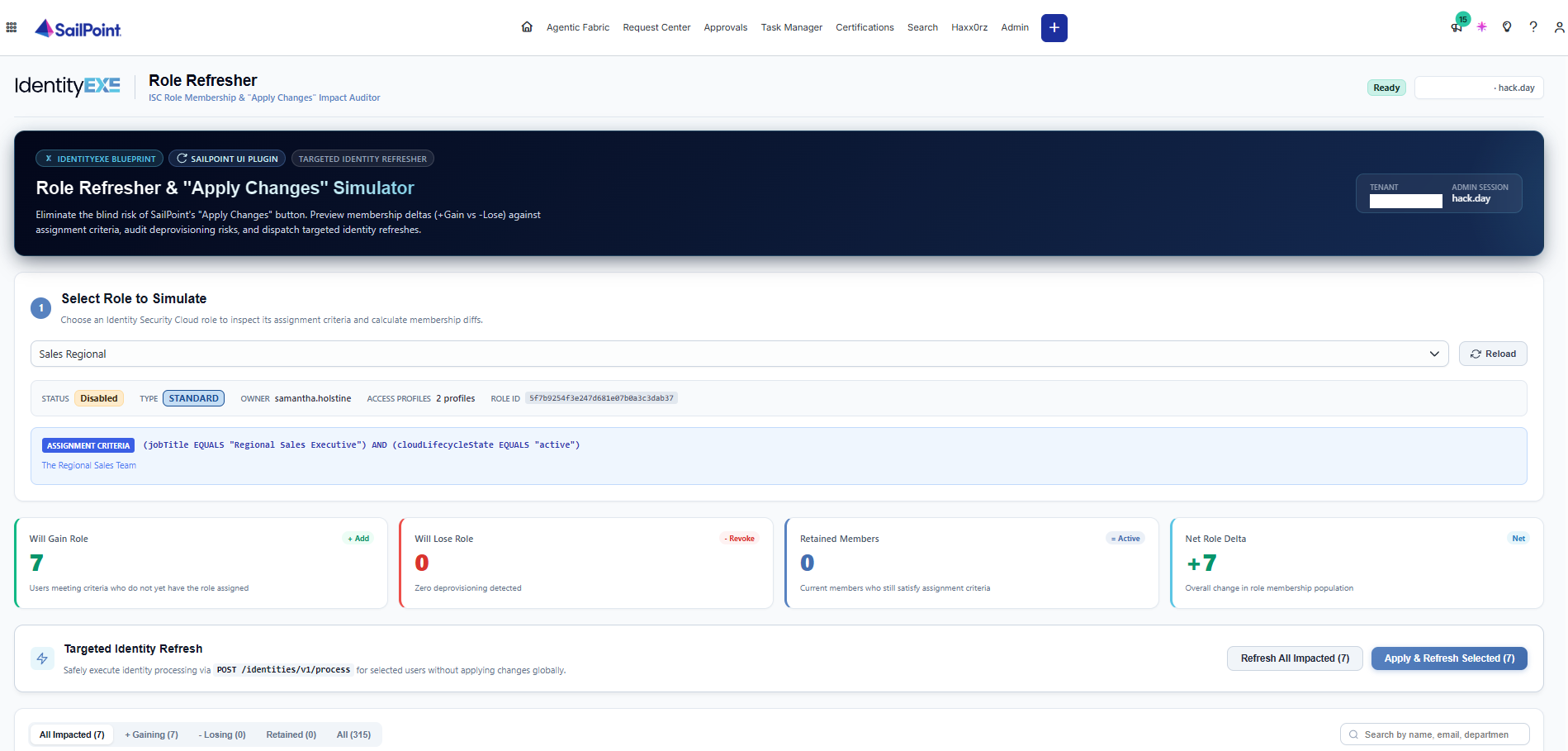
1. Inspecting Criteria & Real-Time Impact KPIs
Selecting a role from the dropdown immediately converts the raw JSON criteria into a clean, human-readable expression and calculates the impact metrics.
In this execution, the role criteria defines (jobTitle EQUALS "Regional sales Executive") AND (cloudLifecycleState EQUALS "active"). The KPI cards show:
- 7 Will Gain Role: Users in the tenant who match the criteria but do not have the role assigned yet.
- 0 Will Lose Role: Zero deprovisioning risk.
- 0 Retained Members: Baseline existing assignments.
- +7 Net Role Delta: Expected net role change across the enterprise.
2. Previewing Identities Gaining Access
Filtering by + Gaining isolates the exact employee population scheduled to receive the role upon recalculation:
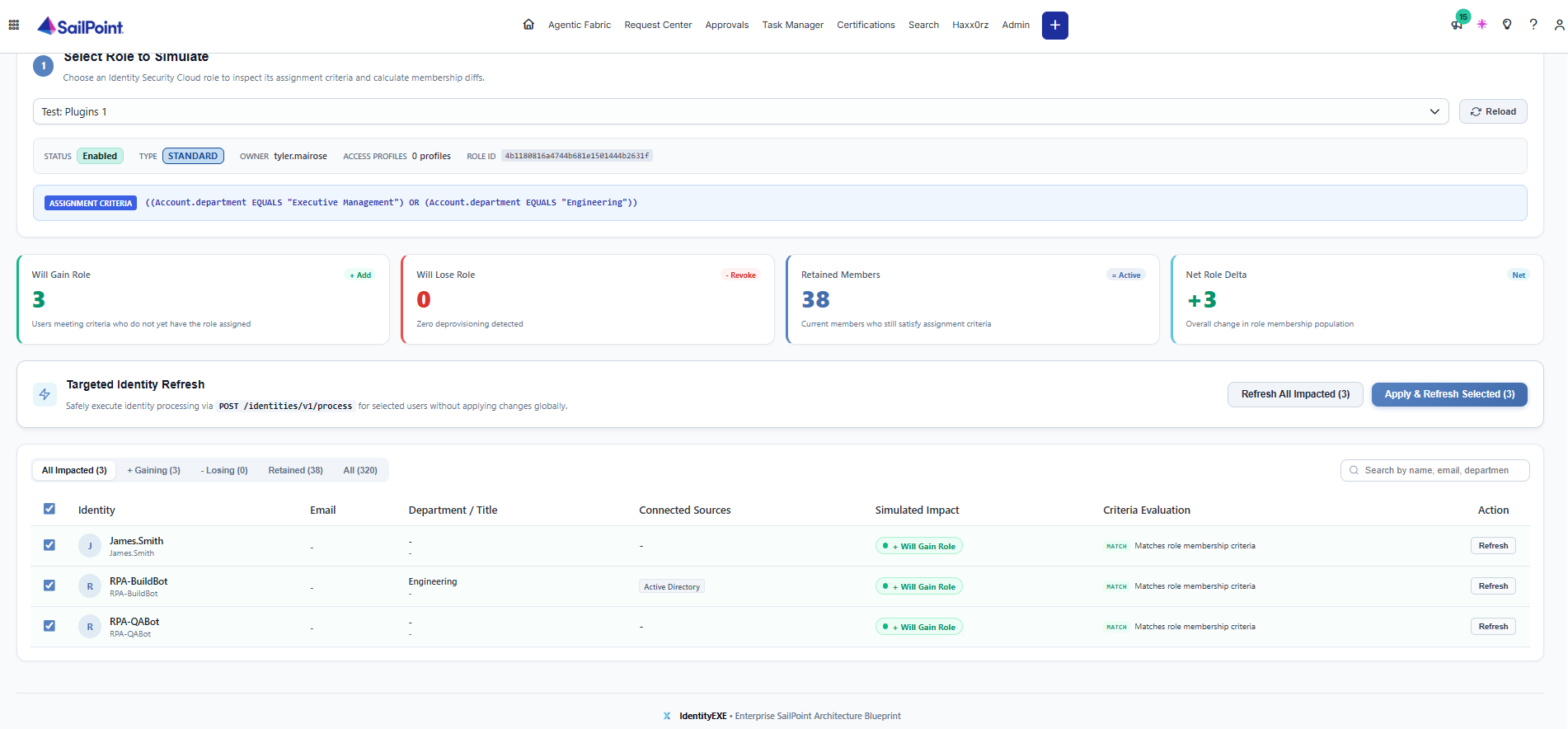
Each identity row displays key context: display name, username, email, department, job title, connected sources (Active Directory, HR, PRISM), match status, and an individual Refresh button for immediate single-user validation.
3. Catching Deprovisioning Risks Before They Happen
The most dangerous risk during role maintenance is accidentally revoking access from active users. If criteria logic is modified (for example, tightening a department condition or adding a source account filter), users who currently hold the role but fail the updated expression will lose access during the next recalculation.
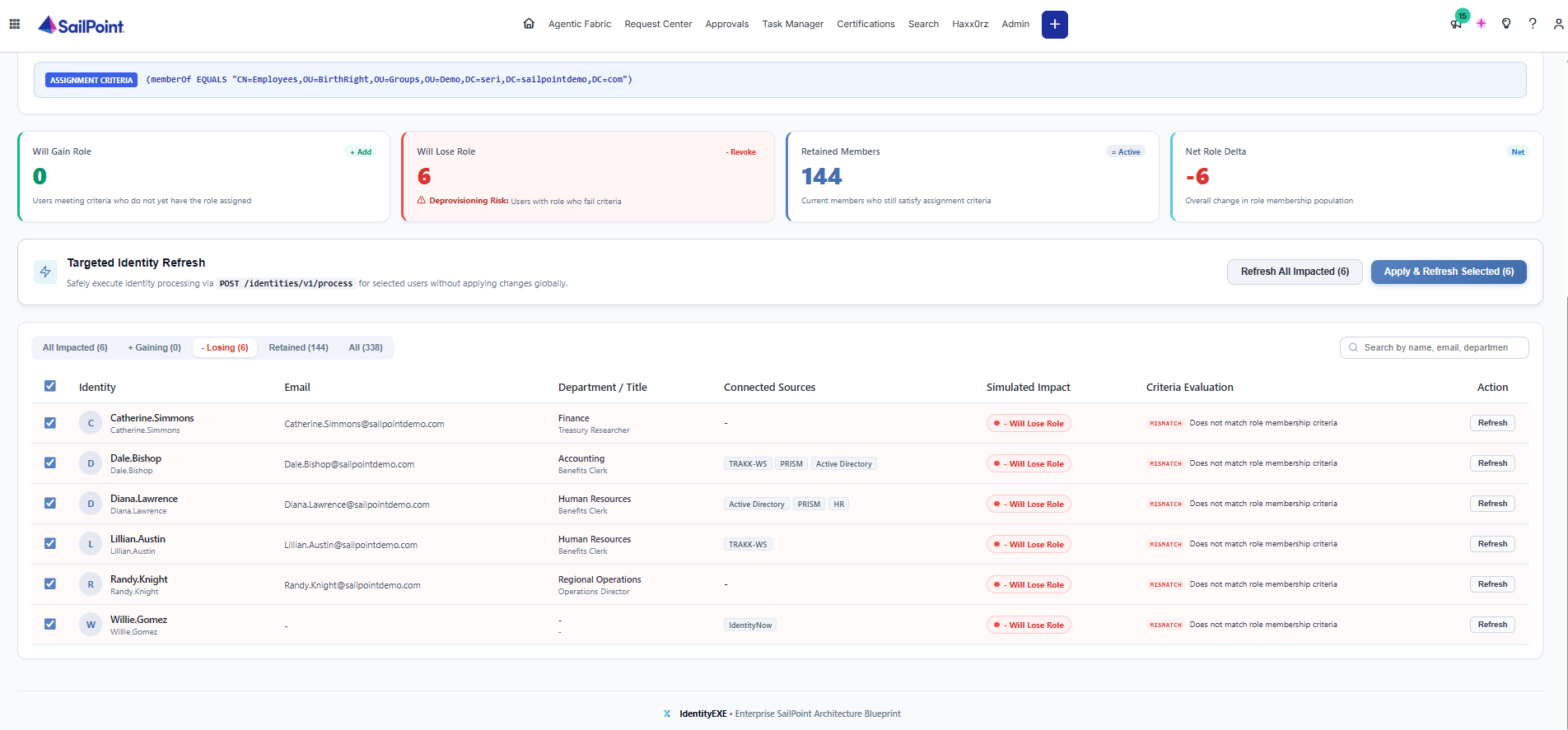
The IdentityEXE implementation framework flags this scenario immediately with a clear Deprovisioning Risk banner. In the example above, 6 active employees currently holding the role fail the updated criteria. Identity engineers can audit each account, verify whether the revocation is intended, or adjust the criteria logic before a single downstream account is touched.
4. Dispatching Targeted Recalculations
Once the membership delta has been verified, administrators can either process the entire impacted delta via Refresh All Impacted or select individual accounts and click Apply & Refresh Selected.
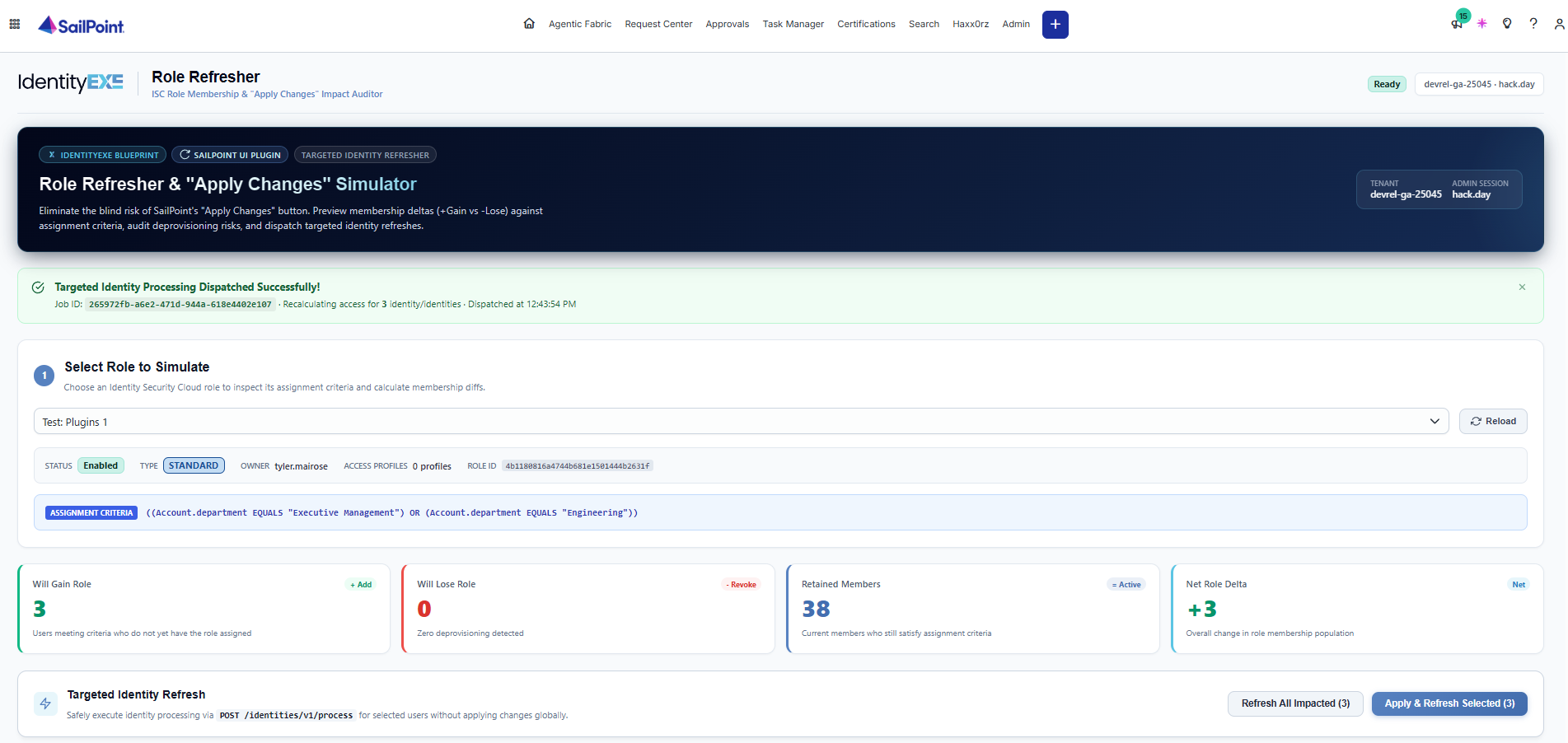
The plugin dispatches asynchronous processing tasks via modern POST /identities/v1/process endpoints, displaying the execution Job ID and timestamp in an alert banner. Rather than waiting hours for the entire tenant to recalculate, only the selected accounts are processed, completing in seconds.
Architecture & Implementation Deep Dive
Building a client-side criteria simulator that mirrors SailPoint ISC's backend recalculation engine requires strict adherence to security boundaries and API protocols.
1. Sandboxed UI Plugin Manifest (sp-ui-plugin.json)
The plugin registers with the tenant using the official SailPoint CLI (sail ui-plugins). It operates in a sandboxed iframe using the full-page slot and communicates with the host window using the cross-origin postMessage protocol (COIP):
{
  "version": 1,
  "manifest": {
    "alias": "role-refresher",
    "name": {
      "en": "Role Refresher & Criteria Simulator"
    },
    "description": {
      "en": "Interactive ISC role membership preview and targeted identity recalculation simulator"
    },
    "apiScopes": [
      "sp:scopes:all"
    ],
    "contentSecurityPolicies": {},
    "permissionPolicy": {},
    "iframeAllow": {},
    "state": "ENABLED",
    "slots": [
      {
        "slotId": "full-page"
      }
    ]
  },
  "build": {
    "outDir": "./dist/role-refresher/browser",
    "port": 4200
  }
}
Because the plugin requests scoped OAuth tokens directly from the host application session, no static secrets or credentials reside in the browser. This preserves zero-trust security invariants across the tenant.
2. Modern /v1 REST API Stack
Our core engineering methodology structures the data layer exclusively on modern, supported /v1 REST endpoints:
| Endpoint | Method | Architectural Role |
|---|---|---|
| /roles/v1 | GET | Discovers tenant roles and extracts raw JSON criteria trees. |
| /roles/v1/{id}/assigned-identities | GET | Retrieves current active role memberships for delta comparisons. |
| /sources/v1 | GET | Dynamically discovers and maps authoritative connected sources by ID. |
| /search/v1 | POST | Executes high-performance identity index lookups and nested @access queries. |
| /accounts/v1?filters=sourceId eq "..." | GET | Queries source-scoped accounts with concurrent pagination. |
| /identities/v1/process | POST | Dispatches batched targeted recalculation tasks (requires X-SailPoint-Experimental: true). |
Replicating ISC Criteria Evaluation Mechanics
SailPoint ISC stores role assignment rules as recursive JSON trees composed of branch nodes (AND, OR) and leaf conditions (IDENTITY, ENTITLEMENT, ACCOUNT). To build an accurate simulator, we developed an in-memory Abstract Syntax Tree evaluator in TypeScript (criteria-tree-parser.ts and leaf-resolver.ts).
Live testing revealed key nuances in how ISC recalculates membership:
A. Branch Folding for Identity and Entitlement Leaves
Issuing individual REST queries for every leaf condition introduces massive latency. Our engineering framework folds sibling IDENTITY and ENTITLEMENT leaves within an AND or OR branch into a single consolidated Elasticsearch query against POST /search/v1. This allows deep criteria structures to resolve in a single network round-trip:
export function toEsClause(field: string, operation: LeafOperation, value: string): string {
  const v = escapeEsValue(value);
  switch (operation) {
    case 'EQUALS':
      return `${field}:"${v}"`;
    case 'NOT_EQUALS':
      return `NOT ${field}:"${v}"`;
    case 'CONTAINS':
      return `${field}:*${v}*`;
    case 'DOES_NOT_CONTAIN':
      return `NOT ${field}:*${v}*`;
    case 'STARTS_WITH':
      return `${field}:${v}*`;
    case 'ENDS_WITH':
      return `${field}:*${v}`;
    default:
      return `${field}:"${v}"`;
  }
}
B. The Entitlement Attribute Prefix Gotcha
In ISC role criteria JSON definitions, entitlement property names are stored with an attribute. prefix (such as attribute.memberOf). However, when querying the nested Elasticsearch index via @access(...), ISC indexes the field name directly without the prefix (memberOf). Retaining the prefix results in zero returned matches. The resolver strips this prefix before generating the Elasticsearch query:
export function buildEntitlementAccessClause(condition: LeafCondition, warnings: string[]): string {
  const innerClauses = ['type:ENTITLEMENT'];
  if (condition.sourceId) {
    innerClauses.push(`source.id:"${escapeEsValue(condition.sourceId)}"`);
  }
  // Strip 'attribute.' prefix: ISC criteria stores 'attribute.memberOf',
  // but Elasticsearch nested index expects 'memberOf'.
  const attributeName = condition.property.replace(/^attribute\./, '');
  innerClauses.push(`attribute:"${escapeEsValue(attributeName)}"`);
  innerClauses.push(toEsClause('value', condition.operation, condition.value));

  return `@access(${innerClauses.join(' AND ')})`;
}
C. Account Attribute Query Limitations & Concurrent Pagination
When evaluating ACCOUNT leaves, custom account attributes (such as attributes.costCenter or attributes.division) cannot be queried server-side via /accounts/v1?filters=.... The API rejects unindexed attributes with a 400 Bad Requesterror ("Attribute is not queryable").
To bypass this restriction, our implementation scopes the query strictly to the source (sourceId eq "..."), reads total records from the X-Total-Count header using count: true, and fans out remaining page requests concurrently via RxJS mergeMap (capped at 6 concurrent connections). Attribute comparisons are then evaluated client-side in memory:
export function accountMatchesCondition(
  account: { attributes?: Record<string, unknown> | null },
  condition: LeafCondition,
): boolean {
  const key = condition.property.replace(/^attribute\./, '');
  const raw = account.attributes?.[key];
  if (raw == null) {
    return condition.operation === 'NOT_EQUALS' || condition.operation === 'DOES_NOT_CONTAIN';
  }
  const actual = String(raw).toLowerCase();
  const expected = (condition.value ?? '').toLowerCase();
  switch (condition.operation) {
    case 'EQUALS':
      return actual === expected;
    case 'NOT_EQUALS':
      return actual !== expected;
    case 'CONTAINS':
      return actual.includes(expected);
    case 'DOES_NOT_CONTAIN':
      return !actual.includes(expected);
    case 'STARTS_WITH':
      return actual.startsWith(expected);
    case 'ENDS_WITH':
      return actual.endsWith(expected);
    default:
      return false;
  }
}
D. Replicating Account Negation Semantics
A critical behavioral nuance in SailPoint ISC is how negative account operations (NOT_EQUALS, DOES_NOT_CONTAIN) function. In ISC, an identity satisfies a negative account condition if they do not possess a disqualifying account on that source. This includes identities whose account attribute is empty or null, as well as identities that possess no account on the source whatsoever. The engine mirrors this logic by isolating disqualifying accounts and inverting that set across the entire tenant identity baseline.
E. Case-Insensitive String Normalization
Native ISC recalculations treat string comparisons (EQUALS, CONTAINS, STARTS_WITH, ENDS_WITH) case-insensitively. The client-side parser normalizes all values to lowercase to prevent false simulation mismatches.
Targeted Recalculation via /identities/v1/process
When refreshing identities from the UI, the component batches target identity IDs into chunks of 250 (the hard limit enforced by the ISC endpoint) and dispatches processing tasks asynchronously:
protected async processSelectedIdentities(target: 'SELECTED' | 'ALL_IMPACTED'): Promise<void> {
  const idsToProcess = (target === 'SELECTED')
    ? this.evaluatedIdentities().filter(i => i.selected).map(i => i.id)
    : this.evaluatedIdentities().filter(i => i.changeType === 'GAIN' || i.changeType === 'LOSE').map(i => i.id);

  if (idsToProcess.length === 0) return;

  const batch = idsToProcess.slice(0, 250);
  this.isProcessing.set(true);

  try {
    const res = await firstValueFrom(
      this.identitiesSvc.startIdentityProcessingV1({
        processIdentitiesRequest: { identityIds: batch },
        xSailPointExperimental: 'true',
      })
    );

    this.lastProcessResult.set({
      taskId: res.id || 'Task Dispatched',
      count: batch.length,
      timestamp: new Date().toLocaleTimeString(),
    });
  } finally {
    this.isProcessing.set(false);
  }
}
Empirical Validation: 100% Equivalence Across 163 Scenarios
Deploying a client-side criteria simulator into an enterprise production environment demands mathematical certainty that its predictions match SailPoint's native backend engine with 100% fidelity across all edge cases.
To prove absolute equivalence, IdentityEXE developed an automated empirical test framework:
Test Matrix Specification
163 distinct test roles covering every possible criteria permutation:
- 40 Identity Attribute scenarios: Multi-value arrays, prefix, suffix, substring containment, negation, and pairwise AND/OR.
- 21 Entitlement scenarios: Multi-entitlement trees, cross-source rules, and nested access evaluations.
- 32 Account Attribute scenarios: Single and multi-attribute rules across connected sources, casing tests, and negation branches.
- 70 Multi-Type Cross-Combinations: Complex tri-type trees combining Identity Attributes, Account Attributes, and Entitlements.
Automated Validation Script
End-to-end PowerShell orchestration against live ISC APIs:
- Authenticates via OAuth2 client credentials.
- Provisions all 163 test roles into the live tenant via
POST /roles/v1. - Executes client-side engine evaluation to predict qualifying identities.
- Triggers native tenant recalculation via
POST /identities/v1/process. - Polls live assignments via
POST /search/v1, asserting zero set difference (Missing = 0, Extra = 0). - Executes automated teardown, returning tenant to clean state.
Execution Walkthrough
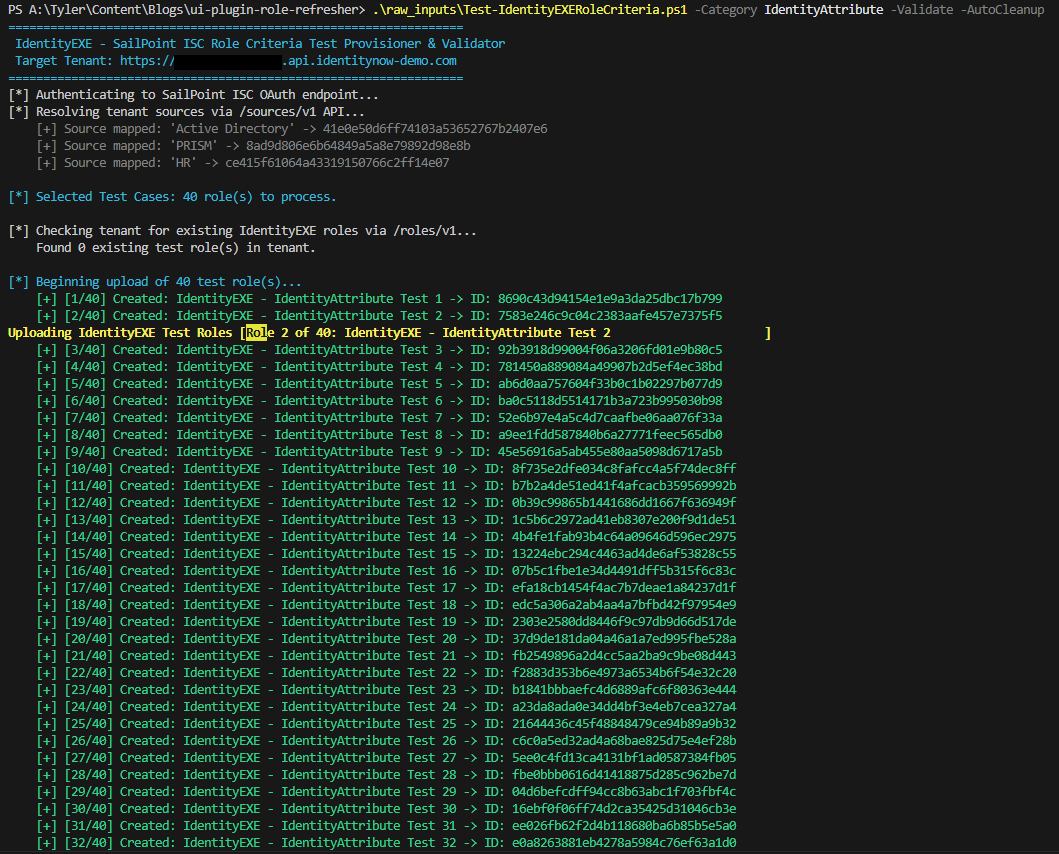
Executing the validation suite begins with provisioning all 163 role definitions into the target tenant:
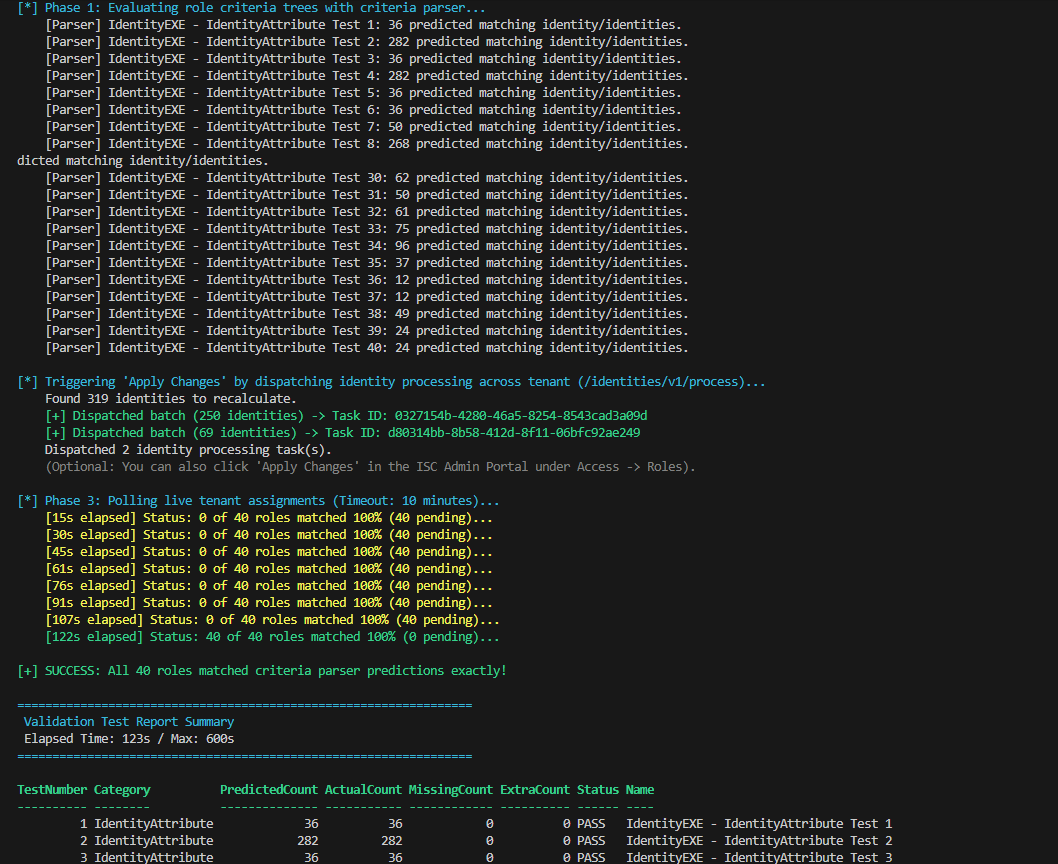
Once roles are staged, the test harness predicts qualifying identity sets, dispatches batch identity recalculations across the tenant, and continuously polls assignment states:
Within approximately two minutes, the tenant completes recalculation. The harness evaluates set differences across every test role, verifying that every single role assignment matches engine predictions with zero variance:
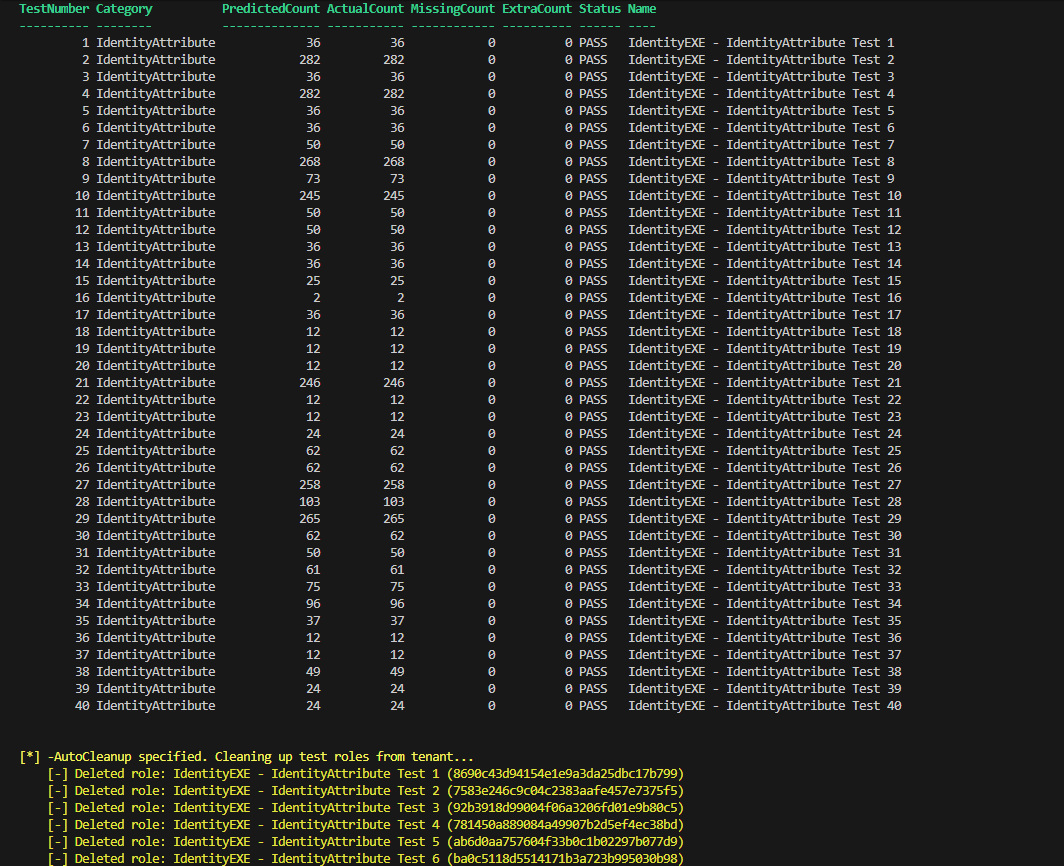
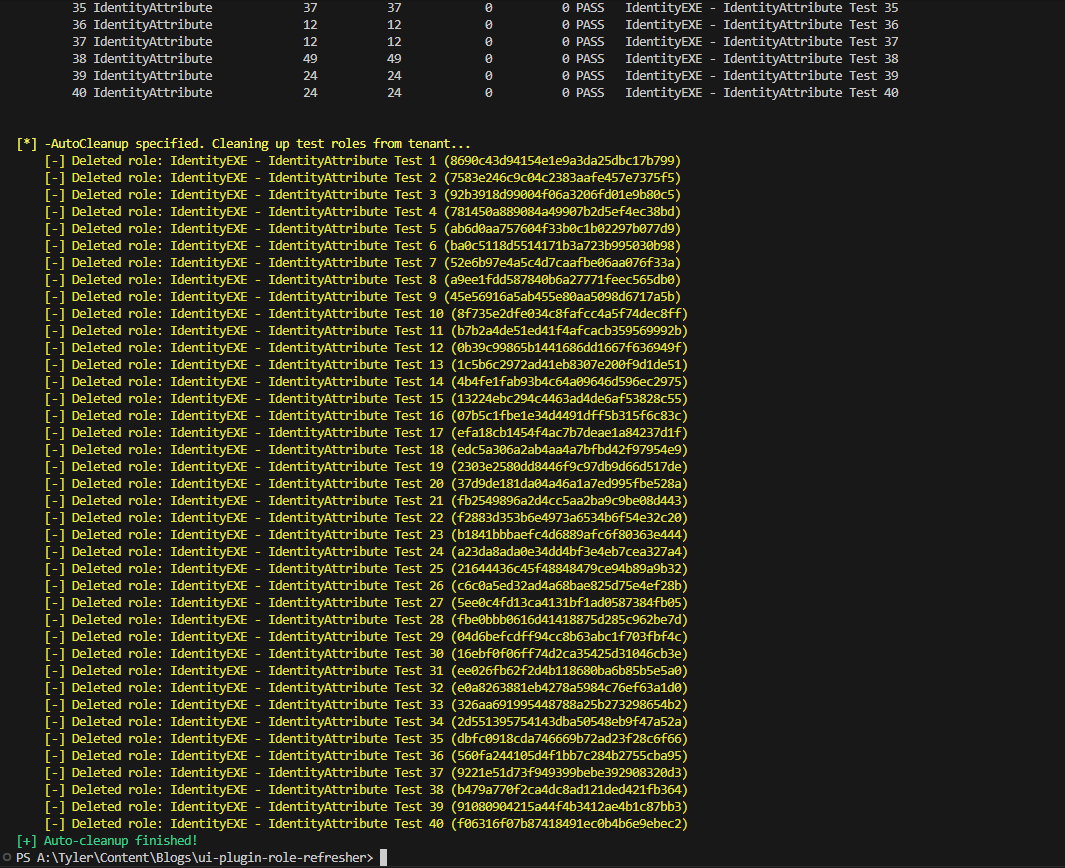
Every single test case achieved PASS status with 0 missing and 0 extra identities. Upon verification, the script automatically tears down all temporary test roles, preserving tenant integrity:
Enterprise Considerations & Production Best Practices
When architecting role simulation and targeted recalculation within enterprise tenants, incorporate these engineering guardrails:
- Respect Batch Size Constraints: The
POST /identities/v1/processendpoint strictly enforces a 250-identity ceiling per request. Exceeding this limit causes immediate HTTP 400 rejection. Implement client-side chunking and throttle execution intervals to prevent tenant rate limiting. - Account Attribute Memory Management: Because custom account attributes cannot be filtered server-side via
/accounts/v1, populations must be evaluated in memory. For sources containing more than 50,000 accounts, scope queries strictly to required sources and evaluate cache policies to preserve client browser performance. - Deprovisioning Governance Gates:Never automate bulk recalculation without presenting explicit deprovisioning metrics to administrators. A sudden spike in "Will Lose Role" counts should mandate manual sign-off to ensure business-critical access is not severed accidentally.
- Staged Sandbox Validation: Run empirical equivalence test suites in staging tenants prior to deploying custom UI plugins or scripts to production environments, especially after major SailPoint platform release waves.
Resources & Source Code
All source code, configuration manifests, and validation test suites are open source and available directly in the GitHub repository:
rettkowskityler / Role-Refresher-IdentityEXE
Complete Angular 21 project, PrimeNG UI, AST criteria evaluation engine, and 163-scenario empirical validation suite.
Inside the repository, you will find:
- Plugin Manifest: Located at
sp-ui-plugin.jsonin the repository root, configured for the full-page slot and scoped tenant permissions. - Criteria Parsing Engine: Core AST evaluator and leaf resolver located in
src/app/features/role-refresher/criteria-tree-parser.tsandleaf-resolver.ts. - Angular UI Components: Complete Angular 21 project, reactive signals state management, and PrimeNG styling located in
src/app/features/role-refresher/. - 163-Scenario Test Matrix: The complete test specification covering all criteria permutations located in
ROLE_CRITERIA_TEST_MATRIX.md. - Automated Validation Script: End-to-end PowerShell script to provision, predict, poll, and clean up test roles located at
Test-RoleCriteriaValidation.ps1.
Conclusion
Blind role recalculations and tenant-wide processing delays do not have to be an accepted cost of managing SailPoint Identity Security Cloud. By combining in-memory Abstract Syntax Tree evaluation with native UI Plugins and targeted /identities/v1/process recalculations, enterprise identity teams can completely eliminate deprovisioning risk, protect executive access, and compress multi-hour update cycles down to seconds.
A stalled identity governance rollout burns capital and stalls organizational momentum.
If your team is hitting configuration walls or struggling with complex ui-plugin-role-refresher integrations, stop guessing. Book a targeted SailPoint Architecture Review directly with our engineering team to map out a clear path forward.