Mastering SailPoint Web Services Attribute Sync

Tyler
IdentityEXE Founder
Executive Summary
While SailPoint Identity Security Cloud (ISC) provides out-of-the-box attribute synchronization, deploying it over the Virtual Appliance (VA) Web Services connector exposes a critical architectural limitation: target enterprise REST and SOAP endpoints do not conform to a singular, uniform update pattern. Out of the box, ISC relies entirely on the standard Update Account operation to synchronize disparate identity attributes, assuming a naive direct mapping. In production environments, downstream systems present fundamentally conflicting requirements: some APIs reject partial updates demanding full resource representations, some strictly mandate HTTP PUT over PATCH, some scatter attributes across nested child endpoints (such as /contact-info), while others operate without an update verb entirely or silently drop cleared attributes due to line-dropping null evaluation.
Leaving these architectural integration gaps unaddressed creates immediate commercial and operational chaos. When target APIs quietly discard partial payloads or reject unannounced PUToperations, ISC falls into the "assumed success" trap, optimistically recording attributes as synchronized upon receiving an HTTP 200, only to discover mismatches during the next scheduled aggregation. This triggers perpetual, runaway sync loops that saturate Virtual Appliance CCG threads and exhaust tenant retry limits. The downstream fallout is severe: critical employee department transfers and job title updates fail silently, leading to catastrophic access misalignments and SOX/SOC 2 audit non-compliance. Business operations suffer massive deployment lag as IAM engineers spend hundreds of hours diagnosing opaque connector failures, while end-user managers experience approval fatigue over stale identity data.
IdentityEXE engineered the Web Services Attribute Synchronization Framework, a repeatable architectural methodology designed to standardize and harden attribute provisioning across any target REST API. Rather than forcing IAM teams into fragile trial-and-error configurations, our implementation framework establishes five battle-tested integration patterns: zero-rule line-dropping JSON bodies, synthetic schema policy mapping, and in-memory state-fetch BeanShell rules for complex payload merges. Combined with our production PowerShell toolchain (AttributeSyncReport.ps1, Invoke-AttributeSync.ps1, and Verify-AttributeSyncConfig.ps1), this methodology provides identity architects with crystal-ball visibility, guarantees zero data loss on strict PUT endpoints, and restores deterministic, audit-compliant attribute synchronization across the enterprise.
How Attribute Sync Operates in ISC Web Services
Before evaluating payloads and rules, identity architects must understand the baseline mechanics of how SailPoint ISC evaluates and dispatches attribute updates over the Web Services connector.
Architecture Distinction: Virtual Appliance (VA) vs SaaS Web Services
This framework focuses on the Virtual Appliance (VA) Web Services connector. While core HTTP payload structures and line-dropping semantics apply universally, custom Before and After Operation BeanShell rules execute exclusively on Virtual Appliances (Cluster CCG). For pure SaaS deployments without a VA, architects must address payload transformations using SailPoint SaaS Customizers, Workflows, or Event Triggers.
- Sync Ingestion Trigger: Attribute synchronization is triggered automatically by an account aggregation, provided the source has attributes mapped and enabled in its
attribute-sync-config. When ISC ingests fresh account data, it compares the aggregated account value with the authoritative Identity Attribute. When an inequality is detected, ISC queues a provisioning transaction. - The Underlying Operation: SailPoint has no distinct HTTP verb or endpoint named "Attribute Sync". It dispatches requests exclusively via the source's standard Update Account operation. If an Update Account operation is missing, attribute sync cannot execute.
- Single Batched Network Request: If multiple mapped attributes diverge simultaneously (e.g.,
email,department, andtitle), ISC aggregates all changes into a singleAccountRequestwithin oneProvisioningPlan. The connector dispatches a single batched HTTP call rather than flooding the target with fragmented requests. - The "Assumed Success" Trap: When the HTTP call completes, ISC checks for a configured success status code (typically HTTP
200 OKor204 No Content). Upon receiving this code, ISC assumes the target system successfully committed the mutation and immediately updates its internal account cache. If the target API silently discarded the payload without returning an HTTP 4xx/5xx error, the next aggregation will re-detect the mismatch, creating an infinite, resource-consuming sync loop.
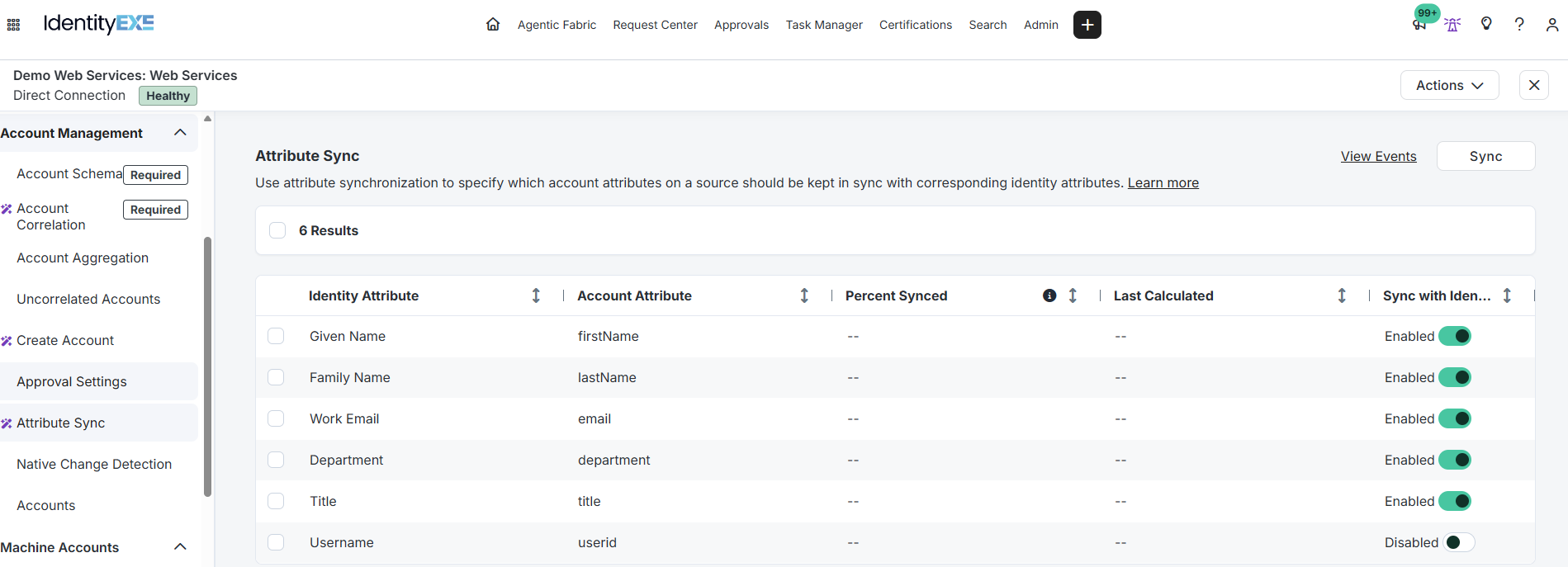
Figure 1: SailPoint ISC Source Attribute Sync Configuration mapping authoritative Identity Attributes to target Account Attributes.
Pattern 1: Raw Body Line-Dropping PATCH (Zero-Rule Baseline)
When target APIs adhere to standard REST semantics and support partial payload updates via HTTP PATCH, this pattern represents the cleanest, zero-code architectural baseline.
Operational Mechanics: Dynamic Line Stripping
Our core engineering methodology structures the data layer to utilize SailPoint's native line-dropping engine. When an Update Account operation is configured with a raw JSON body, SailPoint evaluates every line independently. If an attribute did not change during the sync event, it is omitted from the ProvisioningPlan, leaving its template variable (e.g., $plan.department$) evaluated as null.
Whenever a line contains a variable resolving to null, ISC automatically purges the entire line from the JSON body prior to network dispatch.
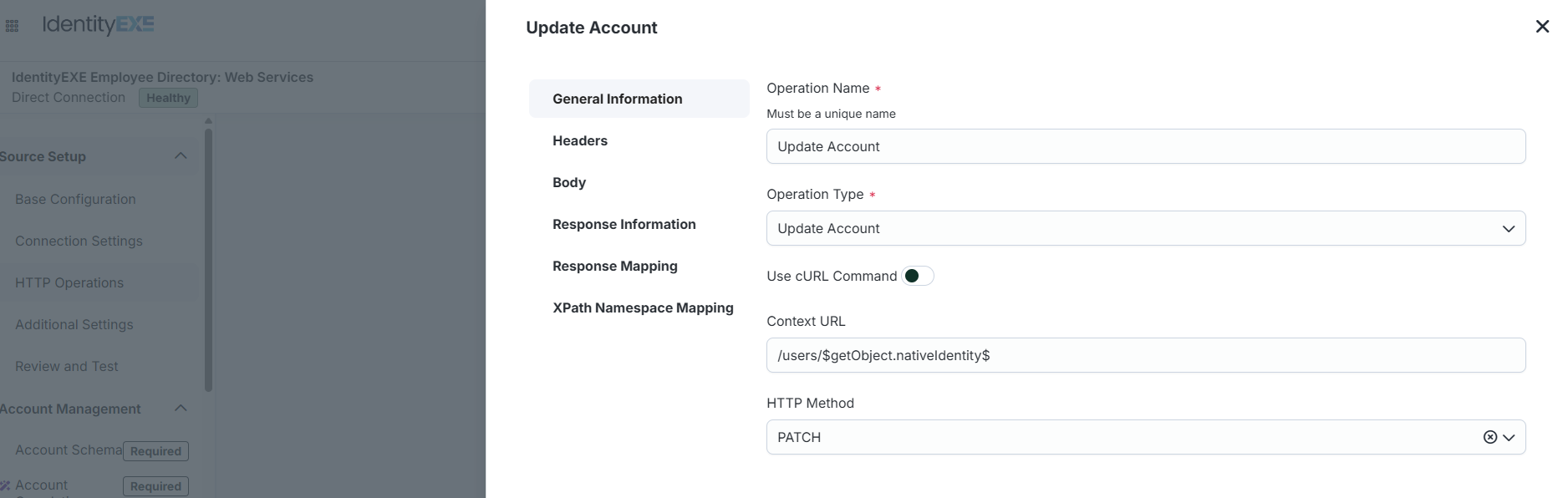
Update Account General Settings: Method PATCH, Context URL /users/$getObject.nativeIdentity$
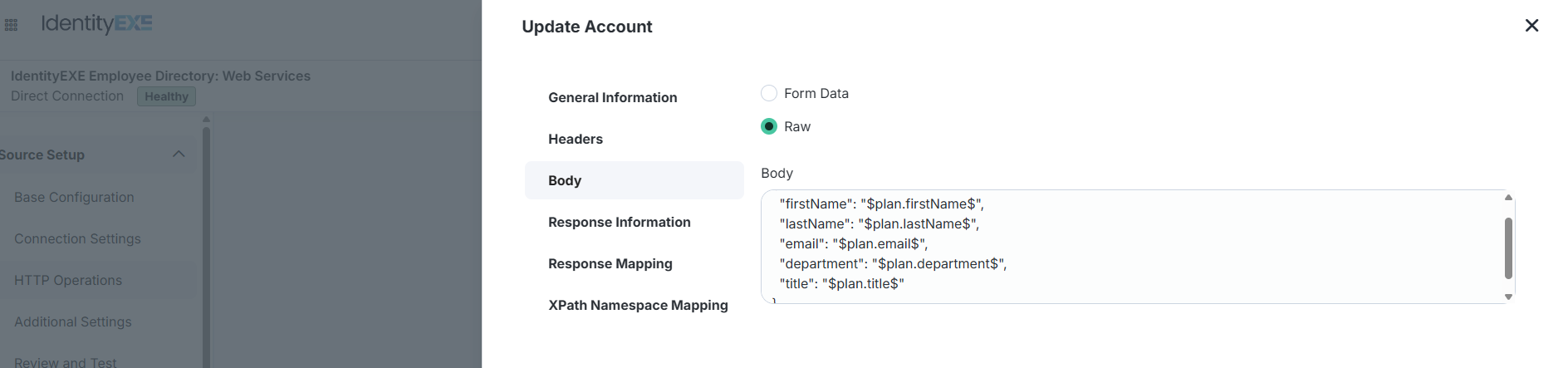
Raw Body Template configured with one attribute per line.
Template vs. Wire Transmission
Consider the raw body template configured within the connector:
{
  "firstName": "$plan.firstName$",
  "lastName": "$plan.lastName$",
  "email": "$plan.email$",
  "department": "$plan.department$",
  "title": "$plan.title$"
}
When an employee undergoes a title change, only title is present in the plan. ISC strips the remaining lines, transmitting the exact delta over the network:
{
  "title": "Senior Product Designer"
}
Pattern 2: Policy-Based PATCH with Synthetic Schema Fields
Enterprise SaaS APIs frequently implement strict JSON schema validators. Even when an endpoint accepts HTTP PATCH, it may reject partial updates with HTTP 400 Bad Request unless mandatory fields (such as email, firstName, and lastName) are present in every payload.
The Trap: Why Direct-Named Update Policies Fail
A common architecture error is creating an UPDATE Provisioning Policy using the exact schema attribute names (firstName, email). When ISC compiles the provisioning plan, it detects that firstName matches between Identity and Account, determines no change occurred, and removes it from the plan. The variable $plan.firstName$ resolves to null, line-dropping purges it, and the API throws an HTTP 400 validation error!
The IdentityEXE Blueprint: Synthetic Schema Attributes
When we architect this solution for our enterprise clients, we utilize synthetic schema attributes. By defining auxiliary attributes on the source schema (idnfirstname, idnlastname, idnemail, idndepartment, idntitle), ISC avoids stripping unchanged values.
- Extend Account Schema: Add synthetic helper attributes to the source schema in the ISC Admin UI.
- Deploy UPDATE Provisioning Policy via API: Because the ISC Admin UI only provides visual editors for
CREATEpolicies, post theUPDATEpolicy directly to the SailPoint API (POST /sources/v1/{sourceId}/provisioning-policies):
{
  "name": "Update Policy",
  "usageType": "UPDATE",
  "fields": [
    {
      "name": "idnfirstname",
      "transform": { "type": "identityAttribute", "attributes": { "name": "firstname" } },
      "isRequired": true
    },
    {
      "name": "idnlastname",
      "transform": { "type": "identityAttribute", "attributes": { "name": "lastname" } },
      "isRequired": true
    },
    {
      "name": "idnemail",
      "transform": { "type": "identityAttribute", "attributes": { "name": "email" } },
      "isRequired": true
    },
    {
      "name": "idntitle",
      "transform": { "type": "identityAttribute", "attributes": { "name": "title" } },
      "isRequired": true
    },
    {
      "name": "idndepartment",
      "transform": { "type": "identityAttribute", "attributes": { "name": "department" } },
      "isRequired": false
    }
  ]
}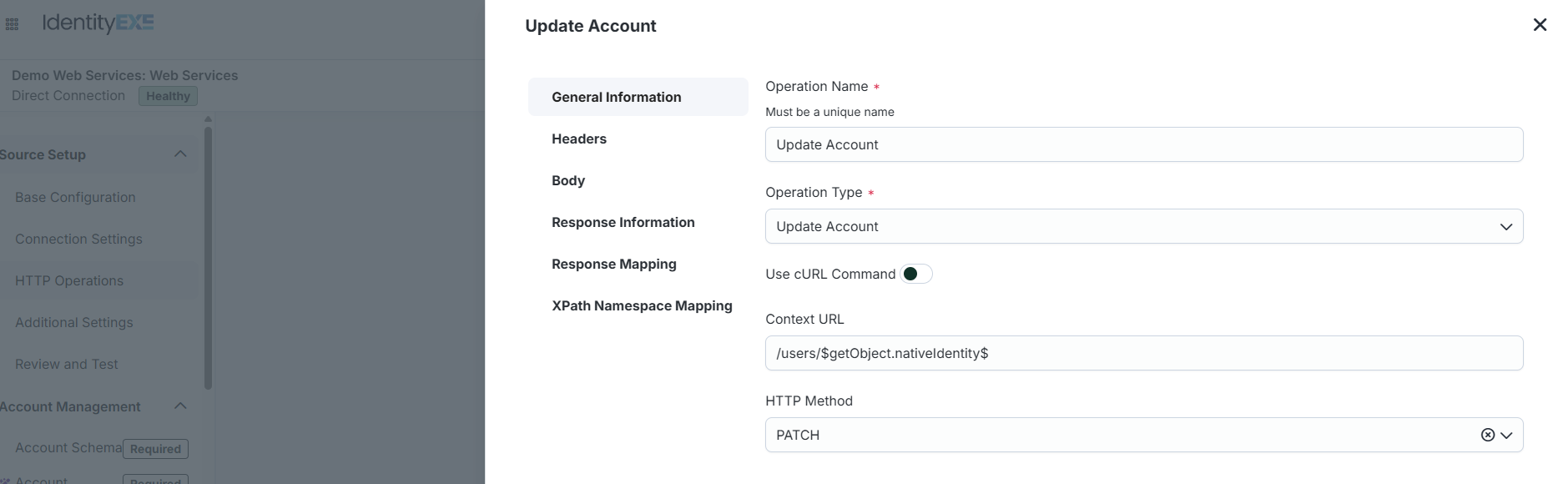
Configuring Update Account with Synthetic Attributes.
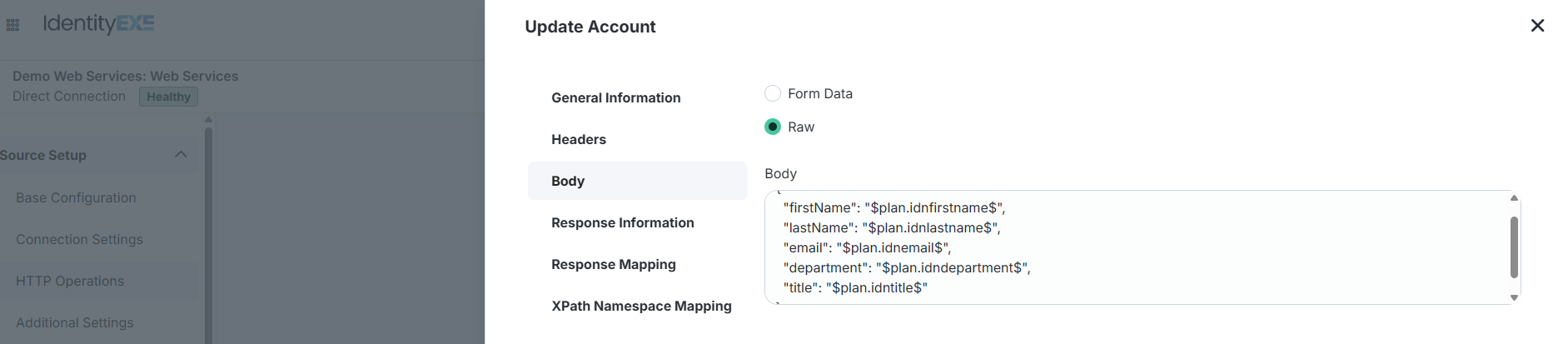
Raw body template referencing $plan.idn*$ synthetic variables.
Runtime Verification Trace
When tested with only the employee's title desynchronized, backend API logs confirm that ISC transmitted the full required JSON object:
[2026-09-23T22:08:43.129Z] PATCH /users/87
HEADERS: {
  "authorization": "Bearer mock-access-token-12345",
  "content-type": "application/json",
  "content-length": "107",
  "host": "api.enterprise.corp",
  "user-agent": "Apache-HttpClient/4.5.13 (Java/17.0.20)"
}
BODY: {
  "firstName": "Amber",
  "lastName": "Parker",
  "email": "amber.parker_85@fakecorp.com",
  "title": "Product Designer"
}
Pattern 3: Policy-Based PUT with Full Resource Replacement
Numerous enterprise platforms reject HTTP PATCH entirely, mandating HTTP PUT. In REST architecture, PUT signifies complete resource replacement.
Catastrophic Risk: Accidental Data Wiping on PUT Endpoints
Dispatching a delta payload (e.g., { "title": "Director" }) to an HTTP PUTendpoint instructs the server to overwrite the user record entirely with that single attribute. The target database permanently deletes the user's first name, last name, department, and phone number, causing catastrophic enterprise data loss.
To execute safe PUT operations without custom BeanShell code, we combine the HTTP PUT verb with the synthetic attribute Update Policy established in Pattern 2.
Runtime Verification Trace
[2026-09-24T13:50:32.310Z] PUT /users/22
HEADERS: {
  "authorization": "Bearer mock-access-token-12345",
  "content-type": "application/json",
  "content-length": "119",
  "host": "api.enterprise.corp",
  "user-agent": "Apache-HttpClient/4.5.13 (Java/17.0.20)"
}
BODY: {
  "firstName": "Amanda",
  "lastName": "Baker",
  "email": "amanda.baker_20@fakecorp.com",
  "title": "Director of Customer Success"
}
Pattern 4: Rule-Based PATCH (State-Fetch & In-Memory Merge)
While synthetic attributes eliminate rules, they clutter ISC source schemas with artificial properties. Furthermore, when target systems maintain dynamic, unmapped metadata, static policies cannot dynamically reconstruct the user state.
This modular framework ensures that your ISC deployment avoids schema bloat by executing an in-flight State-Fetch and Merge cycle directly inside a Web Services Before Operation Rule running on the Virtual Appliance.
In-Flight Fetch & Merge Architecture
BeanShell Before Operation Rule: State-Fetch & Merge
import java.util.Map;
import java.util.List;
import java.util.Arrays;
import connector.common.Util;
import sailpoint.connector.webservices.EndPoint;
import sailpoint.object.ProvisioningPlan;
import sailpoint.object.ProvisioningPlan.AccountRequest;
import sailpoint.object.ProvisioningPlan.AttributeRequest;
import org.json.JSONObject;

String logPrefix = "WebServices - BeforeOperation State Merge: ";

if (provisioningPlan == void || provisioningPlan == null) {
    return requestEndPoint;
}

String baseUrl = application.getStringAttributeValue("genericWebServiceBaseUrl");

for (AccountRequest accountRequest : Util.safeIterable(provisioningPlan.getAccountRequests())) {
    String nativeId = accountRequest.getNativeIdentity();

    // 1. Fetch current live state from target API
    String getUrl = baseUrl + "/users/" + nativeId;
    Map headers = requestEndPoint.getHeader();

    String responseJson = restClient.executeGet(
        getUrl,
        headers,
        Arrays.asList("200")
    );

    // 2. Parse live API response into JSON object
    JSONObject userObj = new JSONObject(responseJson);

    // 3. Loop through plan attribute requests and merge modified values
    List attrReqs = accountRequest.getAttributeRequests();
    if (attrReqs != null) {
        for (AttributeRequest attributeRequest : Util.safeIterable(attrReqs)) {
            String attrName = attributeRequest.getName();
            Object attrValue = attributeRequest.getValue();
            userObj.put(attrName, attrValue);
        }
    }

    // 4. Inject complete merged payload into outgoing request
    String updatedJsonBody = userObj.toString();

    Map body = requestEndPoint.getBody();
    if (body == null) {
        body = new java.util.HashMap();
    }
    body.put("jsonBody", updatedJsonBody);
    body.put("bodyFormat", "raw");
    requestEndPoint.setBody(body);
}

return requestEndPoint;
Verified Millisecond Runtime Trace
Notice the sub-second execution speed: the live GET executed at 15:14:38.375Z, followed by the merged PATCH at 15:14:38.503Z, completing the entire transaction in just 128 milliseconds:
[2026-09-24T15:14:38.375Z] GET /users/24
HEADERS: {
  "authorization": "Bearer mock-access-token-12345",
  "content-type": "application/json",
  "host": "api.enterprise.corp"
}
BODY: undefined
--------------------------------------------------
[2026-09-24T15:14:38.503Z] PATCH /users/24
HEADERS: {
  "authorization": "Bearer mock-access-token-12345",
  "content-type": "application/json",
  "content-length": "180",
  "host": "api.enterprise.corp"
}
BODY: {
  "firstName": "Alex",
  "lastName": "Brown",
  "active": false,
  "location": "Denver, CO",
  "id": "24",
  "department": "",
  "title": "Director of Customer Success",
  "email": "alex.brown_22@fakecorp.com"
}
Pattern 5: Rule-Based PUT (Resource Replacement & Data Protection)
Target SaaS systems frequently store unmanaged data structures, such as dynamic permission arrays (permissions: ["legal-hold-counsel"]), audit timestamps, or location metadata, that are not mapped inside SailPoint ISC. Executing an HTTP PUT via static Update Policies completely wipes those arrays from the downstream system.
Our core engineering methodology structures the data layer to fetch the live state in-flight, preserve all unmapped arrays, overlay the modified attributes, and serialize a non-destructive HTTP PUT payload.
BeanShell Before Operation Rule: PUT Resource Protection
import java.util.Map;
import java.util.List;
import java.util.Arrays;
import connector.common.Util;
import sailpoint.connector.webservices.EndPoint;
import sailpoint.object.ProvisioningPlan;
import sailpoint.object.ProvisioningPlan.AccountRequest;
import sailpoint.object.ProvisioningPlan.AttributeRequest;
import org.json.JSONObject;

String logPrefix = "WebServices - BeforeOperation PUT Merge: ";

if (provisioningPlan == void || provisioningPlan == null) {
    return requestEndPoint;
}

String baseUrl = application.getStringAttributeValue("genericWebServiceBaseUrl");

for (AccountRequest accountRequest : Util.safeIterable(provisioningPlan.getAccountRequests())) {
    String nativeId = accountRequest.getNativeIdentity();

    // 1. Fetch current live state from target API
    String getUrl = baseUrl + "/users/" + nativeId;
    Map headers = requestEndPoint.getHeader();

    String responseJson = restClient.executeGet(
        getUrl,
        headers,
        Arrays.asList("200")
    );

    // 2. Parse live API response into JSON object
    JSONObject userObj = new JSONObject(responseJson);

    // 3. Loop through plan attribute requests and merge modified values
    List attrReqs = accountRequest.getAttributeRequests();
    if (attrReqs != null) {
        for (AttributeRequest attributeRequest : Util.safeIterable(attrReqs)) {
            String attrName = attributeRequest.getName();
            Object attrValue = attributeRequest.getValue();
            userObj.put(attrName, attrValue);
        }
    }

    // 4. Inject complete merged payload into outgoing request body
    String updatedJsonBody = userObj.toString();

    Map body = requestEndPoint.getBody();
    if (body == null) {
        body = new java.util.HashMap();
    }
    body.put("jsonBody", updatedJsonBody);
    body.put("bodyFormat", "raw");
    requestEndPoint.setBody(body);
}

return requestEndPoint;
Verified Runtime Trace (Zero Data Loss)
Executed against an account holding unmanaged security permissions. The connector queried live state at 00:44:38.911Z and issued the complete PUT just 17ms later at 00:44:38.928Z, updating title while keeping permissions intact:
[2026-09-25T00:44:38.911Z] GET /users/24
HEADERS: { "authorization": "Bearer mock-access-token-12345", "host": "api.enterprise.corp" }
BODY: undefined
--------------------------------------------------
[2026-09-25T00:44:38.928Z] PUT /users/24
HEADERS: {
  "authorization": "Bearer mock-access-token-12345",
  "content-type": "application/json",
  "content-length": "197",
  "host": "api.enterprise.corp"
}
BODY: {
  "firstName": "Alex",
  "lastName": "Brown",
  "permissions": ["legal-hold-counsel", "risk-assessor"],
  "active": false,
  "location": "Denver, CO",
  "id": "24",
  "department": "",
  "title": "Director of Customer Success",
  "email": "alex.brown_22@fakecorp.com"
}
The IdentityEXE Testing & Verification Toolchain
Production attribute sync cannot be validated by waiting for manual HR updates. IdentityEXE engineered three high-leverage PowerShell tools specifically for enterprise SailPoint ISC tenants.
Native UI Limitations
- Analyze Attributes Button: Manual, un-schedulable, lacks CSV export, freezes on sources exceeding 10k accounts.
- Synchronize Attributes Button: All-or-nothing execution, cannot filter by lifecycle state, routes into the high-latency WPS background queue.
The IdentityEXE Advantage
- Automated Pipeline Auditing: Scans tenant sources, extracts accounts, and correlates with identities via Search in seconds.
- High-Priority Queue Routing: Directs sync execution to the dedicated interactive queue (
SYNCHRONIZE_IDENTITY_ATTRIBUTES), bypassing tenant backlogs.
Tool 1: Attribute Sync Reporting Engine (AttributeSyncReport.ps1)
Compares live source account attributes against authoritative Identity attributes based on active attribute-sync-config rules, outputting structured pipeline objects and CSV reports:
# Execute report and export CSV
.\AttributeSyncReport.ps1 -SourceId "2c91808568c529c60168cca69f000000" -OutFile ".\SyncReport.csv"| Identity Name | Lifecycle State | Account Attribute | Authoritative Value | Current Account Value | In Sync? |
|---|---|---|---|---|---|
| Alex Brown | terminated | department | (empty) | Customer Success | False |
| Amanda Baker | active | title | Director of Customer Success | Support Lead | False |
Tool 2: Targeted High-Priority Invocation (Invoke-AttributeSync.ps1)
Remediates desynchronized records with production safety controls: lifecycle state filtering (ActiveOnly), single-identity canary testing (-SingleSync), and non-destructive dry-run simulation:
# 1. Preview active users only (dry run):
.\AttributeSyncReport.ps1 -SourceId "<sourceId>" -PassThru | .\Invoke-AttributeSync.ps1 -LifecycleFilter ActiveOnly -DryRun

# 2. Canary test single active user:
.\AttributeSyncReport.ps1 -SourceId "<sourceId>" -PassThru | .\Invoke-AttributeSync.ps1 -LifecycleFilter ActiveOnly -SingleSync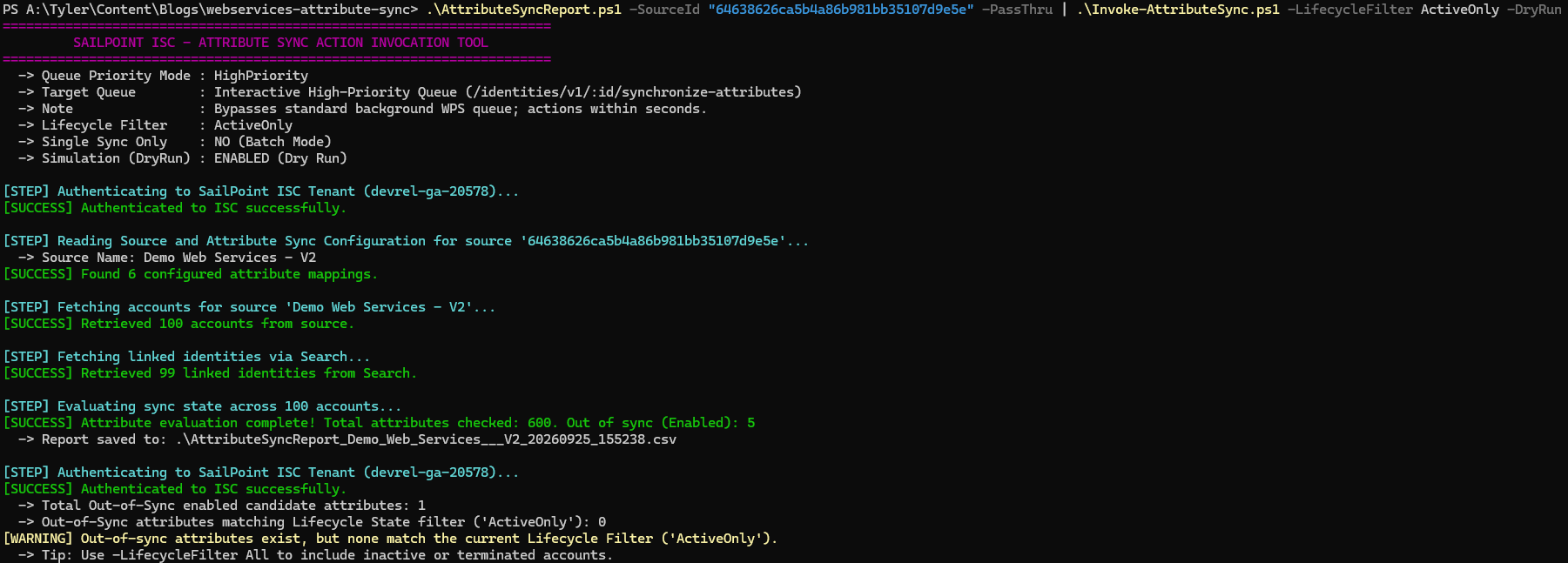
ActiveOnly DryRun mode demonstrating safely skipping terminated workers.
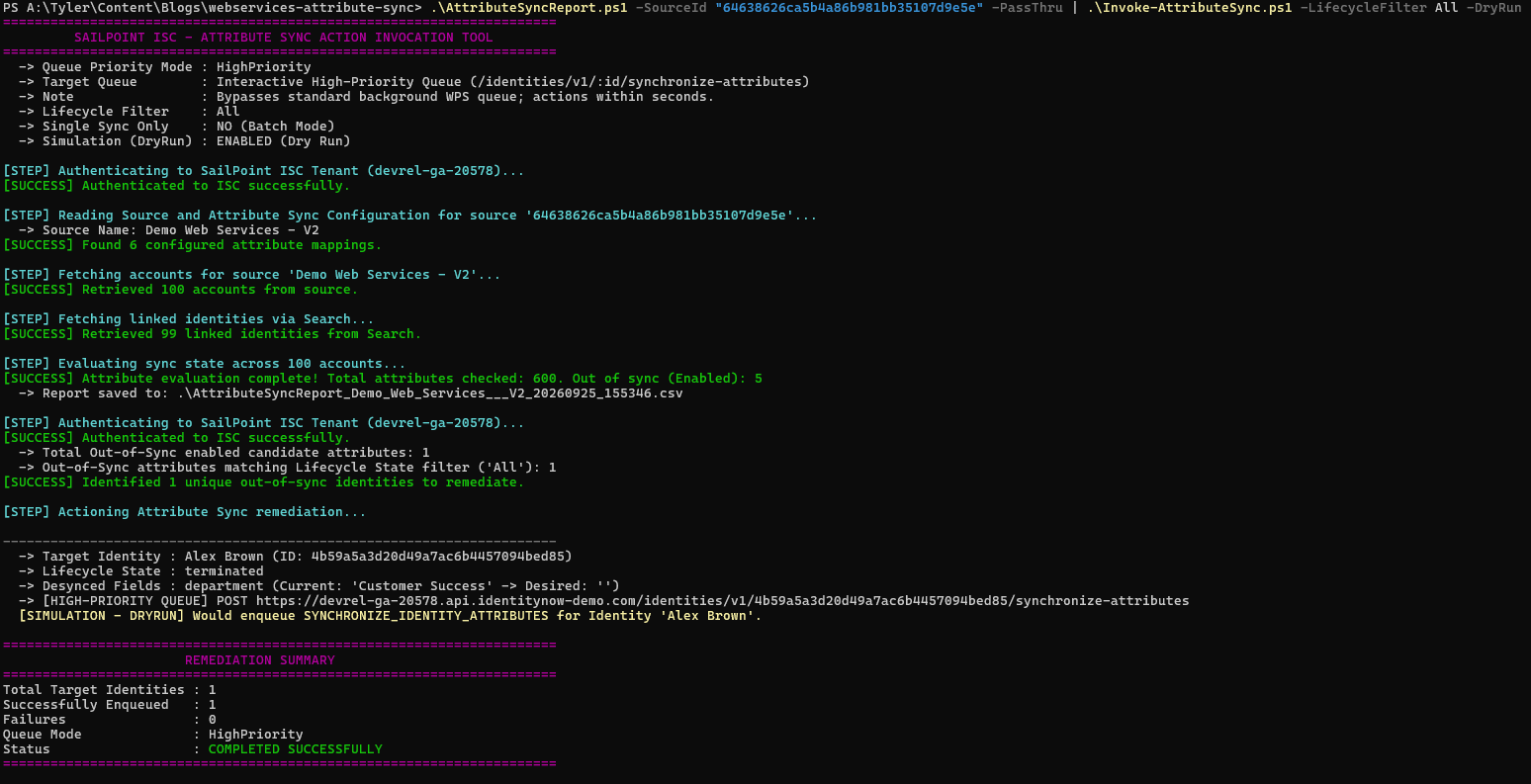
Simulating high-priority queue invocation across all lifecycle states.
Tool 3: End-to-End Configuration Verification (Verify-AttributeSyncConfig.ps1)
Automated 6-step test suite that verifies Update Account operations end-to-end against live APIs in lower environments: injects a desync value into the backend, triggers single-account aggregation (POST /accounts/v1/:id/reload), invokes high-priority sync, and polls until authoritative restoration is confirmed:
.\Verify-AttributeSyncConfig.ps1 -SourceId "2c91808568c529c60168cca69f000000" -NativeIdentity "24" -AttributeName "title"======================================================================
SAILPOINT ISC - ATTRIBUTE SYNC VERIFICATION TOOL
======================================================================
[STEP] Authenticating to SailPoint ISC (enterprise-prod)...
[SUCCESS] Authenticated to ISC successfully.
[STEP] Reading Source Details & Sync Config...
-> Source: Target User Directory (2c91808568c529c60168cca69f000000)
-> Auto-detected Backend URL: https://api.enterprise.corp
[SUCCESS] Testing Sync Mapping: Identity 'title' -> Account 'title' (Enabled: True)
[STEP] Locating Target Account and Authoritative Identity Value...
-> Target User: Alex Brown (Native ID: 24)
-> Authoritative Identity Value (title): 'Director of Customer Success'
[STEP] Injecting Desync Directly into Backend API...
[SUCCESS] Backend updated directly. Injected desync value: 'Desync_Test_054824'
[STEP] Triggering Account Reload in ISC (POST /accounts/v1/0af21129ed5f4627bd4a5294c92617b8/reload)...
[SUCCESS] ISC aggregated desync value in 3s.
[STEP] Triggering High-Priority Identity Sync (POST /identities/v1/4b59a5a3d20d49a7ac6b4457094bed85/synchronize-attributes)...
[SUCCESS] High-priority sync queued. Polling backend for restoration...
-> Waiting for attribute sync... (3s - Backend='Desync_Test_054824')
-> Waiting for attribute sync... (6s - Backend='Desync_Test_054824')
======================================================================
Result : PASSED - ATTRIBUTE SYNC VERIFIED IN 9s!
======================================================================Non-Standard API Topologies & Architectural Workarounds
Enterprise application portfolios invariably include custom, legacy, or microservice endpoints that break standard REST conventions.
1. POST-Only Action Envelopes & HTTP Method Tunneling
When APIs mandate custom RPC action envelopes or when corporate proxies block PATCH/PUT, we deploy an intercepting rule that constructs the wrapper, injects tunneling headers (X-HTTP-Method-Override: PATCH), and dynamically updates both contextUrl and fullUrl:
// CRITICAL: SailPoint pre-calculates fullUrl before rule execution.
// To redirect the endpoint path, you MUST update BOTH contextUrl and fullUrl!
String actionPath = "/users/" + nativeId + "/actions/modify";
requestEndPoint.setHttpMethodType("POST");
requestEndPoint.setContextUrl(actionPath);
requestEndPoint.setFullUrl(baseUrl + actionPath);

Map headers = requestEndPoint.getHeader();
if (headers == null) { headers = new HashMap(); }
headers.put("X-HTTP-Method-Override", "PATCH");
requestEndPoint.setHeader(headers);
2. Zero-Update Support: The In-Flight Account Rebuild Pattern
When an application provides POST /users and DELETE /users/:id but provides zero update verb, our engineering framework fetches live state, executes an in-flight restClient.executeDelete(), and transforms the primary operation into POST /users with the updated resource representation.
Architecture Caution: Historical Integrity & Foreign Keys
Never use the rebuild pattern if the downstream application links ticketing history, audit trails, or file ownership to the internal user ID. Deleting and recreating the user generates a new database primary key, severing historic data ties.
3. Sub-Resource Endpoint Routing (/contact-info vs /users/:id)
When attributes are partitioned across multiple URIs (e.g., job titles on /users/:id, phone and email on /users/:id/contact-info), our Before Operation Rule segregates attributes dynamically:
- Only Child Attributes Changed: Dynamically rewrites the main operation endpoint to
/users/:id/contact-info, avoiding empty-body failures. - Both Core and Child Changed: Dispatches the child update in-flight via
restClient.executePatch(), then routes core attributes through the primary operation.
4. Safe Null Handling & The Line-Dropping Null Trap
When an attribute is cleared on an Identity, its variable evaluates to null. In Pattern 1, line-dropping purges the field entirely, meaning the downstream system never receives a command to clear the value! The next aggregation pulls the old value, initiating an endless sync loop.
In Java BeanShell rules, calling JSONObject.put("department", null) removes the key. To force a true JSON null across the wire, pass JSONObject.NULL:
if (val == null || "".equals(val) || (attrReq.getOperation() != null && attrReq.getOperation().equals(ProvisioningPlan.Operation.Remove))) {
    // Transmits explicitly as: {"department": null}
    userObj.put(name, JSONObject.NULL);
} else {
    userObj.put(name, val);
}
Production Gotchas & Lessons from Enterprise Consulting
During large-scale identity governance rollouts, enterprise teams encounter recurring diagnostic hurdles:
1. The "Assumed Success" Loop
Target APIs returning HTTP 200 OK often silently discard unknown fields or read-only properties without returning error codes. ISC optimistically updates its internal account cache, but the next aggregation discovers the stale backend value, triggering an infinite sync loop. Always verify payload commitment directly against the backend database or via automated verification tooling.
2. Search UI Event Rows vs. Network Request Batching
In the SailPoint Search UI (/search/v1), synchronizing four attributes creates four distinct "Modify Account Passed" audit entries:
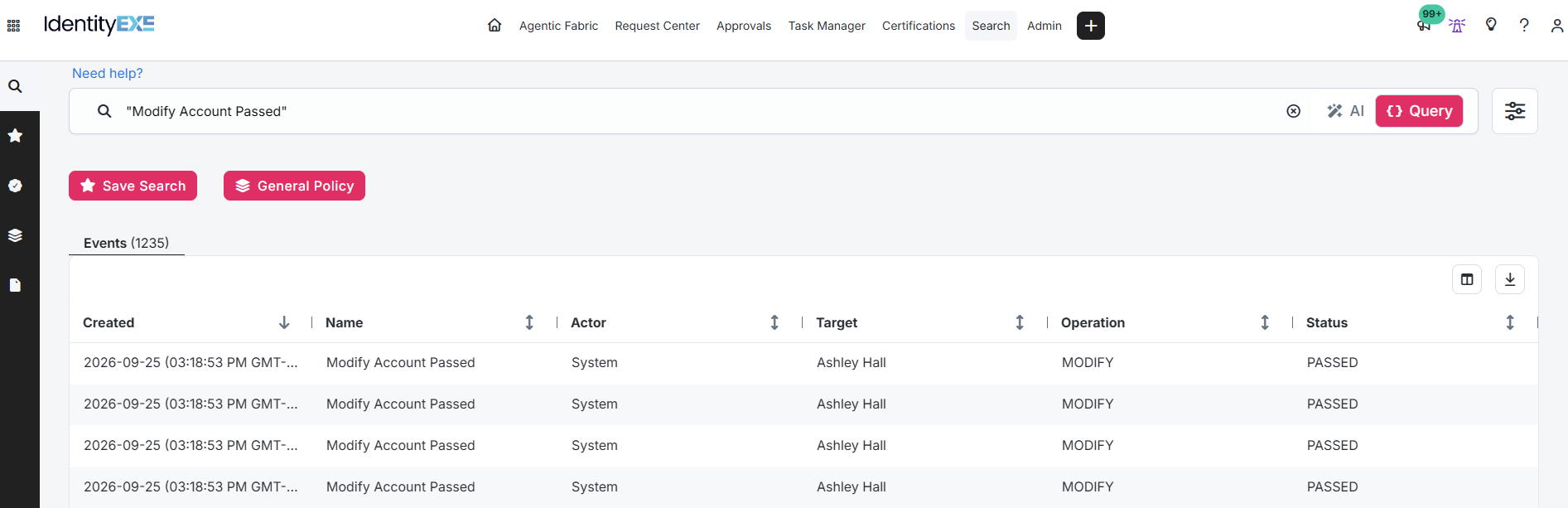
Search UI displays one audit event per attribute.
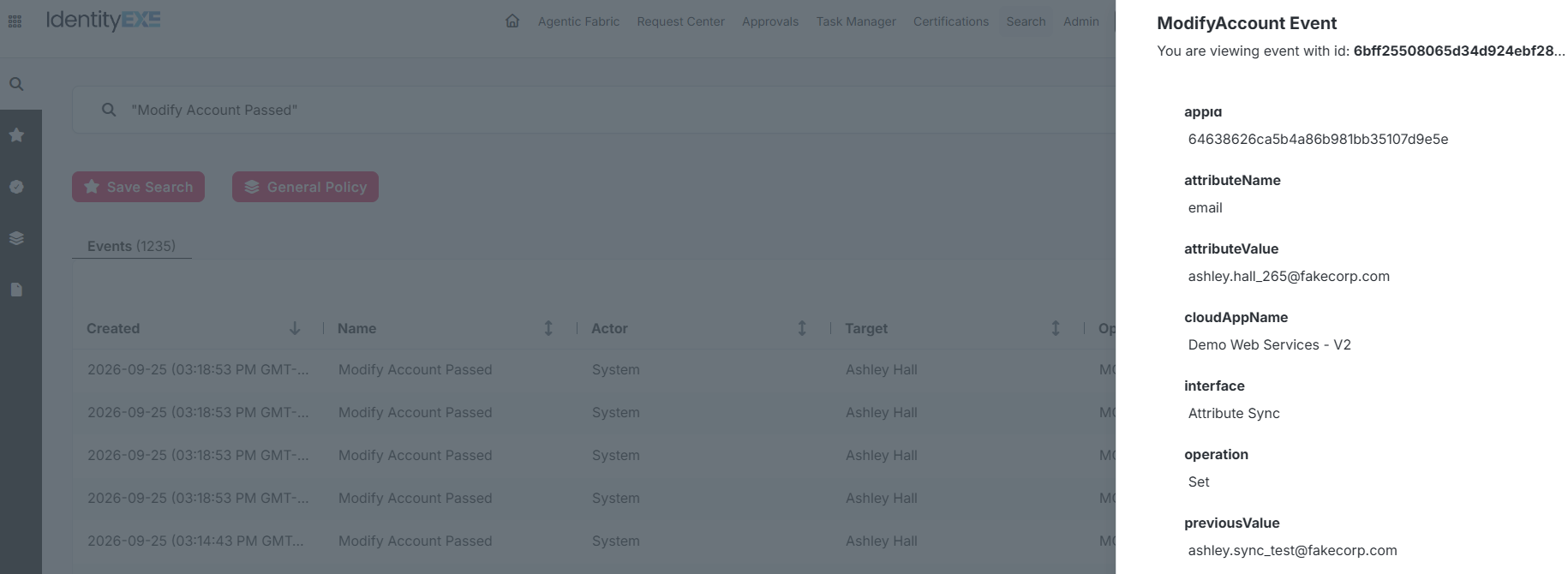
Audit panel displaying granular attribute tracking.
Architects frequently misinterpret this as four individual network requests. Under the hood, ISC compiles all four changes into a single AccountRequest and transmits a single batched HTTP request over the wire.
3. Automatic Retry Exhaustion & Clearing the Retry Lock
When repeated sync attempts fail, ISC marks the account as exhausted to protect tenant background workers. Once locked, subsequent aggregations will permanently ignore desynchronizations on that account.
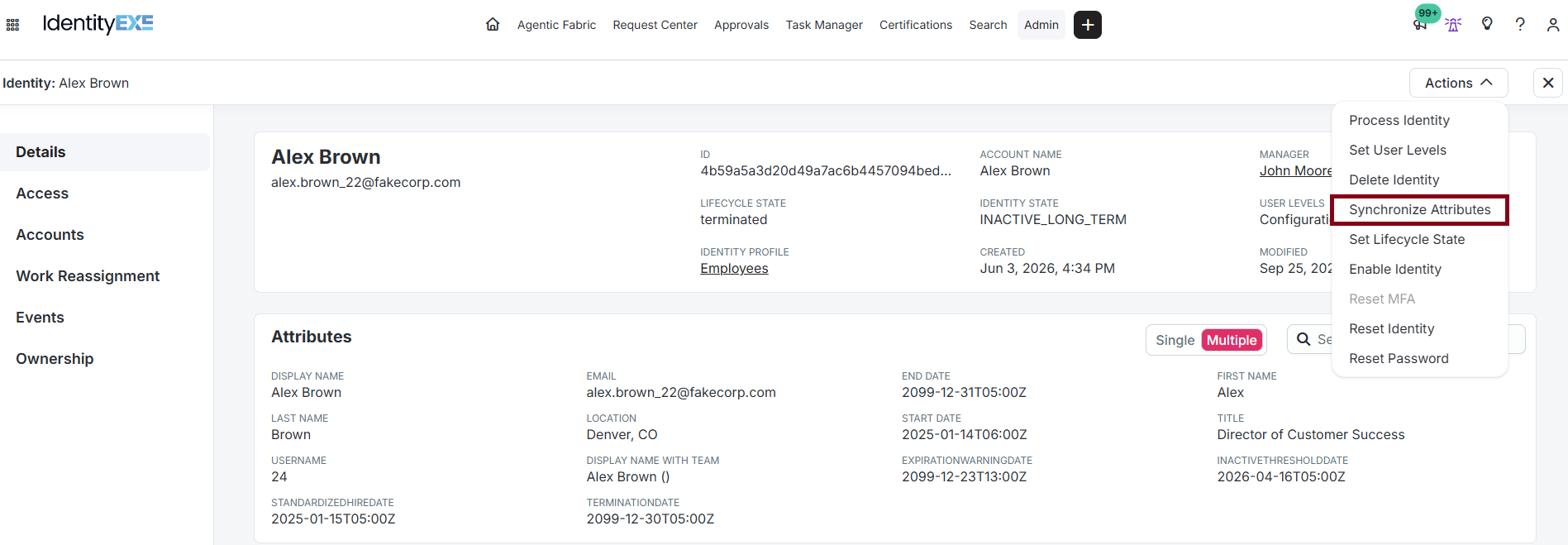
Method 1: Interactive Synchronize Attributes on the Identity.
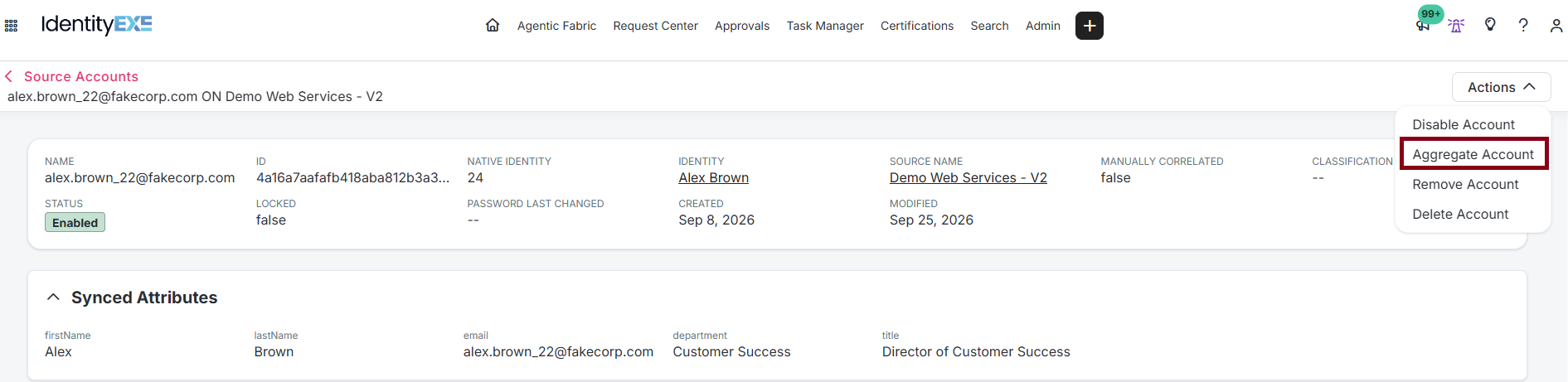
Method 2: Single Account Reload (POST /accounts/v1/:id/reload).
Downloads & Implementation Code
Download the complete IdentityEXE Web Services Attribute Synchronization toolchain below:
Compares source accounts to identities and exports structured CSV reports.
High-priority sync execution with lifecycle filtering and canary testing.
Automated 6-step verification suite for lower environments.
Conclusion
Attribute synchronization over the SailPoint Web Services connector requires deliberate architectural design. By categorizing downstream endpoints into validated patterns (whether leveraging zero-code line-dropping, synthetic schema policies, or in-memory state-fetch BeanShell rules), enterprise identity teams eradicate data loss, prevent runaway retry locks, and maintain complete audit compliance across heterogeneous application landscapes.
A stalled identity governance rollout burns capital and stalls organizational momentum.
If your team is hitting configuration walls or struggling with complex Web Services attribute synchronization integrations, stop guessing. Book a targeted SailPoint Architecture Review directly with our engineering team to map out a clear path forward.